Add/Edit Products Screen
Categories: Admin Screens
The ‘Add/Edit Products’ menu lets you add a new product or edit/update an existing product. Below is a screenshot of the ‘Add/Edit Products’ menu:
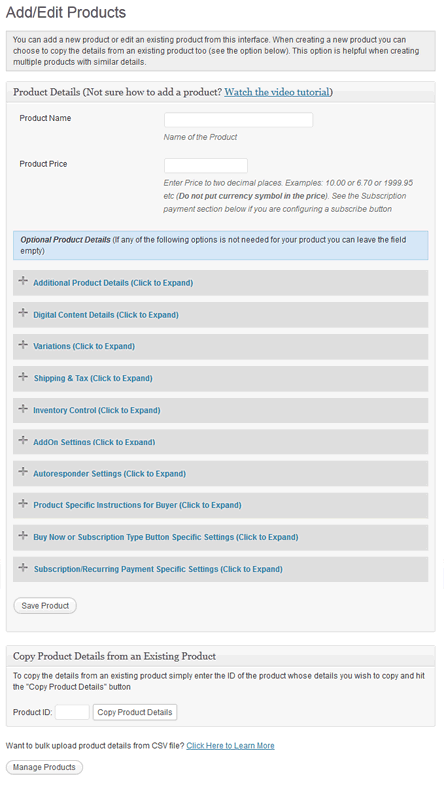
Product Configuration Menu Screenshot
The first 2 fields are mandatory to fill out when adding a new product to the database the rest are optional. The optional fields are for additional functionality and customization.


July 19th, 2009 at 10:12 am
Is there any limit on file size for digital downloads? I want to be able to sell large downloadable files of up to about 10 or 12 MB.
July 19th, 2009 at 11:07 am
Hi Steve, There is no limit on the file size.
July 19th, 2009 at 11:10 am
Thanks for your prompt response. I’m off to your shopping cart right now
August 2nd, 2009 at 1:54 am
Hello and thanks for your continued and devoted WP Plugin Developments
I’d like to know if your eStore plugin has the following capabilities or has the ability to be extended to have the following features:
Add a product automatically using code or have a blog author add a product?
Is it possible to specify a different PayPal email ID for each product?
What I am trying to do is have my blog authors upload and sell their own files using their own PayPal email address. Then when someone wants to buy one of the blog authors product, that blog author would get paid directly to their unique PayPal email address.
Thanks and I’ve been loving the Shopping Cart plugs so far…amazing simple!
Great job !!!
August 2nd, 2009 at 9:48 am
Hi Jhe, Glad to know you like the plugin.. it doesn’t have that capability yet but I can introduce it in a future release.
I can implement it so different paypal ID for each product can be used on a “Buy Now” type button and when a customer buys that product the money goes to the owner of that product. It won’t work for “Add to Cart” buttons though because paypal only allows to have one Merchant ID per transaction. So when you have a shopping cart filled with items from different merchants it’s not going to work. Let me know what you think.
August 2nd, 2009 at 4:21 pm
Hi, thank you for the quick response.
I love the fact that you can implement this in a future release. It will be great if this can be implemented soon.
How soon do you think you’d have it implemented by?
So are you saying that it would be possible to have Blog Authors/Users of my blog upload their own unique product file without me (the Admin) having to interact or configure anything for them to upload/sell a product?
I would love if they can do everything from upload the file to my blogs server, and have their own product pointing to their unique PayPal. Like an automated Blog Author Product Upload feature. I’d like to have it automated as much as possible with minimal administration.
Thanks again…I’m very excited about the possibilities of this.
August 3rd, 2009 at 10:49 am
Hi Jhe, I can make it so they can upload a file/digital product to your blog and sell it using a “Buy Now” type button. I will try to implement it in the next release
August 14th, 2009 at 8:15 pm
Hi.
How do I make a list of products on a post page using the ‘fancy display option’ as on the Additional Product detail settings? I can’t find reference to it anywhere, and I can only make a simple list using the tag. Help!
Cheers.
Jeremy.
August 15th, 2009 at 12:28 am
Hi Jeremy, The following URL should help:
http://www.tipsandtricks-hq.com/ecommerce/?p=240
August 29th, 2009 at 10:20 am
Hi admin,
I’m referring to Jhe’s posts and would kindly like to add the following ‘request’:
I would like to participate in the sales of my Blog Authors/Users, which would result in a split, say 70% goes to his account and 30% goes to mine. If this cannot be automated, then I would like to get 100% and do the split myself.
Thanks a lot.
dt
September 8th, 2009 at 6:42 am
Hello.
Great Great plugin. By far, The best wp store i’ve seen!!!
Is there any way to delete or hide the quantity column? I only sell downloadable products (music) and I want to use the shopping cart widget but my sidebar is a little bit narrow for the widget.
Thank you in advance
September 8th, 2009 at 12:40 pm
Hi Manolis, Glad to hear that you like the shopping cart plugin. It can be done but it requires some simple code modification.. are you okay with modifying a little bit of HTML and PHP code?
September 8th, 2009 at 12:42 pm
Yes I can do that. Could you please help me with that (what files, where is the code etc)?
September 8th, 2009 at 7:00 pm
Hi! I am having trouble getting the shopping cart to be a visible cart rather than the trigger text on my products page. Also, when you go to the page “cart” there is no visible cart, but again only the text [eshop_show_checkout]. What am I doing wrong? PLEASE HELP!! thanks!!
September 8th, 2009 at 7:21 pm
I have a question about products and pricing tiers. Is it possible to have a dropdown option that would allow the user to pick a different priced item? For example, I may have a piece of art that come in 3 different sizes. I would like the buyer to be able to choose from a dropdown box which size they want., and the price would change accordingly. This would eliminate having 3 separate “buy” now boxes with different sizes and prices.
Is this feature under variations already?
Thanks!
September 8th, 2009 at 10:46 pm
Hi Manolis, I will send you an email with the code changes you will need to do to remove the quantity field
September 8th, 2009 at 10:50 pm
@victoria, you seem to be using tags from a different plugin. Please have a look at the shortcode reference at the following URL and use that:
http://www.tipsandtricks-hq.com/ecommerce/?p=460
September 8th, 2009 at 10:56 pm
@Mike, This option is under variation already.
September 16th, 2009 at 12:48 am
if i use this shopping cart plug in can i use the merchant account i have for a different web site? do you have to use Paypal? I see storefront as a name of a shopping cart software, is this company associated in any way with this plug in?
September 16th, 2009 at 9:40 am
Hi Randy, storefront is not associated anyway with this plugin. At the moment you will have to use PayPal as your payment gateway, I am working on introducing 2Checkout in the near future.
November 3rd, 2009 at 8:05 am
Hi Admin,
I’m pinning a lot of hope on your plugin. I have over10,000 original hi-res photographs from a group of photographers, which I am gonna use to make a photo-website. I have invested in other softwares as well but not satisfied I have checked out other pre-existing wordpress e commerce solutions but i didnt like them either. Your seems to be more friendly and useful. But i have a few questions.
1. Like Jhe mentioned, i too have a similar requirement. I want individual photographers (contrbuters) to be able to upload photos on the site and not just that but should be able to track the downloads and items sold as well.
2. The money should automatically get split between the admin and the contributer. A dashboard where he can only track his percentage and get paid later by me on a monthly basis to his assigned paypal id and as per the ration set for each photographer.
Like you replied that paypal can only handle one merchant id per transaction. Thats ok. The money gets deposited at my account and later on i should be able to know who has earned how much. And send it accordingly.
3. Batch Upload facility based on categories.
4. Individual size detail for each thumbnail clicked. ( i dont know if you have it already.
5. roll over effect for each photo. So that one always doesnt have to click on it to see the enlarged photo.
6. Batch meta data edit with selected categories or photos.
7. Existing IPTC Photo data getting added automatically.
8. I believe tagging feature works like any usual wordpress right?
9. Different permissions set for 3 to 4 level admins.
I am already using another non-wordpress script because there weren’t other solutions available when i started working on this project, but damn i badly want to switch platform to wordpress without wasting a single second more. Your plugin seemed to have given me a fresh ray of hope.
I know i am asking for too much. But please reply and tell me how much of it is possible or how can you help me if at all.
November 4th, 2009 at 11:02 am
Hi Admin,
I’m very much interested in exactly the same thing as Krsna, although I’d like to utilize it for documents rather than photos.
If you need a $-contrib to get this done asap, let me know.
Thank you.
November 6th, 2009 at 7:57 am
I will contact you via email.
January 9th, 2010 at 3:59 am
I am using the fancy display option on some pages and the category option on some other pages. I have recently added a few products to sell; however, I would like to change the order in which they are being displayed. Is there a way to change the order that the products are displayed? For example, I would like the last product I added to show up as item 2 and not 10. Hope that make sense.
Also is there a way to edit/add a group of products at once? For instance, I need to increase my shipping costs for several products (not all of them) but have to click on the edit button, make the changes, save the changes, go back to the manage products list and start that process over again for many products is a bit tedious. Like if there was a tabular form or the ability to upload from excel would be awesome.
Thanks for your help.
January 23rd, 2010 at 5:15 pm
Hi Ruhul,
I would like the text for product info to be centred but not sure how to do this.
I would think that I need to modify: wp-cart-for-digital-products/wp_eStore_style.css
but not sure what exactly I need to add and where.
Thank you
January 24th, 2010 at 12:14 am
If you want to do it in the fancy display option then you will need to change the following CSS:
.eStore-product-description {
text-align:left;
margin-left:150px;
}
change “left” to “center”
January 25th, 2010 at 7:08 pm
Thank you
April 1st, 2010 at 12:54 pm
Thanks for your help so far
Is there a way to let the customer choose how much they’d like to pay for a digital download (so that they could either input 0.00, 1.00 2.00 or how ever much they’d like?) We’d like to sell an album Radiohead style
For future releases, it would be great if users could select all the tracks they’d want to download via checkboxes!
April 2nd, 2010 at 3:05 am
Hi James, Unfortunately this can not be done with the eStore. Also Paypal does not allow a “0″ priced item to be process. This will create an error when you go to checkout with paypal.
Let me know if you need anything else.
Cheers,
Ivy
May 29th, 2010 at 3:53 am
Do I have to upload my mp3 as zip files or can they just be .mp3?
If I compress them to .zips they get a funky sound.
Thanks
May 29th, 2010 at 4:43 am
Hi Mark, You do not need to zip the file. You can upload the MP3 and an MP3 if you want to. Remember you can upload your files or link to a file anywhere you want as long as the plugin can access the file. =)
Cheers,
Ivy
May 29th, 2010 at 7:23 am
Thanks for the snappy answer! Saved us a ton of work!
I had to take over the install for my Bro-In-Law…. He chest is hurting from Word Press induced anxiety & I still think of this stuff as fun…. I recall he did to at one point.
But I digress…
Thanks for the quick help!
And just FYI: My Bro-In-Law just updated his site today on Godaddy. Right now they are having a sale for a Worpress website with “Unlimited Space & Transfer,
1,000 Email Accounts, Unlimited MySQL Databases” For $7 a month. He bought 5 years at that price! Seeing as how most people that come here might be in need of unlimited space I post this. I hope it’s not to far off subject but that price is crazy good for people that have to sell & transfer a ton of media.
May 29th, 2010 at 2:00 pm
Hi Ivy,
Question for you:
Can you take a look at my site that I have listed. Do you see the pink hyperlinks on my homepage “Click here to see the contents?” I’ve added that HTML in the product description of the “additional product details” in my WP e-store. How can I get the lightbox feature for WordPress to work for those links?
Thanks for your time.
May 30th, 2010 at 10:13 am
@Tony, You just need to use a special div for the embedded image so the image comes up in lightbox. If you post it on the forum I will give you a code example.
June 19th, 2010 at 2:05 am
I’d love to be able to hide the available qty from those browsing the products on my site; any way to do this? You can see here:
http://www.awesomepaws.us/?page_id=1000
Thanks
Daisy
June 21st, 2010 at 3:45 am
@Daisy, If you take out the “Available Copies” from the “Inventory Control” section of that product it will automatically stop displaying the available copies in the product display.
Or do you want to have a limit but not show the “Available Quantity” counter to the visitors? If this is the case then please post it on the forum and I will give you a simple tweak that should take care of it:
http://www.tipsandtricks-hq.com/forum/
August 9th, 2010 at 5:21 pm
I’m doing that right now!!
Thanks!
August 11th, 2010 at 2:44 am
Hi.
How do I make a list of products on a post page using the ‘fancy display option’ as on the Additional Product detail settings? I can’t find reference to it anywhere, and I can only make a simple list using the tag. Help!
Cheers.
August 11th, 2010 at 4:39 am
Hi Gadget, I believe what you are looking for is product categories. You can read more about this here:
http://www.tipsandtricks-hq.com/ecommerce/wordpress-estore-product-categorization-431
August 29th, 2010 at 5:53 pm
Is there any way to change the title “Quantity” to something else? I need to change it to “Seasons”
August 30th, 2010 at 3:14 am
Hi James, The following forum post will explain how to change various text messages in the eStore:
http://www.tipsandtricks-hq.com/forum/topic/how-to-customize-various-textmessages-displayed-by-the-plugin