This page has a list of all the different pre-configured product display templates and styles that you can use to display your products when using the WP eStore plugin.
Note: You are not restricted to using one of these product displays if they don’t suit your needs. You can design your own product display in a WordPress post or page then use eStore’s simple “Buy” button (there are shortcodes to embed plain buttons on a post or page) to facilitate the purchase of the product (very helpful when designing an optimized sales/landing page).
Stylish Product Display 1 (Fancy 1)

Stylish Product Display 2 (Fancy 2)

Stylish Product Display 3 (Fancy 3)
Stylish Product Display 4 (Fancy 4)
Stylish Product Display 5 (Fancy 5)


Stylish Product Display 6 (Fancy 6)
Stylish Product Display 7 (Fancy 7)
If you wanted to show a very simple and plain product display with name, price and the purchase button then this template will come in handy. This display can be useful for users selling mp3/music/audio files too. Below is an example of how this template looks like:

Stylish Product Display 8 (Fancy 8 )
Below is an example of how the fancy 8 product display template looks like. This display template is useful for audio/music/mp3 file sellers.

Stylish Product Display 9 (Fancy 9)
If you don’t specify a description for a product then this display will become a very compact one with just name, price and a buy button.
Stylish Product Display 10 (Fancy 10)



Fancy10 is a lot similar to the popular Fancy1 display except it has a section to show the additional images below the main thumbnail. The images will show in a lightbox when clicked. The default Add to Cart button has a nice elegant style too. You can still use a custom button image for the “Add to Cart” button just like any other displays.
Stylish Product Display 11 (Fancy 11)

Stylish Product Display 12 (Fancy 12)
This one is just like fancy 8 template but it uses our compact audio player plugin for the audio file preview. Below is an example of how this display template looks like:

Stylish Product Display 13 (Fancy 13)
Here is an example of how this display template looks like:
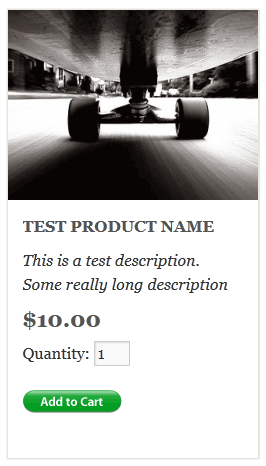
Stylish Product Display 14 (Fancy 14)
Here is an example of how this display template looks like:
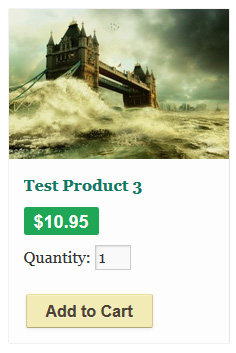
Stylish Product Display 15 (Fancy 15)
Here is an example of this display template:

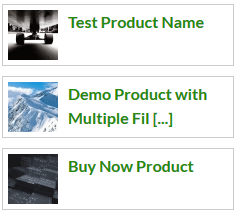
This is a very compact product display template that only has the product thumbnail image and the product name. This display template can be very helpful when you want to show a product on your sidebar or footer area (where you don’t have a lot of space). If you fill out the “Product details page” field of the product then the name will be linked to that page.
Here is an example of how it looks like when you stack a few products using this display template on your sidebar:
Stylish Product Display 16 (Fancy 16)
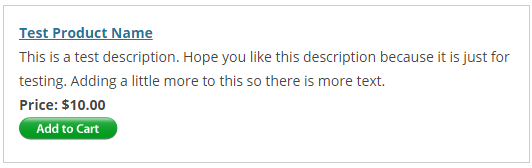
This template doesn’t use any product image thumbnail in the template. So this one should be good for users who don’t want to use an image for their product(s).
Below is an example of how this display template looks like:
Stylish Product Display 17 (Fancy 17)
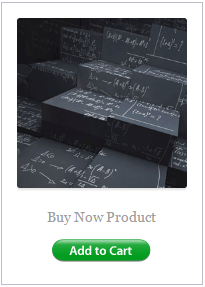
This template uses just the thumbnail image, product name and the add to cart button. It it good for using in a grid display layout.
The following screenshot is an example of how this template looks like:
Stylish Product Display 18 (Fancy 18)
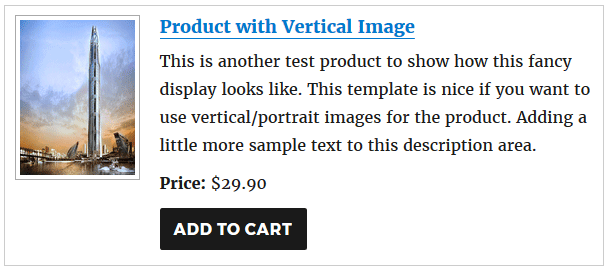
This template uses a vertical/portrait thumbnail size so it will be useful if you use a vertical image for your product.
The following screenshot is an example of how this template looks like:
How to Use the Stylish Product Display Templates
To display a product in any of the above styles you simply have to use a Shortcode (to display it on a post or page) or use a line of PHP code (to display it from your theme files e.g. footer.php). All the available shortcodes and PHP function references can be found here.