This page contains video tutorials for the Free WordPress Simple Shopping Cart plugin.
WP Simple Shopping Cart Installation and Usage Instructions
This page provides basic installation and setup instructions for the WP Simple Shopping Cart plugin. Please read this page thoroughly to gain a basic understanding of how to use the plugin.
Table of Contents
- Video Summary
- WP Shopping Cart Plugin Installation
- Basic Settings Configuration
- Simple Shopping Cart Basic Usage
- Using Blocks to Insert Add to Cart Buttons and Shopping Cart
- Display a Product Box
- Using the Buttons and Cart From a Theme’s Template File
- Example Post/Page Editor Content with Shortcode
- Using a Compact Shopping Cart
- Always Show the Shopping Cart
- Using Shipping Option
- Using Variation Control Option
- Specifying an Item Number or SKU
- Selling Digital Media Files
- Use an User Interface to Insert the Shortcodes
Video Summary
WP Shopping Cart Plugin Installation
Install the WP Simple Shopping Cart plugin by searching for it in the ‘Add New Plugins‘ interface within your WordPress admin dashboard. You can search using the keyword “Simple Shopping Cart” to find it.
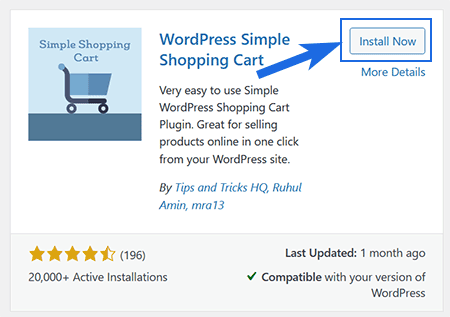
Click ‘Install Now‘, followed by ‘Activate‘ to enable the plugin on your site.
If you can’t use the above method, download the plugin’s zip file, unzip it, and upload the folder to your site’s “/wp-content/plugins/” directory. Next, activate the plugin via the “Plugins” menu in WordPress.
Basic Settings Configuration
Once the plugin is activated, visit the Settings menu to configure basic options, like your PayPal account details, currency code etc. The default settings are typically sufficient to begin with. You can always customize these settings later. Save the settings and proceed to the next step.
Afterwards, you’re ready to use the shortcode(s) to add products to a post, page, or sidebar as desired.
Simple Shopping Cart Basic Usage
Step 1) Inserting an Add to Cart Button
To insert an ‘Add to Cart’ button, simply place the following shortcode into a post or page alongside the product description. This will enable customers to click and add the item(s) to their shopping cart.
[wp_cart_button name="PRODUCT-NAME" price="PRODUCT-PRICE"]
Replace PRODUCT-NAME and PRODUCT-PRICE with the actual name and price.
Here is an example usage of the shortcode:
[wp_cart_button name="Test Product" price="19.95"]
Step 2) Inserting a Shopping Cart
To insert the shopping cart into a post/page/sidebar, simply add the following shortcode into a shortcode block.
[show_wp_shopping_cart]
Using Blocks to Insert Add to Cart Buttons and Shopping Cart
You can also use blocks instead of shortcodes to insert the add to cart buttons and the shopping cart. Follow these guidelines if you wish to utilize the blocks provided by the simple shopping cart plugin.
Display a Product Box
Read the How to display a product box documentation that explains how you can use a shortcode to display a nice product box for your product(s).
Using the Buttons and Cart From a Theme’s Template File
If you want to add a purchase button in your theme’s template file then do the following:
1. To add the Add to Cart button from template (.php) files use the following function:
<?php echo print_wp_cart_button_for_product('PRODUCT-NAME', PRODUCT-PRICE); ?>
Replace PRODUCT-NAME and PRODUCT-PRICE with the actual name and price. Example:
<?php echo print_wp_cart_button_for_product('wordpress', 7.50); ?>
2. To add the shopping cart to the sidebar, simply use the widget from the widgets menu or add the following line to your sidebar template file where you want the shopping cart to appear.
<?php echo print_wp_shopping_cart() ?>
Example Post/Page Editor Content with Shortcode
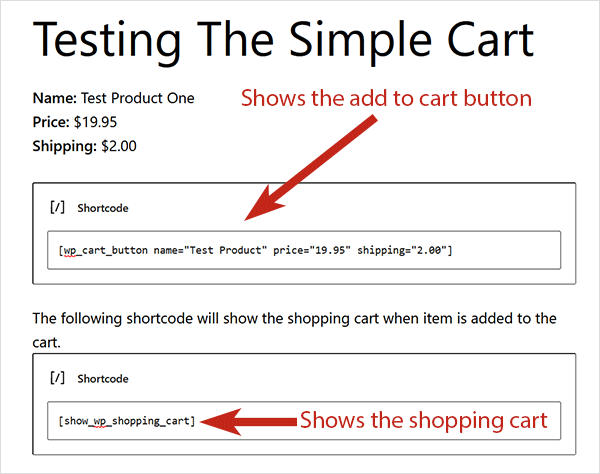
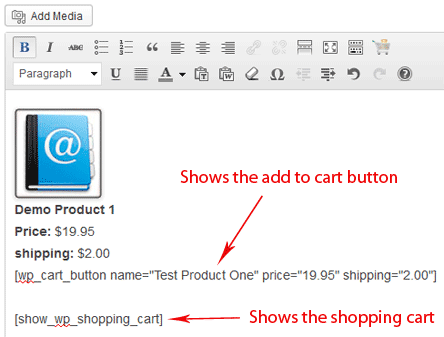
The following is a screenshot of the WordPress post/page editor showing how the add to cart button and the shopping cart is inserted into a post or page.
Block/Gutenberg Editor Example
Classic Editor Example
Using a Compact Shopping Cart
Use the following shortcode where you want to show the compact shopping cart:
[wp_compact_cart]
You can add this shortcode in a standard text widget to add the compact cart to the sidebar.
Always Show the Shopping Cart
The standard “show_wp_shopping_cart” shortcode only shows the cart when there are items in the cart. So it shows the cart when the visitor has clicked on an add to cart button and added item(s) to the cart. When the cart is empty, it simply hides the cart (nothing is shown).
If you want to show the cart all the time then use the following shortcode instead. It will show an empty cart message when there is nothing in the cart.
[always_show_wp_shopping_cart]
Using Shipping Option
1. To use shipping cost use the “shipping” argument in the shortcode. Here is an example usage:
[wp_cart_button name="Test Product" price="19.95" shipping="4.99"]
or use the following php function from your wordpress template files
<?php echo print_wp_cart_button_for_product('product name',price,shipping cost); ?>
Please see the How shipping Calculation Works post for more info.
Using Variation Control Option
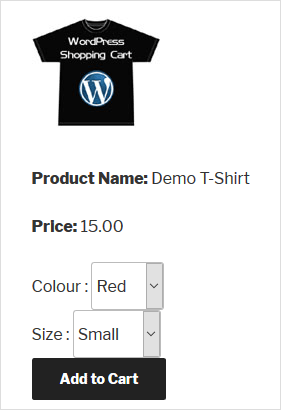
Variation Control can be used to create products similar to the following screenshot. Read the product variation setup documentation to learn more.
Specifying an Item Number or SKU
You can use the “item_number” parameter in the “add to cart” button shortcode to specify an “Item Number” or “SKU” for a product. This “item number” value will get sent to PayPal (when a customer does the checkout).
Below is an example shortcode:
[wp_cart_button name="Test Product" price="19.95" item_number="SKU12345"]
Selling Digital Media Files
Read the media file selling usage documentation.
Use an User Interface to Insert the Shortcodes
The plugin has a shortcode inserter that you can use to add the shortcodes to your WordPress posts/pages.
Visit the WordPress Simple Shopping Cart Documentation Index Page.