How to sell Both Digital and Non Digital Product with the WordPress eStore plugin
Categories: Additional Resources
The WordPress eStore plugin is mainly used for selling digital products securely from your blog but you can still sell non-digital products using this same plugin. To sell non-digital content just leave the Download URL field empty when you add the product to the database. This way when the buyer receives the courtesy/confirmation email it won’t have any link there. Instead it will say there is no downloadable content for this product.
Shipping cost is only added to the cart if any item in the cart has a product with shipping cost specified in the “Shipping Cost” field of the product. So for example, if a customer adds a digital product together with a physical product to the cart only then the shipping cost of the Physical product and the base shipping cost (If this is specified in the settings menu) is applied to the cart.
Below is a screenshot of how the shopping cart looks like when someone adds both a digital and a physical product to the cart:
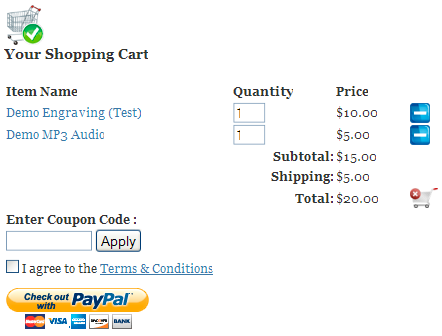
Shopping Cart Screenshot with both Physical and Digital products
And this is a screenshot of what the customer will see in the email or the “Thank You” page after payment:
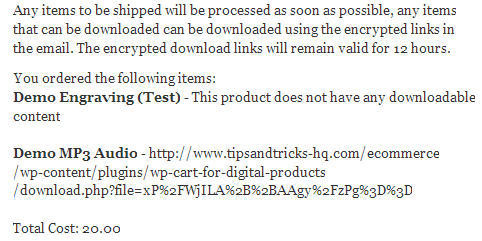
Screenshot of a Post Payment Message
Please refer to the shipping cost calculation guide to understand how shipping cost is calculated for non-digital products.


August 7th, 2011 at 4:24 pm
I think this applies to so many ecommerce businesses. Some interesting points. I wonder how many actually do this…
May 8th, 2011 at 1:09 am
@Tim, Do you mean this solution?
http://www.tipsandtricks-hq.com/wp-pdf-stamper-plugin-2332
May 7th, 2011 at 11:04 pm
I’ve been reading through your site’s details regarding handling digital media distribution, and can it handle dynamically adding to an ebook pdf the purchaser’s email address?
thx
January 7th, 2011 at 9:13 am
@Chris, This link should help:
http://www.tipsandtricks-hq.com/ecommerce/setting-up-pay-per-view-option-using-wp-estore-plugin-1066
January 6th, 2011 at 9:13 pm
How do I set up a streaming (VOD) option where the link is encrypted and expires within (x hours)?
August 18th, 2010 at 3:05 am
Hi JB, With the eStore you can set the amount of times a link can be downloaded.
Download Limit Count
Number of times an item can be downloaded before the link expires. Leave empty or set a high value (e.g. 999) if you do not want to limit downloads by download count.
This would be a global setting for all download links.
August 17th, 2010 at 9:08 pm
can the store determine for digital music sales how long the link will be available, a limited # of downloads and specific URLS for each customer based on their account?
Thanks.
Justin
April 15th, 2010 at 12:16 am
Hi Mark, This sounds like a PHP session issue. You will need to contact your hosting provider to fix this issue. They will need to check that the PHP session is turned on and configured properly. This should only take them a few minutes to do.
If you post a like to your site then I can verify that this is definitely the case.
Let us know how this goes.
Cheers,
Ivy
April 14th, 2010 at 11:32 pm
Great plugin! I am having trouble with my cart keeping items. I can add a single item, but when I add another item, only the latest item is showing. Also, if I change the quantity, the cart completely clears. When I go to the demo sites, I can add multiple items, so I guess its not a cookie issue with my browser. I must not have a setting correct. Pls help! Thanks!
April 1st, 2010 at 8:23 am
Hi, When PayPal profile based shipping is used the shopping cart just tells PayPal to use the shipping specified in the profile.
I am a merchant from Australia so I don’t get to use “PayPal’s Profile based shipping” as it’s only available to US merchant but I would think you could somehow flag a product so it doesn’t get a shipping charge?
March 31st, 2010 at 10:23 am
Hi;
Super plugin!
However; my clients are getting charged for shipping when they by a digital product.
My configuration is as follows:
I’ve selected “Use PayPal Profile Based Shipping” checkbox in the “Payment Gateway Settings” tab under the “Settings” Menu of the eStore plugin. I’ve also setup my shipping cost calculation in Paypal, and my non digital products get the appropriate shipping charge added upon purchase.
But I can’t figure out how to stop shipping charges added to my digital products.
Thank you in advance for your help.
March 30th, 2010 at 3:06 am
Ivy – Thank you for replying but I have already figured out the problem. It was nothing to do with the plugin but turned out to be my own PayPal settings that needed tweaked.
March 29th, 2010 at 11:25 pm
Hi David, Can you please send a link to where you are having this issue so I can take a look at it?
Cheers,
Ivy
March 29th, 2010 at 4:33 pm
The shipping charges are not being sent to PayPal. Example – item cost 3.50 + shipping cost 5.75 shows in shopping cart – but when you click to pay and are transferred to PayPal the price reverts to just 3.50
December 7th, 2009 at 5:43 am
Hi,
Is there a way to create a new product by uploading it?
For instance, instead of uploading the file separately then adding it in the Add Product section, is there a way I can upload the file then the plugin auto creates the Product?
September 12th, 2009 at 1:32 am
Hi Josh, It kinda depends on the ticket type… if you are just selling ordinary entry ticket for an event and say for example you have 50 spots then you can just make a product called “Some event ticket” with the price you want to charge and set the available copies to 50. When someone purchase a ticket you just ship them.
Now if you want to sell tickets where seating chart is involved and you want the customers to be able to select their seats then it gets tricky. You will need a system to track which seats are sold and what not. You can probably get some script that does this for you but this is really getting into the realm of user customization and I can’t really predict what you have in your mind.
September 11th, 2009 at 6:12 pm
Hi, how would I this estore to sell tickets for an event I am hosting?
August 27th, 2009 at 12:37 am
@shipra, It all depends on how you want to deliver your tutorial to your clients. If you want to deliver it as a downloadable PDF file for example then all you have to do is configure a product that has this PDF file in the “Digital Content Details” section so when a customer purchase it he/she gets to download this file.
You can add as many products as you want.. each product being a tutorial for example.
August 26th, 2009 at 7:08 pm
i want to sell tutorials with this. can u tell how to add the content and if i can add the cotnent from time to time
June 1st, 2009 at 4:18 am
@Debbie, I haven’t implemented variation control in WordPress eStore plugin yet.
Update: Variation control has now been implemented and the documentation can be found at the following URL:
http://www.tipsandtricks-hq.com/ecommerce/?p=345
June 1st, 2009 at 12:02 am
hi my question relates to having a product with different sizes
how can I add different sizes to the price slots ?
ex
pictures of different sizes ..
8 x 10 $20
16 x 20 40
like this ..
is this possible here
and to have for both digital and non digital sales as well?
thank you