Simple WP Shopping Cart Installation and Usage Instructions
Categories: Installation
WP Shopping Cart Installation
1. Unzip and Upload the folder ‘wordpress-paypal-shopping-cart’ to the ‘/wp-content/plugins/’ directory.
2. Activate the plugin through the ‘Plugins’ menu in WordPress.
3. Go to Settings and configure the options eg. your paypal email, Shopping Cart name, Return URL etc.
4. Use the trigger text to add a product to a post or page where you want it to appear.
WP Shopping Cart Usage
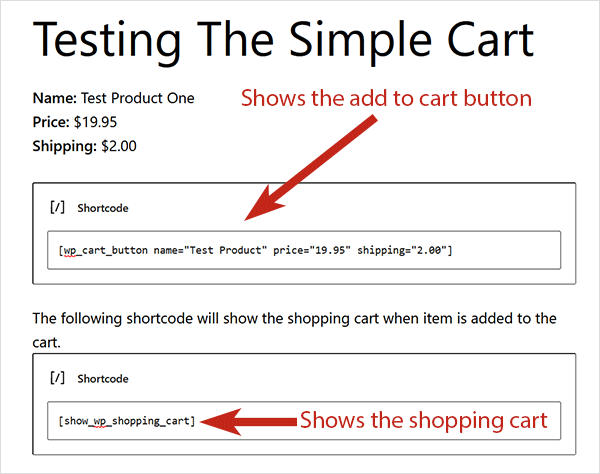
1. To add the ‘Add to Cart’ button simply add the following trigger text to a post or page next to the product:
Replace PRODUCT-NAME and PRODUCT-PRICE with the actual name and price.
2. To add the ‘Add to Cart’ button from template (.php) files use the following function:
Replace PRODUCT-NAME and PRODUCT-PRICE with the actual name and price. eg. <?php echo print_wp_cart_button_for_product(’wordpress’, 7.50); ?>
3. To add the shopping cart to a post or page simply add the following trigger text to a post or page in HTML view. The shopping cart will only be visible when a customer adds a product to the cart.
4. To add the shopping cart to the sidebar, simply use the widget from the widgets menu or add the following line to your sidebar template file where you want the shopping cart to appear.
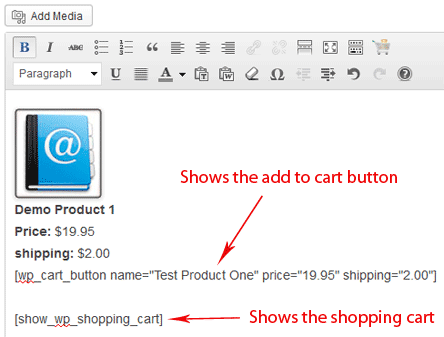
Example HTML Code
The following is a screenshot of an example html code showing how the ‘add to cart’ button is inserted into a post or page.

Using Shipping Option
1. To use shipping cost use the following trigger text
or use the following php function from your wordpress template files
Please see the How shipping Calculation Works post for more info.
Using Variation Control Option
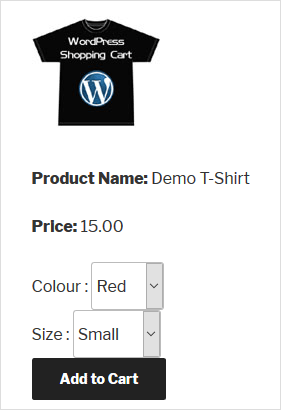
Variation Control can be used to create products similar to the following screenshot:

Shopping Cart Screenshot with Variation Control
1. To use variation control use the following trigger text
wp_cart:PRODUCT-NAME:price:PRODUCT-PRICE:var1[VARIATION-NAME|VARIATION1|VARIATION2|VARIATION3]:end]
eg.
wp_cart:Demo Product 1:price:15:var1[Size|Small|Medium|Large]:end]
2. To use variation control with shipping use the following trigger text:
wp_cart:PRODUCT-NAME:price:PRODUCT-PRICE:shipping:SHIPPING-COST:var1[VARIATION-NAME|VARIATION1|VARIATION2|VARIATION3]:end]
eg.
wp_cart:Demo Product 1:price:15:shipping:2:var1[Size|Small|Medium|Large]:end]
3. To use multiple variation option use the following trigger text:
wp_cart:PRODUCT-NAME:price:PRODUCT-PRICE:var1[VARIATION-NAME|VARIATION1|VARIATION2|VARIATION3]:var2[VARIATION-NAME|VARIATION1|VARIATION2]:end]
eg.
wp_cart:Demo Product 1:price:15:shipping:2:var1[Size|Small|Medium|Large]:var2[Color|Red|Green]:end]
Feel free to leave a comment below if you are having any difficulties.
Still Not Clear?
Visit the WordPress Shopping Cart Plugin Page.


July 21st, 2009 at 9:55 am
Why doesn’t the shipping work. Tried it a thousand times but no shipping costs..
What do I do wrong, this can’t be..
July 21st, 2009 at 9:56 am
[wp_cart:PRODUCT-NAME:price:PRODUCT-PRICE:shipping:SHIPPING-COST:end]
This really doesn’t work!!
July 21st, 2009 at 9:59 am
Here’s the page
http://www.awesomekickassrecords.com/wordpress/?page_id=46
the button below is with shipping costs
July 21st, 2009 at 10:28 am
Hi Ritchie, Looks like you are using an old version of the plugin… please download the latest version from the WP Shopping Cart plugin page and use that.
July 21st, 2009 at 11:13 pm
Is there any way to have text fields that are submitted along with payment. Say you are making a custom item and you want them to enter the text they want. Or, somehow combine this plugin with contact form 7?
July 22nd, 2009 at 12:44 am
@JMP, Yes, there is a way to have a text field that the customer can enter a text into but it will require some code modification. If you are okay with HTML then I can explain the code changes that you need to do.
July 22nd, 2009 at 5:57 am
Is there any possibility to add different shipping costs to var1?
[wp_cart:Get It (CD Single):price:7:shipping:3:var1[Shipping to|Germany1|Europe2|Rest of the world3]:end]
July 22nd, 2009 at 6:03 am
@Ritchie, Not at the moment… it starts to get complicated when you start doing those… I will consider adding this in a future release.
July 22nd, 2009 at 6:19 am
I understand, but it would be a great feature though
July 22nd, 2009 at 10:32 am
That would be great! That was the one thing holding me back from using your plugin, which BTW, is wonderful.
July 22nd, 2009 at 11:37 am
The new update gave an error “Fatal error: Cannot redeclare shopping_cart_show() ….wordpress/wp-content/plugins/wordpress-simple-paypal-shopping-cart/wp_shopping_cart.php on line 34″
July 22nd, 2009 at 11:47 am
Sorry seems to be okay, the automatic update seemed to be not functioning properly..
July 22nd, 2009 at 1:48 pm
I’m having trouble figuring out what I’m missing…. I’ve got the nextgen gallery and the paypal shopping cart scheme going…. The problem I’m having is the ‘add to cart buttons’ are not showing up. I’ve deactivated all plugins expect for nextgen and the shopping cart… even switched themes to be sure – no luck.
you can find it here: http://www.unicronstudios.net/wp-testing/
I’m overlooking something simple I know it.
Any help is appreciated!
July 22nd, 2009 at 8:10 pm
How do i set up my paypal with the plugin? i do not see a paypal config page in the settings. pls help
July 22nd, 2009 at 11:42 pm
@Dan, I had a quick look at your test page and it looks like your page isn’t getting filtered. The only reason for this to happen is if you don’t have the plugin active or if the trigger text is wrong. None of these two reasons seem to apply in your case though. I would try putting the trigger text on a simple post or page and see if the button shows up there… that would indicate something might be going wrong when integrating with the NextGen Gallery plugin.
July 22nd, 2009 at 11:46 pm
@Sanjay, you only need to enter your PayPal email address in the field that says “PayPal Email Address” in the settings menu of this plugin. If you don’t know where the settings page of the WP Shopping Cart is then please have a look at the WP shopping cart additional resources page to see a sreenshot.
July 22nd, 2009 at 11:50 pm
I tried it without the nextgen when i first discovered the plugin and it worked fine – the add to cart buttons showed up. I’ve got wordpress version 2.8.1 do you think that has something to do with it? I’ll try to find an older version of nextgen gallery and see if it works.
July 23rd, 2009 at 12:04 am
Remember you need to put the template file in the ‘gallery/view’ folder again after you upgrade the NextGen gallery.
July 23rd, 2009 at 12:16 am
HHmm.. no luck… tried several older versions of nextgen 1.0 1.2 1.3 no luck.
I remembered to add the estore template file… the shopping cart plugin was active… the code was correct… eh just no luck.
July 23rd, 2009 at 12:51 am
You can email me the instructions for the text fields and I’ll let you know how I do
July 23rd, 2009 at 1:08 am
After more digging.. its the nextgen gallery… its not ready for wp 2.8 yet… thats the cause. Thanks for helping me narrow it down admin, and thanks for the offer to help JMP.
So i just gotta wait… this is good news cause i just installed the ecommerce plugin and thought ‘oh they made this reeeeaaaal easy to work with huh?’
Peace and chicken grease!
July 23rd, 2009 at 5:09 pm
I figured out a work-around for my problem…. I changed the code in the pic description to the original simple paypal cart code without nextgen integration… viola! The add to cart buttons show up just fine under the pics and work too!
Weird solution but whatever… nextgen gallery with add to cart buttons… awesome!!
I hope this helps some folks.
July 24th, 2009 at 3:20 pm
@admin – Sorry to bug you again, I am still chomping at the bit to add custom text fields to the products
What code changes that you mentioned above do I need to make?
July 24th, 2009 at 3:46 pm
almost at the very top of this page – WP Shopping Cart Usage – underneath is a pic with the code – its the code for using the cart plugin WITHOUT nextgen. Still use the nextgen code in the post… but under each pic description… use the the standard cart code at the top of this page as mentioned. I even got it to work with a sizes drop down. SO in other words.. use any standard cart code in the pic descriptions under manage gallery in your admin panel.
Hope this helps! Good Luck!
July 24th, 2009 at 5:07 pm
I keep receiving an operation aborted error message when trying to use the plugin on IE. Is there IE support?
July 24th, 2009 at 8:23 pm
I am having problems with the sales count working for my ebook download. I have had sales, but I do not see anything happening in the sales count entry? All other pieces are working.
Otherwise a very easy plugin to get up and running.
Thank you for your insights.
July 25th, 2009 at 7:54 am
Hi Kyle, This plugin works fine in Internet Explorer… you just have to make sure that you are not loading any Javascripts in the header of your theme. The Javascript should always be loaded in the Footer for site performance anyway.
July 25th, 2009 at 7:59 am
@Karen, I think your problem is related to the WP eStore plugin. I will send you an email to address this issue.
July 25th, 2009 at 10:12 am
it do not work now, wrong page of paypal, before it was good with this version it is wrong what can i do, help please
i am in premier account on paypal, as before
July 26th, 2009 at 1:53 am
Hi Annie, what doesn’t work? Please give me a little bit more details as to what doesn’t work so I can help you. You can also post a link to the page where you are using it so I can have a look.
July 26th, 2009 at 3:38 am
Evening to all… I’m having trouble with the simplest code line. I cannot seem to get the product name or price to be displayed. The ‘add to cart’ button is visible and works (and even adds the correct item and price into the cart).
To test, I created a blank test page to see if the text was being hidden by images, etc. No luck…
Thanks in advance… it’s a great plug-in… perfect for my needs…
July 26th, 2009 at 7:42 am
Hi Brian, The trigger text only gives you the ‘Add to Cart’ button. It doesn’t display the Product name or price. This is so you can design the way you want to display the Name and price and any other details about the product and then just add an ‘Add to Cart’ button next to it so people can purchase it.
July 26th, 2009 at 2:36 pm
That explains it. Thanks for the quick response…
One other question… is there a way to allow customers to purchase multiple quantities of the same item? (either using a variable pull down menu or providing a blank entry field?)
If not, we’ll continue with simply changing the quantities in the cart (which works perfectly)…
July 27th, 2009 at 11:19 pm
Hello all,
I’m wondering if it’s possible to add a third variance to the drop down menu? for example a clothing store: a shirt size, colour, AND style?
Thanks in advance for any helpful replies.
July 28th, 2009 at 2:17 am
Being able to add prices to each of the vars would be amazing.
[wp_cart:Something Coolvar1[Size|Small|Medium|Big][Price|7.99|13.99|17.99:end]
That would fit my needs perfectly. Even still, as it is, great mod. Thank you! You may have saved me a ton of trouble!
July 28th, 2009 at 3:30 am
Hi there Admin,
I thought I already left a post but it’s disappeared. Can you please send me the instructions you sent to JMP about adding more fields for the customer to fill in.
Many thanks.
July 28th, 2009 at 4:51 am
Thanks for the great information. I would be selling HID kits for cars on my site and i would need a option like if the customer wants them for a 2009 Toyota Corolla how would i do that! I would have to create an option with the Year another with the Make and another with the model. Is there a way that i can do like if they pick a toyota then they would have to pick model but i don’t want models from Ford,Nissan and other companies to appear. ONly toyota product. Heres an example http://www.sylvania.com/ConsumerProducts/AutomotiveLighting/LampReplacementGuide/
July 28th, 2009 at 12:17 pm
@Laurie, It will require some code changes to add a third variation… you can have a look at what I have done for the 1st two variations and do the same for the thrid one.
July 28th, 2009 at 12:22 pm
@Chris, It gets a little complex to add prices to each variation on the fly when you are not using the database. When both variations use different prices the number of combinations get messy. I am implementing this capability in the WP eStore plugin at the moment as that one uses a database. If everything goes good I will see if I can come up with something for the simple shopping cart one in the future.
July 28th, 2009 at 12:24 pm
@Len, I sent you an email with the shopping cart modification idea.
July 28th, 2009 at 12:28 pm
@Justin, Your need is a little unique so I suspect you will need something a little bit more customized. Essentially those type of things that you mentioned are done with Javascripts.
July 28th, 2009 at 12:57 pm
ok! Thank you.. Is there a blank custom field that customer can fill out??
July 31st, 2009 at 1:00 pm
any reason why I can’t delete Items out of my cart? i tried deleting & re-installing the cart plugin but the items still show up in the cart
July 31st, 2009 at 1:01 pm
Here’s the address to the cart problem http://poppeace.com
July 31st, 2009 at 2:16 pm
ok I uninstalled everything.. even wordpress… re-installed everything… and those items are STILL showing up in the cart. The problem is they have an ‘ in the name. I fixed it inside of the nextgen gallery, but I just can’t get those items to delete out of my cart… PLEASE HELP!!
July 31st, 2009 at 4:19 pm
this is a wonderful tool. Thank You! I am not HTML or javascript capable but still able to operationalize for essentially all of my needs. One issue I am struggling to master is why doesn’t shopping cart work with IE . There is a previous post that says: This plugin works fine in Internet Explorer… you just have to make sure that you are not loading any Javascripts in the header of your theme. The Javascript should always be loaded in the Footer for site performance anyway. Apologies but can you say this in a way that I can know how to change my website? FYI here is the specific link http://corpusoptima.com/book-tour/
July 31st, 2009 at 10:03 pm
Ok for some reason it worked itself out… the additional items are no longer showing up in my cart.
Sorry for the multiple post – I wrote all the needed info in one post but then it didn’t show up… twice.
Thanks anyway!
August 1st, 2009 at 1:25 am
@Dave, If you display the shopping cart on a different page (eg. checkout page) than where the ‘Add to Cart’ buttons are then you won’t have any problem even if your theme is loading the Javascript files in the header.
Anyway, to load the javascript files in the footer you need to simply copy the line of text that’s loading the javascript file from the ‘header.php’ file to the ‘footer.php’ file. in your header.php file you will see lines similar to the following that loads the javascript file:
<script type=”text/javascript” src=”http://www.your-domain.com/wp-content/themes/your-theme-name/script-name.js”></script>
so just search for the following text and move that line to the footer.php
<script type=”text/javascript”
Hope that helps.
August 2nd, 2009 at 11:48 pm
The variation control only allows three or four choices. Yesterday I tried adding 15 choices and the first I don’t remember if it was three or four showed up.
August 3rd, 2009 at 3:39 am
@David, I have tested with more than 4 variations.. make sure you don’ thave any special character (eg. ‘, ” etc) in the variation name.. PHP doesn’t handle them very well.
August 3rd, 2009 at 2:31 pm
Here’s an example of what I mean. The 3rd variation shows up inside of the Color box, instead of having it’s own drop down.
[wp_cart:Product:price:34.95:var1[Color|1|2]:var2[Flavor|1|2|3|4|5|6|7|8|9|10|11|12|13|14]:var3[Size|1|2|3|4]:end]
August 3rd, 2009 at 2:33 pm
Sorry I’m not trying to spam your blog, but it won’t let me add all of the code. I’m going to try to separate it to a few lines.
[wp_cart:Product:price:34.95:var1[Color|1|2]:var2
[Flavor|1|2|3|4|5|6|7|8|9|10|11|12|13|14]
:var3[Size|1|2|3|4]:end]
Add them all together and they are the example code.
August 3rd, 2009 at 3:01 pm
The update quantity input and remove item from cart button are not working for me. They just reload the page (I’m assuming the JS isn’t working).
August 3rd, 2009 at 9:24 pm
@David, Looks like you are using three variations… the shopping cart handles upto two variations at the moment.
August 6th, 2009 at 12:15 am
After placing one particular item in the shopping cart, the plugin doesn’t go to the proper post.
I get a ‘Nothing Found’ error, though the URL is correct, but for some reason it says ‘–WEBBOT-SELF–’ at the end of the url. Any ideas on how to fix this?
August 6th, 2009 at 1:04 am
OK this is very awesome indeed. I am challenged in a few places. I have successfully added the shipping costs for base and individual items.
But then when it goes to paypal it does not include the shipping amounts. then it gives me an error code that it cannot process at this time.
Also how can we set this to open as a new tab or page and not leave the main webpage of the product.
Here is where I am testing it from: http://empowerednutrition.com/burner/
I am getting ready to let this go live to my private list and passively online, but then will purchase and implement eStore and Affiliate Platform Plugin within a week or less if things pan out correctly on this one.
Please help, I love this set up and have almost abandoned my magento shopping cart site for this one if I can get it to work with PayPal and shipping costs.
Thanks in advance for your answer and awesome info and products.
August 6th, 2009 at 11:38 am
@Vinnie, I have never seen that before… please post a link to the page where you are testing it so I can have a look.
August 6th, 2009 at 11:44 am
@Patrick, Thats strange.. I checked your HTML code and it looks like it’s adding the shipping properly but for some reason PayPal is not taking it. Did you setup profile based shipping in your PayPal account?
August 8th, 2009 at 8:38 pm
Hi, this indeed seems to be an awesome widget! But for some reason, when I click “add to cart,” it goes to the same URL and not to my PayPal page. I have my e-mail address for my PayPal account inputted correctly, too. Any idea what I may be doing wrong? Thanks!
August 9th, 2009 at 12:18 pm
@Tim, when you click the “add to cart” button it adds the item to the shopping cart on your site. Customers can add more products to the shopping cart or delete items from it. It takes them to the PayPal page for payment when they click the “Checkout” button on the shopping cart. You seem to be missing the shopping cart part. Please follow the instructions and add the shopping cart to your sidebar using the widget or to a post or page using the trigger text. This way when someone clicks the “Add to Cart” button their item(s) will be displayed in the shopping cart. Let me know if that helps.
August 9th, 2009 at 11:42 pm
Great, thanks! I though that was an option and not a required step. Do I still need to add “” somewhere in my template, and if so, where would that go?
August 10th, 2009 at 12:51 am
Hi, I tried it again, and the price doesn’t show up in the shopping cart (just $0.00). When I click on the checkout logo, I get this error on the PayPal page: “The link you have used to enter the PayPal system contains an incorrectly formatted item amount.”
August 10th, 2009 at 2:12 am
@Tim, It’s because you are putting the currency symbol ‘$’ in the price (PayPal doesn’t like it). Just enter the price without the currency symbol (30.00) like it is shown in the HTML example code in this page
August 10th, 2009 at 2:45 am
Ah – I was staring right at that the whole time and not even noticing what I did! Thanks!
August 10th, 2009 at 1:02 pm
Hi There,
I am considering this plugin for my website. Just wondering if it handles quantity, for example, if I only have 8 items to be sold will it only allow me to restrict the number of items available?
Thanks,
Alec
August 10th, 2009 at 10:23 pm
Hello after testing all the shop plugins I think your´s best for me, but I have a problem: prices and product name aren´t showing in my post I tried everything but no, the variations appears, and in the shopping cart does.
I am using wp 2.8.3
the code I insert in the post is: [wp_cart:PRODUCT-NAME:price:PRODUCT-PRICE:end]
August 10th, 2009 at 11:21 pm
@Alec, It doesn’t allow you to restrict the number of items available.
August 10th, 2009 at 11:23 pm
@Diana, You need to replace the PRODUCT-NAME and PRODUCT-PRICE text with the actual name and price of your product eg. [wp_cart:Test Product:price:10.50:end].
August 11th, 2009 at 12:55 am
Hi Admin
You state this in the changelog.
#
Capability to limit the maximum number of copies to be sold for a specific product (Useful when you only want to sell 50 copies of a product for example)
#
So, I dont understand why you say to alec above that you cannot restrict the number of items available.
Unless I am not understanding his question properly, which is very possible.
If I had 10 products only to sell and do not wish any more to be sold as I would not have them in stock, can I do this, and if so how.
The above changelog statement says I can, or am I confused.
Regards
John
August 11th, 2009 at 1:09 am
Hi John, You are confusing the WP eStore changelog with the simple shopping cart one (Pay attention to the title of the post). Please note that there are two plugins WP eStore (this allows your to restrict the number of items available) and WP Simple Shopping Cart (this does not have that functionality). Alec’s question was in regards to the simple shopping cart plugin.
The simple wp shopping cart plugin doesn’t have this functionality because it doesn’t use a database to store the product details and hence it can’t keep track of the number of items sold. I have many thousands of users of this plugin who like it because it’s very light-weight and simple to use and I plan to keep it that way.
August 12th, 2009 at 12:09 am
Thanks for reply.
Sorry I asked a question relating to the wrong plugin.
I clicked to the question from recent comments and never noticed I was in the simple plugin section as I noticed mentions previous, relating to the estore plugin.
Again, sorry to waste your time answering a pointless question.
Regards
John
August 12th, 2009 at 11:11 am
Hello Admin
I dont know how to upload products and how to show them on the front.
I need help.
Please explain how can i do it
Thanks
August 12th, 2009 at 11:13 am
your write in “Step 4 Use the trigger text to add a product to a post or page where you want it to appear” i did not understand it please explain clearly
Thanks
August 12th, 2009 at 9:28 pm
i have a problem , i want to show the shipping cart in the sidebar template , so i get the php code widget to execute the line
but it shows the line as it is (as a text) ,,i dunno where is the problem?
August 13th, 2009 at 9:00 am
@newdeveloper, you need to use the PHP function and not the trigger text. try putting the following:
<?php echo print_wp_shopping_cart(); ?>
August 13th, 2009 at 9:02 am
@Hameed, I don’t know how to explain it but you need to enter the trigger text similar to the following where you want an add to cart button:
[wp_cart:Test Product:price:10:end]
August 15th, 2009 at 8:39 pm
@admin ,, thanx so much for your help
August 17th, 2009 at 9:42 pm
The shopping cart trigger is not working when I put on a separate page. It works in the widget and on the same page as the items; however, it will only show one (1) item at a time. If I select a second item, it replaces the original item. If I leave the page, the cart is emptied. I am using 2.3
August 18th, 2009 at 4:51 pm
Hello,
I am trying to add this piece code in my footer.php section of code and it does not seem to work. The footer section of my website completely disappears. Any ideas why this piece of code is not working. If need be I can send you the .php file.
Thanks,
David C.
August 18th, 2009 at 4:55 pm
&lst;? php echo print_wp_cart_button_for_product(’Classic Break Beat Drums Volume I’, 4.99); ?&grt;
here is the code. Sorry about that !
August 18th, 2009 at 9:11 pm
David, are you using WP 2.8.4? I noticed the issues you and I are having with PHP, are related to this update.
August 19th, 2009 at 1:02 am
Hi Guys, It’s got nothing to do with WP v2.8.4 as i am using it myself.
@David, you need to put double-quote (not single-quote) around your product name. so change ‘Classic Break Beat Drums Volume I’ to “Classic Break Beat Drums Volume I” and it should work fine.
August 19th, 2009 at 2:55 am
Thanks for the great plugin.
I am having difficulties with getting the products and order information to line up.
I went to the CSS file to change the size of the add to cart button but WP says that the CSS is inactive. How do I activate this so I can resize my button??
http://mycareband.com/?page_id=11
New to WP, New to Thesis, New to Shopping Cart
Thanks
August 19th, 2009 at 3:59 pm
Ruhul Amin,
First, this is a great plugin that you have developed! I appreciate your hard work into this project.
Second, could you please help me with something? I am running a website for an author who wishes to offer signed copies of his book to anyone who orders online. The book could be given as a gift, so I need a custom text box to get the name that the customer wants on the book.
I am having trouble with the solution you provided in previous posts. All I need is for my shopping cart to ask the user “Who is this book for?” and provide a small text box near the question so that the user can provide the answer. Obviously, this new variable will be sent to the paypal address along with the rest of the information, so that the author can correctly sign the book.
If you could help me by showing me specifically what code I should be adding and where, I would be grateful. I am running “Wordpress” version 2.8.4 and your “WP Simple Paypal Shopping Cart” version 2.3.
Thanks so much!
Zack S
August 20th, 2009 at 12:55 am
@Patti, CSS should not be inactive.. not sure what you meant by “products and order information not lining up”
August 20th, 2009 at 1:23 am
Thanks for the reply.
How do I activate the CSS?
When I view my page the first picture is on the left with the product price, color and size.
The second picture is supposed to be on the right below the first one but it shows up more to the center, almost in the middle of the first one.
I know it probably has to do with the size of the Order now button or HTML….
Thanks Again
August 20th, 2009 at 2:04 am
@admin,
Sorry to be a bother, but did you get my problem? When I sent the post, my internet died on me.
August 20th, 2009 at 3:21 am
Hi Zac, You can collect special instructions from the buyer during the checkout using the method described in the following URL (Look for the collecting additional instructions section):
http://www.tipsandtricks-hq.com/ecommerce/?p=322
Let me know if that helps
August 20th, 2009 at 3:38 am
Ok, so that’s on the paypal side of things? There’s no way to customize it before it hits paypal then? I just want to make sure we understand each other. Thanks so much!
August 21st, 2009 at 4:31 am
Hey,
The plugin seems great and simple. Yet, I have a question. If I would like to sell digital downloads, so after they pay I give them the link to automatically download the file, do I have a way to send them to that specific page for the product. I have not been able to find this info here.
Thanks,
Julio
August 21st, 2009 at 11:34 pm
Hi Ruhul,
Hopefully a quick and easy question. On my home page I am trying to achieve the Add To Cart Button being there before the customer decides which service package they want and as they choose the package for that button to disappear and the actual cart to appear. I have this code currently in my html.
echo print_wp_cart_button_for_product(’Annually’, 239.95);
echo print_wp_shopping_cart()
inside php tags. I have removed the image and know how to modify the CSS to suit my needs. Is there a “quick and easy” fix to this?
Thanks and GREAT plugin, VERY customizable!
August 22nd, 2009 at 12:45 am
Am I bad, I forgot to mention that That this is actually a WordPress Home Page and it is set to “static” (even though WordPress tells you they are really not…. but that is a whole different topic
) I even tried an IF… ELSE using the cart_not_empty() but no luck every way I could think of….
Thanks again.
August 22nd, 2009 at 3:57 am
Hi Mark, You can wrap the code to show the Add to cart button in an if statement similar to the following:
if (!cart_not_empty()){
//Show add to cart button
}
August 22nd, 2009 at 7:57 am
Hi Ruhul
Can I move the “add to cart” button down, as it is too high above the line? I’ve added white space to the “add to cart” button but it just creates more space between line items. I’ve used padding-top:1cm to .wp_cart_button{ but it also does not move the button down.
Your plugin is amazing otherwise..
August 23rd, 2009 at 3:33 pm
Hi,
Could anyone help me out here? I have a question. If I would like to sell digital downloads, so after they pay I give them the link to automatically download the file, do I have a way to send them to that specific page for the product. I have not been able to find this info here.
Thanks,
Julio
August 24th, 2009 at 8:38 am
Hi Julio, you won’t be able to do that using the simple shopping cart plugin. The WP eStore plugin can do what you are after.
August 24th, 2009 at 1:43 pm
The variation does not show up on the Paypal checkout page. Does anyone know if there is anyway for the user to see it there ? How does the vendor get notified of the variation ?
August 24th, 2009 at 1:45 pm
Oops sorry to multi-comment but I see the variation is only displayed if the dropdown box is actually pressed. If it is left at the default display (ie the first item), it will not be included. This is fine.
August 24th, 2009 at 8:09 pm
1) After I have tested eStore successfully I use the simple shopping cart pl. für another project. But: I prefer not applying the widget in the sidebar (theme is a bit complicated). So I built a new php-file to show the cart in die sidebar (). BUT: the cart is toooooo large, as you can see at http://www.hapkemeda.com (top left sidebar). I think customers like to see their card. That’s why I don’t generate a special cart-page or checkout page.
What’s your idea, Ruhul?
2) If I put another product in the cart, the plugin counts shipping not only one time, but for each product. At the end shipping costs are very high. What’s wrong with my configuration?
3) Thanks for good ecommerce solutions!
@Tim: If users do not write the correct price (11,95 instead of 11.95) a mistake with paypal is occuring.
August 24th, 2009 at 8:10 pm
sorry: http://www.hapke-media.com!
August 25th, 2009 at 9:50 am
Meanwhile I have found “my” solution: Cart in each product page integratedt, link from the sidebar to the cart .
August 26th, 2009 at 6:40 am
@Ramona, how did you solve the shipping total issue?
August 27th, 2009 at 9:22 am
@Nena: The code for a product looks like [wp_cart:iClone3:price:79.99:end] = tigger text without shipping cost. During check-out the plugins shows the total amount with 1 position shipping cost. These costs are configured under WP shopping cart – Base Shipping Cost. That’s it!
August 27th, 2009 at 9:24 am
Ruhul, is it possoble to have an additional (second) payment option beside paypal : prepaid? Instead of the paypal website the customer gets an email with banking information and a “thankl ypo for your oder – oderdetails”. There a a lot of customers who don’t have/want a paypal account.
August 28th, 2009 at 12:48 am
Hi Ramona, I can come up with something I guess.. I can optionally add an extra checkout option that takes the customer to a Manual Order page where they can put in their details (Bank information, shipping detials etc) and when they click “Confirm Order” it emails those information to the admin.
Do you have something else in your mind?
August 28th, 2009 at 1:32 am
Hi Ruhul, Ramona’s option would be good for us too.
August 28th, 2009 at 6:33 am
@admin Thank you for this idea! What I mean is vice versa: The checkout option sends an email to me (admin) with order details (what is ordered) after the customers has filled out his email address and has accepted my business conditions via check box. The admin panel should have a field to fill in the url to the conditions. I don’t want to have the customers bank information. If you can solve my problem it would be great and of couse I would pay for it. Interesting for me: Do also other users want this solution? Greetings from Germany!
September 2nd, 2009 at 8:09 am
Hey
Was wondering if there was any way i could use variations with the php function?
Many Thanks,
Chris
September 2nd, 2009 at 10:10 am
@csocha, Nope, the variation can’t be used with a PHP function.
September 2nd, 2009 at 11:15 am
Hi,
I wrote once before and sent in a donation but didn’t see my post here. I am using variation control settings as below but the trigger text does nor generate the drop downs.
I’m using this with the nexgen gallery which otherwise is a killer combination. Can you suggest what I’m missing or where the problem is?
The site is http://www.stitchnow.net It is the first product on the 3rd page of the online store page, labeled coming soon-an orange shirt, in case you ant to look at the set up
[wp_cart:Caique on a Branch T-shirt:price:18:var1[Size|Small|Medium|Large]:end]
September 3rd, 2009 at 11:05 pm
Hi Dan, I sent you an email but it came back to me with a “Mail Delivery Failed” message. Anyway, I use Akismet so sometimes comments get blocked without me knowing.. sometimes I just get overwhelmed (I have a few sites that I maintain) with comments and I just can’t get to reply to all.. sometimes I think about replying later and then I forget. Anyway, I can’t see why the variation control won’t show up cause I just took the trigger text you provided and pasted into my test site and it works fine so there is nothing wrong in the trigger text. What version of the plugin are you using?
September 4th, 2009 at 5:47 am
Thanks for a great plugin!
I have two questions:
1) When the cart is empty, the phrase “Your cart is empty” is not showing up on the page.
2) Is there a way to allow the shopper to enter an amount of money for, say, a donation?
Thanks for your help.
Rich
September 5th, 2009 at 1:12 am
Hi Rich, By default the shopping cart doesn’t show the “Empty Cart” message when embedded in a post or page. You can change it easily though… this URL should help (http://www.tipsandtricks-hq.com/ecommerce/?p=322)
The WP Shopping Cart plugin doesn’t have the donation option.
September 6th, 2009 at 9:47 am
Hi,
Is it possible to include cost in the variations that will change the final price as the site that I am working on has different options for its products?
Thank you
Sasha
September 7th, 2009 at 4:50 am
Hi Sasha, The simple shopping cart plugin doesn’t have that option.
September 7th, 2009 at 6:32 am
Hi,
Sorry but i must have missed something.
I’m on WP 2.8.4, i installed the plugin on 3 different blogs (1 local,2 hosted) wrote a post with the trigger syntax for testing, get the “add to cart” but it doesn’t create anything, just reloads the page.
see : http://blumpit.com/blog/?p=3
Thanks for your answer
September 7th, 2009 at 6:51 am
@Olivier, the tag you are using to display the shopping cart must be entered in the HTML view and also make sure the tag doesn’t have any spelling mistake in it.
September 7th, 2009 at 7:25 pm
thanks Ruhul !
September 10th, 2009 at 4:09 am
Hi,
Do you know if it’s possible to code the Variation Control into the template directly?
I want to use the “the_title()” tag as the product name.
Cheers
September 10th, 2009 at 4:20 am
using it on http://www.lecompt.com/ecommerce any reason why it just adds 1 item? see the url and the LeCompt Gear page add 2 cd’s only the last one shows up any reason to that?
Frank
September 10th, 2009 at 6:01 am
@swollenpickles, you should be able to use the following function and pass in the title as the product name to display a button:
print_wp_cart_button_for_product($name, $price, $shipping)
September 10th, 2009 at 6:03 am
@Frank, Your PHP session isn’t working… please contact your hosting provider to get your PHP session to work properly and this plugin will work.
September 11th, 2009 at 6:29 am
I tried this, but it didn’t work (eg. didn’t pass the title):
echo print_wp_cart_button_for_product(the_title(), ‘2′, ”);
Also, how would I insert product variations (eg. different sizes, sml, med, lge) into the above code (to be used directly into the wordpress template files)?
September 14th, 2009 at 5:55 pm
Is the plugin capable of calculating and adding on tax?
September 14th, 2009 at 6:01 pm
Anyone else have a problem using this plug-in and PayPal then not adding tax on to the total?
September 15th, 2009 at 12:41 am
@Cindy, The following URL should help sorting out the sales tax:
http://www.tipsandtricks-hq.com/ecommerce/?p=191
September 15th, 2009 at 6:43 am
Another question I have is, is it possible to use variation control on price and shipping as well?
For example, how could I do the following.
Product A
size: Small = $5
size: Medium = $10
size: Large = $15
Shipping then varies depending on the size, so a small item may cost $2 to ship, a medium item $4 and a large item $6.
Is it possible to set up something like that with this plugin?
September 18th, 2009 at 9:44 am
Hi There,
The remove item form cart doesn’t seem to be working on my site… any tips?
Thanks
Lee
September 21st, 2009 at 3:45 am
Hello,
Nice simple plugin. My question is why do the items in the cart show as links but do not go anywhere? Can we specify where each item links back to? Like the item description page or just have the items in cart not appear as links.
I am trying to set up a retail clothing site with wordpress and your plugin.
Chuck
September 21st, 2009 at 11:55 am
The links of the item goes to the URL from where the item was added to the cart. You can add a product to the shopping cart then navigate to a different page then click on the link of the item and it will take you to the page where it was added.
September 21st, 2009 at 1:20 pm
It does not seem to be doing that. Please see http://www.goddessfx.com
Also, is it possible to do a “PROMO CODE”. If your code which is used normally for item and price can do a negative that would work.
Please let me know and thank you so much for your help.
Chuck
September 22nd, 2009 at 7:25 am
hi!
great plugin.
I’ve customized my paypal payment page with my own logo, within the profile section in paypal.
I want this to show though when customers click on the buy now page. At the moment it’s just showing email and no logo.
What do i need to change in order to do this?
Thanks
September 22nd, 2009 at 10:55 am
You shouldn’t need to change anything on the plugin side for the customized PayPal checkout page to work unless you have a few different page styles that you want to use for different sites.
September 23rd, 2009 at 6:44 am
thanks for replying so quick.
i do have different styles i use for different sites. so thats why i dont want to make one the primary style.
any ideas how i can show my custom style for this site.
also. i tried adding the:
to the sidebar.php in my templates file. It doesn’t work.
I also tried to no avail.
im not very good with php, i think i need to add more to integrate it with my WP template bt not sure what, any ideas?
September 23rd, 2009 at 9:47 am
Hi Dom, if you have multiple page styles then you will need to specify the one you want to use for this site by adding an input field like the one below in the shopping cart checkout form:
<input type=”hidden” name=”page_style” value=”PayPal”>
“PayPal” here is the default one… change this to the name of your page style.
Please note that the trigger text only work in a post or a page. If you want to use something from the sidebar then you will have to use the respective PHP function call specified in the documentation.
September 23rd, 2009 at 10:52 am
hi ruhal,
got it! cheers
September 27th, 2009 at 6:39 pm
Hello, using WP 2.8.4, Atahualpa 3.4.3 Theme, NextGEN Gallery 1.3.6, Simple WordPress Shopping Cart Plugin v2.3. The Button and shopping cart seems to work just fine “standalone”.
But when intergrated into NextGen Gallery ( i.e. when trigger text is inserted within the picture Description field), the web page displays my product description and the trigger text instead of the button.
September 27th, 2009 at 9:18 pm
Hi Moisha, please post a link to the page where you are having the issue so I can have a look.
September 28th, 2009 at 12:43 am
Here is my playground: http://www.nytees.us/denisrush/?page_id=63
September 28th, 2009 at 5:02 am
Strangely, but after image rotator plugin addition and another gallery options reconfigure, buttons and drop-downs are shown.
September 28th, 2009 at 12:37 pm
Hi,
Great plugin thanks!
I’m fleshing out a new blog for our site and I’d like to implement the plugin for our shop.
Seems to be workign though when adding the variations for t-shirt sizes the drop down seems to span the entire post/page:
http://co-mission.co.uk/blog/shop/
This looks a bit wack, any suggestions?
Cheers,
Rich
September 28th, 2009 at 11:21 pm
Hi Rich, you seem to have the following in your theme’s CSS file:
select {
width: 130px;
}
This is why it’s making the “select” input fields 130px wide. remove the width or the whole select block and it will adjust to the size of the text.
September 29th, 2009 at 12:23 am
Why when I add a product to the cart, in the sidebar widget, the title then appears twice for the shopping cart.
http://www.bradgebhart.com/purchase/
Can someone help me?
Thanks!
September 29th, 2009 at 11:02 am
@Mike, you can leave the “Shopping cart title” field empty and it won’t the 2nd time. Normally with the image and proper formatting of the title it looks nicer when you have the title there but on your theme it’s not the case.
September 29th, 2009 at 11:13 am
You said “The links of the item goes to the URL from where the item was added to the cart.”
It does not seem to be doing that. Please see http://www.goddessfx.com
Also, is it possible to do a “promo code”. If your code which is used normally for item and price can do a negative that would work.
Please let me know and thank you so much for your help.
Chuck
September 29th, 2009 at 11:49 am
@admin ….. thanks, worked like a charm.
What file can I edit in the package to remove a which is creating an space not needed.
September 29th, 2009 at 11:50 am
remove an html break <br />, sorry, the comment interpreted my html.
Thanks!
September 30th, 2009 at 4:15 am
I can’t remember exactly which line but try searching for the following and remove the br:
$output .= ‘<br /><span id=”pinfo”
September 30th, 2009 at 4:38 am
Hi,
I have managed to place all the items on the site with a ‘add to cart buttons’ but I can’t seem to work out how to create a page where users can submit their order (which inserts there order into pay-pal or whatever)
I also am interested in how to insert additional text fields into the order form (I was reading previous posts and you have said that you need an understanding of html which I have as well as basic php)
September 30th, 2009 at 6:16 am
Hi Beth, You need to add the trigger text that displays the shopping cart when items are added in the cart so customers can checkout. Please refer to the 3rd and 4th instructions on the Usage Instructions on this page.
You can add a reference text input box to collect user input using the “on1″ and “os1″ optional PayPal HTML Variables. Simply add a input text box and put the value of this to the “os1″ field and add to the paypal form that gets submitted during checkout.
October 2nd, 2009 at 6:43 pm
Sorry, posted on the other page and then saw the notice to come here!
~~
Love the plugin functionality, simplicity, (and ability to pick up text off my post page to create the product info vs. filling out lengthy forms).
But I like others need a manual option as well as PayPal. Working on a form with pass throughs, but very messy.
Also, (the real question here), it seems that buyers clicking through must have a PayPal account or be willing to create one. Thought PayPal would process credit cards w/o a PayPal account. Am I missing something here, a setting, or has PayPal just quietly eliminated that option?
Thx.
October 3rd, 2009 at 1:54 am
Hi Gary, Buyers can pay using a Credit card or their paypal account. The following URL has full explanation:
http://www.tipsandtricks-hq.com/ecommerce/?p=523#paypal_credit_cart
October 15th, 2009 at 9:00 pm
What about a coupon code? I offer a guide at 37.99 retail but want to give a coupon. As it sits now when I click through to PP there isn’t a coupon code area.
Is that coming in the future?
October 15th, 2009 at 11:38 pm
Hi Terry, The simple shopping cart doesn’t have a database so it can’t manage coupon codes. This is why coupon codes are only available in the WP eStore plugin.
http://www.tipsandtricks-hq.com/ecommerce/?p=364
October 16th, 2009 at 8:21 am
Hi there.. very cool and thanks for sharing. Wordpress can always use more e-commerce solutions
I almost have it working correctly.. however the variations are not being carried over to the Paypal page. I am trying something like this:
[wp_cart: t-shirt:price:25:var1[Sizes|small|medium|large]:end]
any idea what is going wrong ?
October 16th, 2009 at 10:15 am
Hi Zac, please post a link to the page where you are testing it so I can have a look.
October 16th, 2009 at 5:56 pm
cool thanks….
http://melodramarecordings.dreamhosters.com/?p=290
October 16th, 2009 at 5:59 pm
ahhh… wait.. it is fixed. apparently the problem was that I had the Maintenance Mode plugin enabled.
October 26th, 2009 at 4:27 am
Hi there ‘Admin’ (sorry I don’t know your name)
I am using Wordpress 2.8.4, and WP Simple Paypal Shopping cart v2.3 as well as Hackadelic Sliding Notes 1.6.2.1. Unfortunately the shopping cart shortcode does not work when it’s embedded in the Sliding Notes shortcode.
On my site, travelhorizonstyle.com.au you choose the COUNTRY Africa, then
ROMANTIC ROVOS RAIL EXPERIENCE, and expand Tour Prices>> you’ll see the problem.
Hackadelic wrote to me & said: “[wp_cart:...] is not a shortcode. It must have been implemented as a filter. Hence shortcodes=on has no effect.
What comes to mind is that wp_cart’s filter priority may be too low, so it executes AFTER the slider shortcode. Can’t tell w/o deeper analysis though.”
There is very little info about shortcode / filter priority. Can you give me a hint where & what I might change to make WP Simple Paypal Shopping cart work again ?
October 26th, 2009 at 7:28 am
@Joan, please search for the following in the “wp_shopping_cart.php” file:
add_filter(‘the_content’, ‘print_wp_cart_button_new’,11);
11 is the filter priority.. you can change that to whatever you like.
October 26th, 2009 at 7:07 pm
Hello,
I’ve just installed your simple Shopping Cart and it seems to work a charm, except in the case of updating quantities. Any attempt to change quantity above ‘1′ reloads the page sans shopping panel. See what I mean here: http://www.interrobangzine.com/store/
Any help would be greatly appreciated.
October 26th, 2009 at 10:36 pm
Hi admin,
Shall I take it that there is no known solution to my question on Paypal not receiving/accepting shipping calculations, or that the solution is so easy that I should have found it myself?
Sorry to bother you, I have tried researching this in the help files and forums but cannot see any suggestions. At the moment we cannot use the cart but would like to know for sure why before we abandon.
Thanks in advance
Daniel
October 26th, 2009 at 11:33 pm
I changed it to 1, which is indicative of the rating of your absolutely fantastic wordpress plugin and it works a charm. You are a very wonderful person to keep on top of all of your developments and such good work. Thank you thank you thank you !
October 28th, 2009 at 6:54 am
@Daniel, Looks like you are using the WP-eCommerce plugin by Instinct. Thats a different plugin… Please post your issues regarding that plugin on their site.
October 30th, 2009 at 11:07 pm
I would like to use the variation method, and be able to select Qty… is this possible ? You should make a product tag creation tool on here… with fields waiting… then those lazy … or people with lots of products to create can just copy paste into the table and hit process… and in one hit it creates all thirty or so products with the details prefilled into the fields… they then copy the html created and add that to their WP. Cheers g
October 31st, 2009 at 2:05 pm
Hi,
Your plugin is great. But I have one problem.
I have some product with variations.
Here’s how I embed it into the page.
[wp_cart:MY PRODUCT:price:49,99:shipping:2:var1[Color|Yellow|Red|Blue|Black]:end]
When I push “Add to Cart” button it adds MY PRODUCT to cart without Var1 value. If then I choose another color and push “Add to Cart” it increases the quantity by 1 instead of addind new product with another var1 valut to cart.
What do I do wrong?
November 1st, 2009 at 12:17 am
@Guy, Nope, the variation method can’t be used with quantity field. I will give the tag creation tool some thought.
November 1st, 2009 at 12:29 am
@Michael, please make sure you don’t use any symbol in your price field including comma (,). Only use the number eg. 49.99 (PayPal doesn’t like symbols in the price field.
Regarding the variation… you need to make sure your themes footer.php has a call to the wp_footer() function or it won’t add the javascripts. Many themes are not designed according to WordPress standard and causes problems. The following URL should help:
http://www.tipsandtricks-hq.com/ecommerce/wp-shopping-cart-troubleshooting-578
November 17th, 2009 at 4:02 am
I have added this line on my page here:
http://www.vegasleisuretime.com/shopping-cart/
but does not work no matter what i do.
http://www.vegasleisuretime.com/about/
thanks for any help
November 17th, 2009 at 8:23 am
Did you add that text in the HTML view?
November 17th, 2009 at 2:16 pm
yes i did,i am using the latest wp version.it works on the widget but not on a new page.
November 17th, 2009 at 8:52 pm
Hi there,
This is a great product. I just have one question. I’m want to be able to specify a quantity field by the add now button. I’m using the var2 for the quantity but when I click add now, the actual quanitity is set to 1. Is there a way to do this?
Thanks.
November 17th, 2009 at 10:06 pm
@aghper, please double check the trigger text you are using show the shopping cart (it is easy to make a mistake). Copy the text from the readme.txt file that comes with this plugin and paste it in the HTML view and it will work (if you go through the comment section then you will see how many people had the similar issue all because of a small typo).
November 17th, 2009 at 10:07 pm
@Megan, it is not possible to specify the quantity field in the variation section.
November 18th, 2009 at 12:00 am
Yes it works,
i was trying to copy/paste from the examples above,if wish some wehere it referred to readme file.i spent more than 30min.thank you for your support.
show-wp-shopping_cart
November 18th, 2009 at 11:02 am
Hey there,
Thank you so much for your work. I’m may go with the eStore, but for now I’m testing out the Simple version. Three quick questions: 1) Can you tell me how, if there’s nothing in the shopping cart, in fact to display nothing at all (in other words, to show neither “Shopping Cart” nor “Your cart is empty” — reason for this: my sidebar is on the bottom of my WP page and the space encompassing the widgets will only expand based on the height of any input, so if there’s nothing there, it’ll be as though no widgets, and if someone adds to the cart, it’ll open up – cool effect)?; 2) Is there a way in the Simple version to have the variations affect the price, such as various print sizes of photographs costing different amounts and showing up as such in the tally?
Thanks so much!
November 18th, 2009 at 11:22 am
Hey sorry to spam your comments. After reading for a while longer, I figured out the answer to 1) from your Additional Resources; and to 2) from a previous comment. Sorry about that! A quick note though, on your Additional Resources page, where it describes the code to insert in the show_wp_paypal_shopping_cart_widget function, since I’m no programmer, I didn’t know that I had to put that inside of the {, so I was placing it directly at the top of the function and kept inducing fatal errors in my script. Took me a number of minutes to figure it out. Just a note. Thanks again for everything! No need to answer my questions
November 19th, 2009 at 5:31 pm
Hello and thanks for this wonderful little gem!
It has been asked before, twice, but was not answered. I hope we get more lucky this time
When products are inserted into the cart, the links of their names do not point to the page containing the product (as they are supposed to). They point to whatever the current page is instead.
It happens both when the cart is shown via the widget on a sidebar and when it is shown via the trigger-code in any post or page.
I’m using the NextGEN Gallery integration method to add products inside the cart.
As a side note, is there any chance we get UTF8 support in a future version? Right now, when I use Greek text inside the trigger-code the products are shown up with weird characters inside the cart (plus they cannot be removed).
Thanks in advance for any help!
PS: WP 2.8.6, WP Simple Paypal Shopping Cart 2.4, NextGEN Gallery 1.4.3
November 20th, 2009 at 6:59 am
@migf1, the cart displays the link to the page where the product was added from cause you can have the same product displayed on different pages. This way it will go to the one where you added it from.
Please download v2.5 from the plugins page for UTF8 support (http://www.tipsandtricks-hq.com/wordpress-simple-paypal-shopping-cart-plugin-768)
November 20th, 2009 at 10:15 am
Thank you for the quick response!
I’m downloading version 2.5 now, thanks! (that’s great news)
For the links in the cart, unfortunately they do not work the way you described. They point to the current page (they do not point to the page the product was added from).
For the next 3-4 hours you can check the problem in the following testing url: http://migf1.selfip.com/wp_test/?page_id=198
Add a product from the list in that page, and then check the cart by selecting the “cart/euro” icon from the top of the page… product links do NOT point back to the previous page… the same happens regardless the way I implement the Cart (widget and/or trigger code).
Thanks!
November 21st, 2009 at 12:54 pm
Any news about the product link problem?
November 21st, 2009 at 10:15 pm
@migf1, I didn’t make the 3-4 hour window so couldn’t see it on your site.
November 29th, 2009 at 3:19 am
Hey. On the verge of purchasing the eStore after using the Simple version some. A few questions first:
1. It’s not mentioned anywhere on your site, but does your eStore plugin also support PayPal’s donation service? I’d like to be able to add Donate buttons to my site.
2. Also, in the eStore version, are the buttons tied to a product in a box like in all of the examples on your site here, or are they merely buttons, just like in the Simple version? I ask because I have a photo gallery and have no need for the boxes with the product thumbnail but rather only need an Add to Cart button that will add the photo it’s next to to the shopping cart.
3. Can the eStore version also be made to only display the shopping cart when it has items in it, and otherwise hide it?
Thanks!
November 29th, 2009 at 6:44 am
Hi Jared, you can use this plugin for donation (http://www.tipsandtricks-hq.com/wordpress-paypal-donation-plugin-942)
No, products are not tied to a box.. it’s just some additional options that you get in the eStore if you want to use it.
yes, the WP eStore shortcodes page has the references you need
http://www.tipsandtricks-hq.com/ecommerce/wp-estore-shortcodes-and-functions-reference-460
November 29th, 2009 at 8:14 pm
I’ve purchased and installed the eStore plugin now. Since I’m placing the Shopping Cart as a widget in my sidebar instead of by code into a template file, how can I make the Cart only display if there are items? In the Simple version, it was as simple as adding a line of code to the php file in the print_shopping_cart function. Can I do the same here? What would be the code, and which file? It’d be nice if this were an option on the Settings page as well – maybe I’m overlooking it?
November 29th, 2009 at 10:01 pm
Hi Jared, if you look at the shortcode references you will see that it has PHP function references too. the following will display the cart only if there are items in the shopping cart:
<?php echo eStore_shopping_cart(); ?>
November 30th, 2009 at 4:52 am
Hello,
I’m having trouble with the variables. They aren’t showing up in brackets like in the example.
Thanks very much!
-Daniel
November 30th, 2009 at 6:24 am
Oops sorry about that! I just found the line that needed to go into my footer.
Thanks for the great plugin!
-Daniel
November 30th, 2009 at 9:10 am
QUOTE:
“@migf1, I didn’t make the 3-4 hour window so couldn’t see it on your site.”
I’m sorry for the late response, but I got the damn flu and I wasn’t able to cope with the site. Anyway, you can check again now at: http://migf1.hopto.org/wp_test/?page_id=198 for the next 3-4 hours. If you miss it again, I’ll open it again later from a different PC (i’ll keep you posted).
Thanks in advance!
November 30th, 2009 at 12:11 pm
I posted this question on a different discussion as well. I have installed the plug in as per the Photocrati instructions. Buttons are good, everything good except the shopping cart does not appear. The page is blank with nothing at all on it. What am I missing?
November 30th, 2009 at 8:22 pm
Hi Catherine, just checked your site and looks like the cart is appearing fine (I am guessing you figured it out yourself)
December 3rd, 2009 at 7:39 pm
I’m working on a site for a client, and your plugin has been a lifesaver. But I can’t seem to figure out why my product variation are not being passed to paypal. They’re showing up in the dropdown, but when I add to card, nothing.
The page in question is: http://www.brownbagbotanicals.com/products/sugar-whip-body-scrub/
And the code I’m using is
[wp_cart:Sugar Whip:price:19:var1[Select Aroma|Chocolate Decadence|Ambrosia|Cucumber Honey]:end]
December 3rd, 2009 at 7:51 pm
Nevermind!! I solved it. Was missing the footer function. Duh!
December 10th, 2009 at 3:08 am
Hello. Let me start by saying that this is a great plug-in. It was super easy to set up and get going.
I have one two-part question:
1) Is there a way to add a ‘Convenience’ or ‘Paypal’ fee that will automatically calculate based on the total price?
Say a purchase of $100 is made. So in the shopping cart it would show the product purchased: $100; then an added convenience fee (where shipping is listed) of $3 showing a total of $103?
2) Following the same idea as above, but instead of calculating a percentage of the total price, adds a flat rate convenience fee?
So if the flat rate convenience fee is $5, and the total product purchase price is $100, then it’ll show:
product: $100
fee: $5
total: $105
Thanks very much!
December 11th, 2009 at 1:14 am
@DS, this is not possible without some code modification. You can use the shipping field to specify your “fee” and change the logic so it calculates based on the percentage.
December 20th, 2009 at 11:01 pm
I don’t know where else to ask this, and I’ve searched for the answer to no avail, what size should the thumbnails be?
December 21st, 2009 at 8:29 am
You can use any size image… the plugin will automatically resize it to 125×125 pixel.
December 31st, 2009 at 6:01 am
Hi
Just installed this but my view cart feature blows up on me.
If you go to the site and add a product to the cart…the items in the cart become huge and unreadable. They also spill over into the rest of the site. I’m guessing this is a CSS problem but couldn’t find any documentation on it.
anyone have ideas?
thanks
December 31st, 2009 at 11:53 am
This is very specific to your theme’s CSS. this happens when some theme specifies the size of input field which it shouldn’t do. You can check the following URL to get some idea as to how you can override this CSS
http://www.tipsandtricks-hq.com/ecommerce/wordpress-estore-troubleshooting-218
December 31st, 2009 at 6:12 pm
Just downloaded eStore and am excited about getting started!
Going to see if I can work out selling Gift Certificates as a digital download.
One of the hottest trends is Gift Cards. Just wondering if the Coupon/Discounts could be configured as a Gift Card that can be redeemed online?
For instance:
Individual (coupon) codes for each Gift Card that would allow the holder to purchase FREE for the amount of the card and charge for any amount over?
That would be fantastic!
January 1st, 2010 at 2:12 am
I will look into it.
January 16th, 2010 at 4:35 pm
I just downloaded this and within 5 minutes, I was up and running. I had been using Quick Shop in a site with about 4,000 hard-goods products. But when I switched to WP 2.91, it didn’t work anymore and the developer’s web page says that they will get around to updating when they get time!??! Reviewed eight other shopping cart apps before I found this one.
I’ve looked at all of your product pages and reviewed the requests for support comments. You are amazingly supportive. In all cases you answer quickly and in easy to understand language.
I also purchased the WP e-store app because I have another site I am developing with digital products. I have no doubt that will be just as easy.
Thank you but I have to go. I need to change the trigger text to wp_store in another 3,999 products.
January 17th, 2010 at 12:17 am
Hi Mark, glad to hear you like the WP eStore plugin… I have added your comment to the following page:
http://www.tipsandtricks-hq.com/ecommerce/?p=154
January 31st, 2010 at 5:20 am
Nice plugin! I’m working with a non-profit organization and they would like to change the “Visit The Shop” link in the sidebar widget to “Visit Member Services”. I’ve changed the code in wp_shopping_cart.php and things work fine. However, it would be nice if you could make this an item in the Settings panel.
January 31st, 2010 at 5:29 am
Follow-up on the “Visit The Shop” suggestion. I did find a better work around than editing the wp_shopping_cart.php. I simply put the link into the “Text to show when Cart empty” setting:
Visit Member Services
It works fine, but breaks the settings page display of that field, probably because of the unexpected HTML.
Thanks again for a great plugin!
January 31st, 2010 at 5:49 am
Thanks so much for the plug-in. I got it working in no time. I wanted to pass along some code to some fellow users that may be helpful.
Let’s say you hard coded the Add to Cart code on your template file and need to change the price for individual products on individual pages or posts. You can do so by using a WordPress Custom Field. The following example works the the custom field of “price”.
ID, ‘price’, true ); ?>
^^^Above the loop in the template
^^^In your template
I hope this can help someone and I’d love to hear Ruhul’s input.
January 31st, 2010 at 5:54 am
Thanks so much for the plug-in. I got it working in no time. I wanted to pass along some code to some fellow users that may be helpful.
Let’s say you hard coded the Add to Cart code on your template file and need to change the price for individual products on individual pages or posts. You can do so by using a WordPress Custom Field. The following example works the the custom field of “price”.
&alt;?php $price = get_post_meta( $post->ID, ‘price’, true ); ?>
^^^Above the loop in the template
&alt;?php echo print_wp_cart_button_for_product($name, $price); ?>
^^^In your template
I hope this can help someone and I’d love to hear Ruhul’s input.
February 3rd, 2010 at 8:07 pm
Bookmarked!!!
Thanks for the complete explanation..
February 4th, 2010 at 5:28 pm
Hi
I am having a few problems. I made a page with 3 tshirt designs i want to sell. Everything seemed ok so far. I can select a tshirt and add it to the cart but if I change the quantity it just refreshes the page and the cart goes away.
The second problem is that if i want to make another selection (get another shirt) it refreshes again and the first shirt no longer shows up in the cart.
I am unable to provide you with a link to my page right now because my user would start trying to buy shirts if i publish it.
Any help would be appreciated. Been looking and reading but cant seem to find an answer to my problems.
February 4th, 2010 at 11:33 pm
Hi KeDeUs, This sounds like a problem with your PHP session. Here are a few forum post that may help you with this issue.
http://www.tipsandtricks-hq.com/forum/topic/only-buy-one-item#post-264
http://www.tipsandtricks-hq.com/forum/topic/shopping-cart-empty/page/2
Cheers,
Ivy