Simple WP Shopping Cart – How the Shipping Cost Calculation Works

Categories: Shipping

Shipping Cost Calculation in the WordPress Shopping Cart

Simple Shipping Options

Option 1. Flat Shipping Charge Per Item

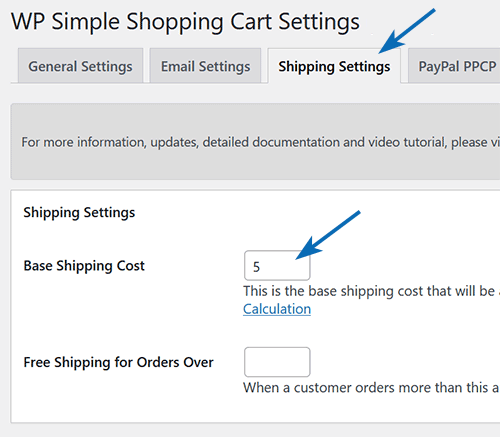
If you just want to use flat shipping cost for each item then just put ‘0′ in the ‘Base Shipping Cost’ option and specify the individual shipping cost in the trigger text (shortcode) for each product and you are done. For example, the following shortcode will place a button for a product that charges $2.00 for shipping.

[wp_cart:Test Product:price:10.00:shipping:2.00:end]

Option 2. Flat/Fixed Shipping Charge Per Checkout (no matter how many items in the cart)

If you just want to use a fixed shipping cost for the cart no matter how many items are in the cart then you can achieve this by specifying this fixed amount in the base shipping cost. Remember, the base shipping cost is only added to the cart if a product in the cart has individual shipping value specified (this way if a customer buys digital product he doesn’t get charged any shipping). Use an individual shipping value of “0.001″ for your physical items which won’t increase the shipping cost but will trigger the base shipping cost to be added as a fixed shipping rate. For example, use the following shortcode:

[wp_cart:Test Product:price:10.00:shipping:0.001:end]

Giving Shipping Discounts

What if you want to be a little more intelligent with the shipping cost calculation and want to use ‘Base Shipping Cost’ in conjunction with the individual product shipping cost to offer your customers a better shipping price? You can do that too.

The base shipping cost is added to the total of the individual products shipping cost. So for example if you had two products that costs $50 each and you want to charge $10 shipping for each item then someone buying both the products whould have to pay $100(product cost) + $20(shipping cost) = $120(total). That is not a very realistic shipping price since you are shipping both the products to the same address in one package so it will probably cost you $15 instead of $20.

How do you handle this situation?
You use a base shipping cost of $5 and indidividual product shipping cost of $5.

Now when someone buys both the products the shipping cost will be calculated as following:
$5(shipping for product1) + $5(shipping for product2) = $10(total individual products shipping cost)
Total shipping cost = $10(total individual products shipping cost) + $5(base shipping cost) = $15!

When someone buys one product the shipping cost will be calculated as following:
$5(shipping for product1) = $5(total individual products shipping cost)
Total shipping cost = $5(total individual products shipping cost) + $5(base shipping cost) = $10! (this is the shipping you wanted to charge for one product)

So, hopefully you can see that using the base shipping cost in conjunction with the individual product shipping cost you can be very dynamic in determining the total shipping cost for a purchase.

Visit the WordPress Shopping Cart Plugin Page.

Related posts

Subscribe to Tips and Tricks HQ to stay informed

twitter_icon

29 Responses to “Simple WP Shopping Cart – How the Shipping Cost Calculation Works”

  1. Jenny Says:

    I am using your brilliant e-commerce store and I have one problem. I have added the shopping cart and visit the store as a widget to the sidebar. This is the only way they can get to the Product Page.

    1} is there any way I can have an image link within the static first page of the site saying Vist the Store and can I make Visit the Store larger so people can see it in the sidebar?

    Otherwise it works great, thanks

  2. admin Says:

    Hi Jenny, yes you can put a link to the shop page anywhere like any normal HTML link

  3. Chris Melton Says:

    Hi,
    I’m using your plugin and really like it – except for one problem – “shipping charges”.

    I use paypal’s flat rate charges – ie $.01 – $50.00 = $9.95 shipping charge
    $50.01 – $150.00 = $12.95 shipping charges – these charges should be added once the customer proceeds to paypay processing.

    I don’t know how to make this happen with this plugin and right now I don’t have anything in the shipping field and no shipping charges are being added by Paypal to orders.

    Can you help?

  4. Chris Melton Says:

    Is it possible to disable the shipping option? If so, please tell me how to do it.

    I would like to use the shipping calculator on the paypal website once the customer clicks “proceed to checkout”.

    Thanks

    Chris

  5. admin Says:

    Hi Chris, Yeah you need to modify the code so it doesn’t send shipping info to PayPal in order to use PayPal’s profile based shipping. Open the “wp_shopping_cart.php” file and search for the following word:

    “shipping_1″

    Delete the whole line once you find it. That should do it.

  6. Chris Melton Says:

    Thanks for the help. I’ve deleted this line:

    $form .= “”;

    Is this correct? your quick response is outstanding. Super client service.

    Chris

  7. admin Says:

    @Chris, that will do but you can delete the whole line including that form bit too.

  8. ilsita Says:

    I came here with exactly the same question, removed that line from the code, and it worked perfectly! Thank you!

  9. Max Supera Says:

    This is freakin awesome. thanks so much!!!

  10. Jeremy Says:

    I really dig this plug in :) A problem I am encountering is it is sometimes charging double shipping. I have a flat rate of “0″ because we are charging shipping per item (which is $4.95 per item) but my client just sent me a Paypal receipt and it charged someone double shipping. Any advice on this would be most appreciated!

  11. Jeremy Says:

    Nevermind, found out it was on Paypal’s end! Keep on rocking with this plug-in!

  12. RevTrev Says:

    Is it possible to use the base shipping price as you’ve outlined above, and yet NOT charge for shipping on downloadable products?

  13. admin Says:

    yep, downloadable products won’t have a individual shipping attached to it so the base price won’t be added to the cart. Base price is only added to the cart if one of the items in the shopping cart has an individual shipping price (meaning it’s a physical product). If you want to charge flat rate with your physical price then simply use 0.0001 as the individual shipping price of the physical items. This way the base price will simply get added to the cart but won’t really increase the shipping price.

  14. jamal Says:

    hello thanks for providing a great plugin i am using wordpress 2.8 it works there i want to know how i use this plugin in seperate page that is php page.

  15. admin Says:

    This is a wordpress plugin so it only works for wordpress site.

  16. Vincent Says:

    Hello and thank you for such a great product.

    Is it possible to include options for shipping costs ?
    For example International Shipping : 10$ , FedEx shipping : 20$ …

    Do you have any idea about how to do that ?

    Thanks again

  17. Ivy Says:

    Vincent, We do not have a complex shipping option for any of our shopping cart plugins. Paypal has some shipping options that may be able to help you. Please see the following post: https://cms.paypal.com/us/cgi-bin/?&cmd=_render-content&content_ID=developer/e_howto_html_ProfileAndTools#id08A9EF00IQY

    Ivy

  18. DeBorah Beatty Says:

    So, reading what’s above in the comments, how does the shopping cart tell if it’s a download or a physical product? Sorry, but I’m new at this

  19. admin Says:

    If you don’t use an individual shipping cost for an item it will treat that as a digital product.

  20. Vincent Says:

    Thanks for the quick and accurate answer^^

  21. Dawn Says:

    Hi!

    I am using this plug-in on one of my websites and it works great except that I already have a shipping calculation set up in my PayPal profile for another website.

    My question is can I use this plug-in (each item has different shipping costs) so that it doesn’t want to pull the shipping calculation that is set up in my PayPal profile.

    Is there a way that can be done?

    Thanks!

  22. admin Says:

    By default the shopping cart do not use the shipping options specified in your PayPal profile so you shouldn’t have any issue around that.

  23. Ric Says:

    Hi,

    Is it possible to set the shop to only charge one single shipping price, rather than one for each product? This is what is happening when someone buys something. I only sell stickers so there is no need to charge more shipping if two or three things are bought at the same time etc.

    Thanks in advance,

    Ric

  24. Ivy Says:

    Hi Ric, Yes you can do this. The following post (option 1) should explain this more:

    http://www.tipsandtricks-hq.com/ecommerce/how-the-shipping-cost-calculation-works-in-wordpress-estore-50

    Even though this is for the eStore it can be used for the Simple shopping cart also.

    Ivy

  25. Kay Says:

    I do both domestic and international shipping can I set up options. Shipping based on location/

  26. Riccardo Says:

    Is it possible to set 2 different shipping costs?
    Like “For Europe” and “For Asia”?

  27. Ivy Says:

    @ Kay, Both of our shopping cart plugins have only simple shipping options. These carts where designed more for digital products. The following post explains the shipping options that are available. Even thought this post is for the WP eStore the shipping is the same for the simple shopping cart.

    http://www.tipsandtricks-hq.com/ecommerce/how-the-shipping-cost-calculation-works-in-wordpress-estore-50

    @Riccardo It is not possible to set 2 different shipping costs. Please see the link above for the shipping options that are offered.

    Ivy

  28. Thomas Says:

    Great plug in…I’m going to have to install this one!

Who is Linking?

  1. Simple WP Shopping Cart Installation and Usage Instructions | Tips and Tricks eCommerce Site

Leave a Reply

Featured Posts

Tips and Tricks Hot Items

wordpress_estore_icon
wordpress membership plugin icon
infinity remix wordpress theme
wordpress_affiliate_plugin_icon