If you use YouTube videos in your blog then you might find some of the following tips and tricks pretty handy if you don’t know them already.

Link to a Chosen Start Time of a YouTube Video
Say for example, you want to link to a nice video that you found on YouTube but it has some crap at the start which you don’t really want your visitors to watch. In a situation like that you can just link to a specific time of that video so when the video starts it will start from that specific time and skip everytime before that.
So if I wanted to link a YouTube video and wanted it to start playing from 1 minute and 17 seconds when someone follows the link then all I have to do is append #t=1m17s to the video URL.
Original video URL:
http://www.youtube.com/watch?v=DFoe6oS0Np0
Vidoe URL linked to a specific time:
http://www.youtube.com/watch?v=DFoe6oS0Np0#t=1m17s
Below is a link for a demo
http://www.youtube.com/watch?v=DFoe6oS0Np0#t=1m17s
Add a Video to Quick List for Future Viewing
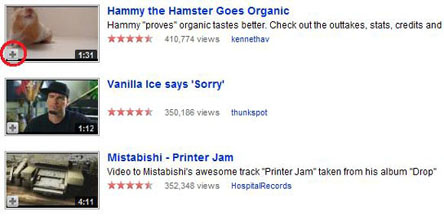
This is particularly useful when you are trying to find some videos on a specific topic but along the way you discover something interesting that you want to watch too but if you don’t want to get distracted at that moment then you can just add it to the Quick list by clicking the ‘+’ icon in the corner of video thumbnail for future viewing.
Show Video Captions by Default
If a video includes captions or subtitles, you can activate them by clicking the menu button located on the bottom right of the video player. When you embed a video on your blog, you can make it so that captions are always shown. Having the captions shown allows your blog’s visitor to watch a video silently. To enable captions on a video you’d like to embed, just add &cc_load_policy=1 to the video’s embed code. This page describes how to use it.
Some Useful Tools for YouTube Videos
- Delutube – Lets you view deleted Youtube videos.
- Video Downloader – a firefox extension that allows you to download youtube videos to your computer from YouTube and most video sites.
- YouTubeX – allows you to save and download YouTube videos easily using only your IE or firefox browser.
- TubeSock – grabs YouTube videos from the web and copies them to your video iPod, Mac, or PlayStation Portable.
If you know of any cool YouTube video tips or tricks that is handy for a blogger please share it in the comment area below.
Thank you for taking this opportunity to discuss this. I like it.
Excellent post! Youtube recently updated its format and I was confused about a few things such as the‘+’ icon in the corner of video or how the ‘Quick List’ even worked. Thanks for helping me familiarize myself with the feature I will definitely use it in the future.
Very cool feature. I was wondering how to eliminate portions of the video I don’t want my audience to use. I am going to put this into action. Thanks