 This tutorial shows how you can Rotate a video taken at an angle (for example the video was taken holding the camera vertically) by 90, 180, 270 degrees easily using the Windows Movie Maker software.
This tutorial assumes that the video file you are trying to fix is in a format readable by the Windows Movie Maker software (e.g .avi, .wmv, .mpg, .mpeg etc video file format).
How to Rotate a Video in Windows XP
- Import the video clip into Movie Maker (File -> Import into Collections).
- Drag and drop the imported video onto the Timeline.
- Select Video Effects from the Tools menu (Tools -> Video Effects).
- Select and drag the ‘Rotate 90’ or ‘Rotate 270’ effect depending on if you want to rotate the video clockwise or anti-clockwise onto the movie on the timeline. (Alternatively, you can right click on the star looking icon in the lower left corner of the movie in the timeline and then select ‘Video Effects’ to bring up the ‘Video Effects’ Window and then add the ‘Rotate 90’ effect to the video).
- Click on the ‘Save Movie File’ from the ‘File’ menu and follow the onscreen instruction to save your movie with the new effect (File -> Save Movie File).
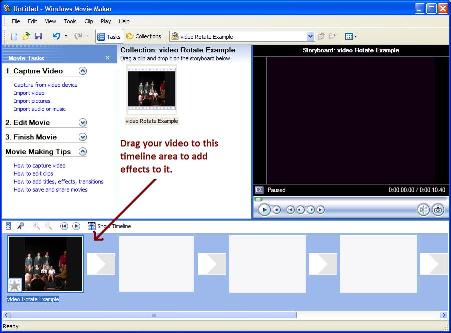
Windows Movie Maker Screenshot
How to Rotate a Video in Windows vista
- Import the video clip into Movie Maker (File -> Import Media Items).
- Drag and drop the imported video onto the timeline.
- Select Video Effects from the Tools menu (Tools -> Effects).
- Select and drag the ‘Rotate 90’ or ‘Rotate 270’ effect depending on if you want to rotate the video clockwise or anti-clockwise onto the movie on the timeline. (Alternatively, you can right click on the star looking icon in the lower left corner of the movie in the timeline and then select ‘Effects’ to bring up the ‘Effects’ Window and then add the ‘Rotate 90’ effect to the video).
- Click on the ‘Publish Movie’ from the ‘File’ menu and follow the onscreen instruction to save your movie with the new effect (File -> Publish Movie).
This should work easily without any trouble but If you are unsure of any step mentioned above and want some clarification then leave your question in the comment area below and I will try to follow that up.
If you know of any other easier way to Rotate a Video then please let me and the readers know by leaving your suggestion in the comment area below.
Just want to thank you for your help. I was making a video with my Samsung Galaxy S3 and some of the videos were sideways.
thank you so much! finally I have found my answer 😉
Thank you for the information!!! Have been looking all day for some answers about rotating videos with Movie Maker and this was the place. Thanks again! 🙂
I needed to rotate my video for a class requiring a video. It’s due tomorrow. If it wasn’t for this, I would have been stressed for ages. Thank you so much. 🙂
Your directions saved me my sanity!. I had made a movie with my camera yesterday of a very special eagle and was totally frustrated when the movie was sideways!
Found in the camera manual -“movies cannot be rotated” as I tried on the camera to change directon. Your directions were extremely clear and easy to follow. Wish you wrote the manuals for my “gadgets”!!! THANK YOU!!!!!!
Thanks! Time to edit those home movies now…
I can not rotate my video mpeg-4 file using window movie maker .. the format is unsupported or unreadable..
please give tips to do it.
If you want to convert a small video and no Movie Maker is around you could use http://www.rotatevideo.org. A free online tool for rotating videos.