Designing your site with a slick, stylish look, along with some cool Ajax-y features definitely impresses the visitors. They’ll come to your site more, the traffic goes up and the revenue grows. Yes, it does require a lot of work involving CSS/JavaScript and HTML, but that’s why JQuery is here for!
This lightweight JavaScript framework and the plugins built with it for implementing numerous front-end features, have made the lives of web developers and designers a lot easier. This article is a round up of some really cool JQuery plugins available on the Internet for download and use. Don’t forget to read the JQuery introduction article if you are new to this.
How to add JQuery library to WordPress Theme
WordPress already comes with the latest jQuery library so all you have to do is include it in your theme if you want to make use of it. Once you include the JQuery library you can start using all the cool JQuery functions. There are two ways you can include the JQuery library in your theme:
Option A: Insert the following in your “header.php” file of the WordPress theme:
Option B: Add the following bit of code in the “functions.php” file of your WordPress theme:
{
wp_enqueue_script(‘jquery’);
}
add_filter(‘wp_head’,’insert_jquery’);
Some Cool JQuery Plugins
1. Slider Gallery
With Slider Gallery you can create a slider just like the ‘product slider’ Apple so proudly showcases at their website.

Visit the Slider Gallery site for a live demo and the tutorial.
2. Auto Suggest – Facebook Style!
Want to build an auto suggest field like Facebook search box? Web2Ajax has a cool plugin for that. It uses JQuery as an Ajax framework and BSN Auto suggest library. Supports cache and has cross browser support.
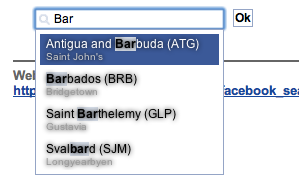
Visit web2ajax.fr site for a live demo and the tutorial.
3. Round Corners
Plain old right-angled corners of HTML are considered archaic these days. However the extra work required to take the edge off the corners is quite cumbersome. The JQuery Corners to the rescue! This easy-to-use library offers various corner effects including round ones. Different affects can be applied to top and bottom corners.

Visit the Malsup site for a live demo and the tutorial.
4. markitUp!
If you find the look and feel of TinyMCE as a rich text editor very boring(I know I do), markitUp is a great alternative for you. It has customizable skins, one of which gives it a Mac OS style look and feel!
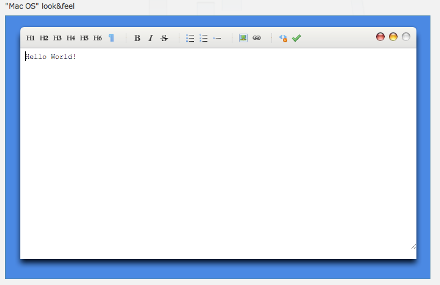
Visit markitup.jaysalvat.com for a live demo and the tutorial.
5. Lightbox
Don’t alarm your users with alert boxes! Use Lightbox instead. It’s a simple, elegant and unobtrusive plugin that overlays images on the current page and displays a message box(or whatever HTML you choose) on top of it. It was inspired in Lightbox JS by Lokesh Dhakar.

Visit leandrovieira.com for a live demo and tutorial. I use the JQuery lightbox plugin in the WP eStore Shopping Cart plugin.
Jules, did you figure out your problem with the rounded corners?
I am having a similar issue but i am not sure if im doing this correctly.
Im using WP 2.8.5
I added the code below in my sidebar.php:
div.demo, div.inner { color: #000; text-align: center; font-family: verdana, arial, sans-serif;}
div.demo { float: left; width: 18em; padding: 20px; margin: 1em; background: #6af; }
Round $(“.demo”).corner();
i made sure to have the code in my header.php file as follows in the head section:
Not sure what im doing wrong, i also tried doing the following in my sidebar.php file:
Round $(this).corner();
its just not rounding up the corners.
Thanks for this great post! I’m new to jquery too and just can’t get it to working properly. Do you (or does anyone else here) have any experience with adding the rounded corners plugin to WP 2.8.4?
I’ve inserted the above code (option a) into my header.php plus added the following:
$j(function() {
$j(“.header”).corner(“bottom 13px”);
$j(“.menu”).corner(“top 13px”);
$j(“.footer”).corner(“top 13px”);
});
However, its working in my offline .html file but not in my WP.
Thanks again!
Thanks for the tips, I’m still new to adding jQuery with WordPress, it still haven’t figured it out completely, but your article got me that much closer.
Keep up the good work.
I can see jquery in action on this blog. I want my hand on it but alway fear to mess up with things.
-Shanker Bakshi
This is a really great post. I’m going to have to lock myself in a room for a few hours to figure this out and add it to my Blog. You’re such a Tech Genius 🙂