Watch the following video for a good overview of the admin dashboard area of the affiliate platform plugin:
After you activate the WordPress Affiliate Platform plugin, the settings/options menu can be found on the left hand side menu similar to the following screenshot
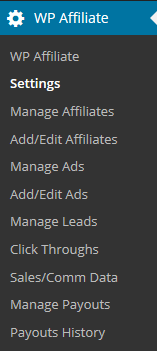
Short Description of Each Menu Item
In this section I have added a short description of all the menu items. I have also included some screenshots where I think it adds value.
WP Affiliate Dashboard
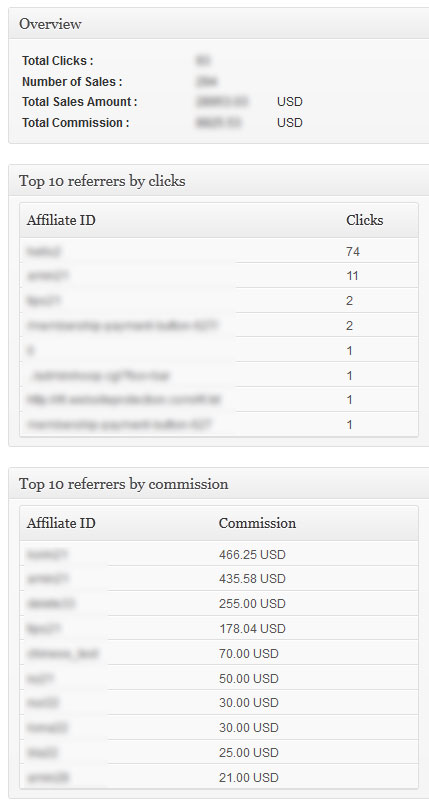
The WP Affiliate screen shows a summary stats.
Settings Menu
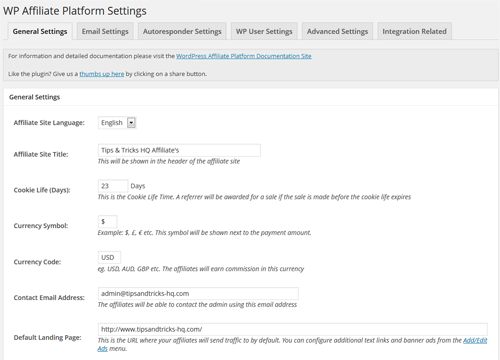
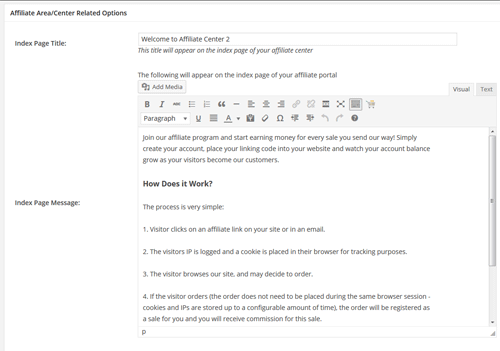
The Settings menu allows you to set various general settings of this plugin. This menu has 6 tabs in it (there are lots of settings options).
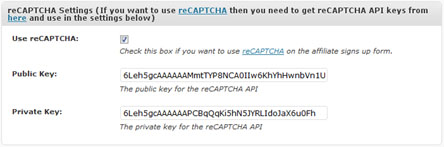
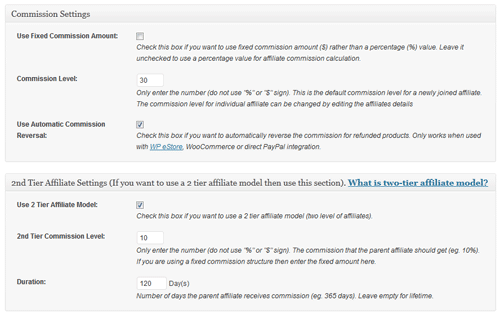
Manage Affiliates Menu
The Manage Affiliates screen allows you to manage your existing affiliates.
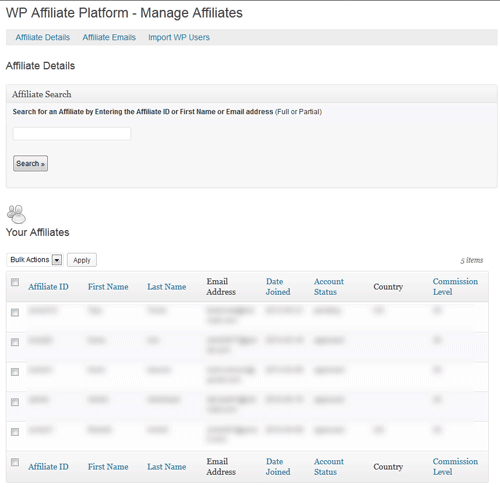
Add/Edit Affiliates Menu
The Add/Edit Affiliate menu allows you to add a new affiliate account manually or edit/delete an existing one.
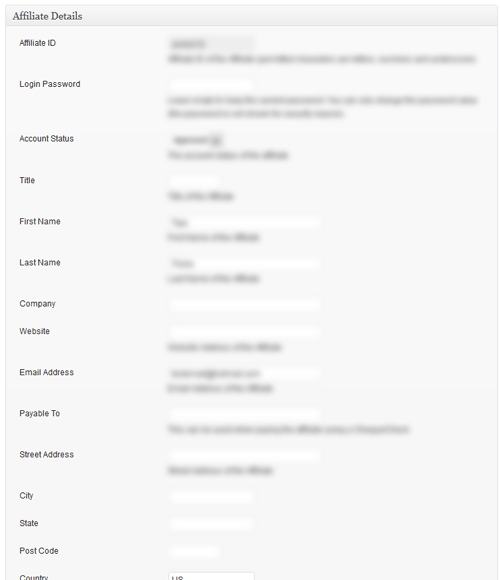
Manage Ads Menu
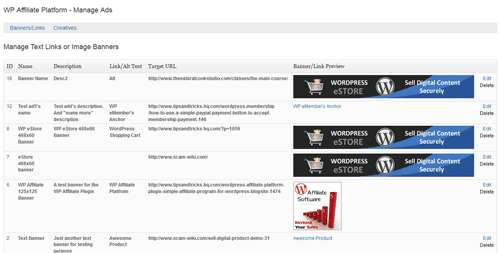
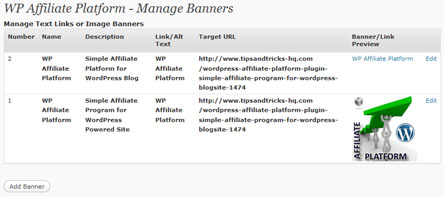
Manage Ads menu lists all the existing affiliate banners/link ads you have configured.
Add/Edit Ads Menu
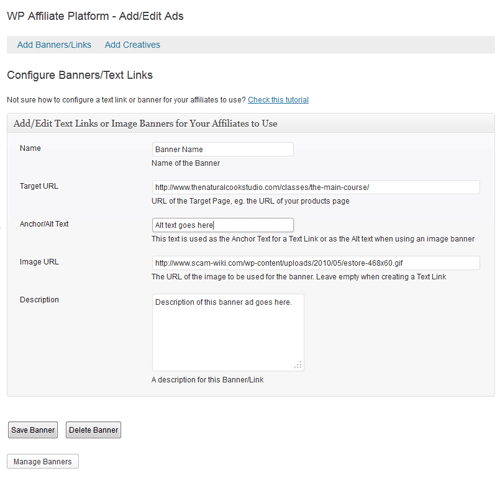
The Add/Edit Ads menu allows you to add a new banner/link or update and existing one so the affiliates can use them to direct traffic. You can configure/create new creatives via this interface too.
Click Throughs Menu
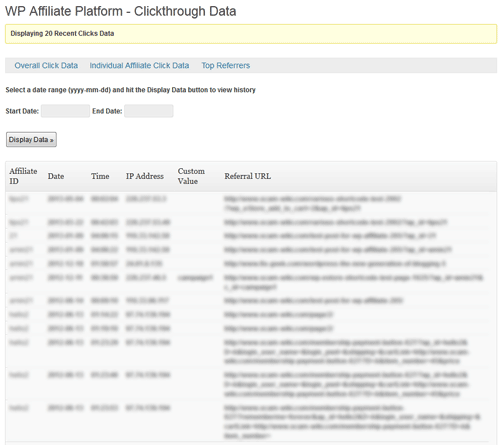
The Click Throughs screen lets you see all the traffic your affiliates are sending to your site.
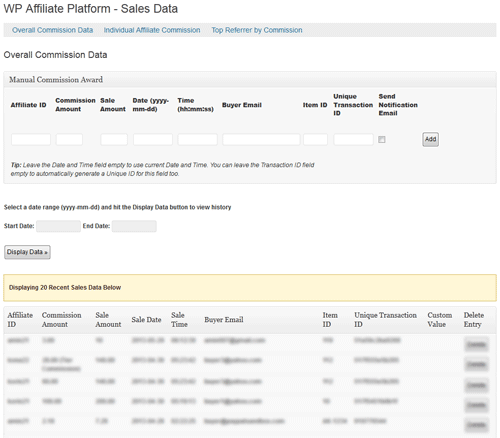
Sales Data Menu
The Sales Data screen lets you see all the completed sales that you got from the referrals of your affiliates.
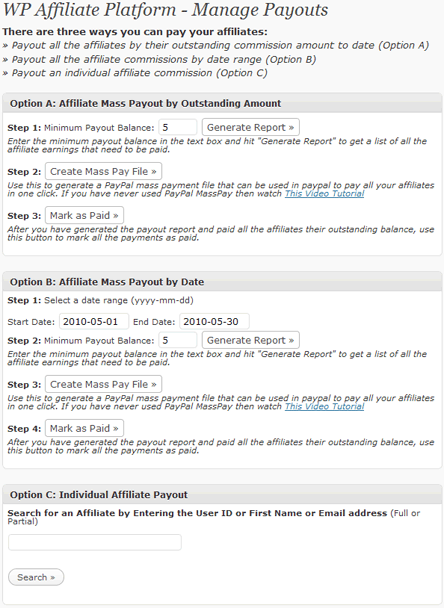
Mange Payouts Menu
The Manage Payouts menu is used to manage affiliate commission/payments. You can generate the payout report based on how you want to pay your affiliates.
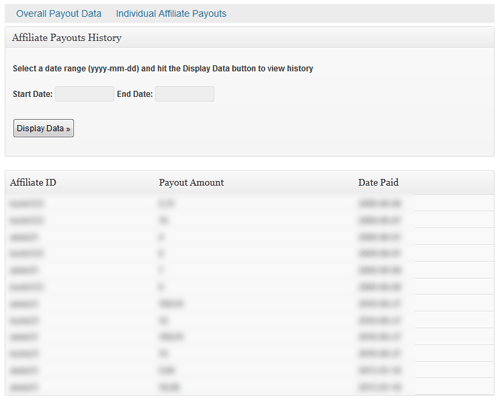
Payouts History Menu
The Payouts history menu allows you to see all the payouts you made to your affiliates. You can also see all payouts you made to an individual affiliate from the “Individual Affiliate Payouts” tab.
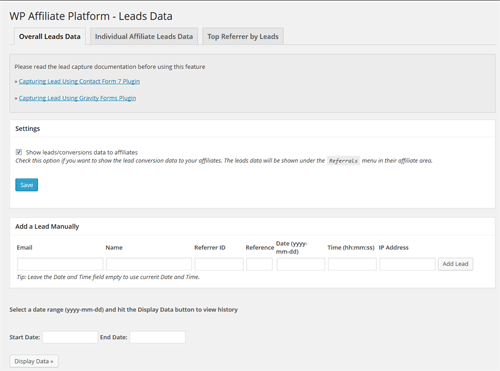
Manage Leads Menu
The Manage Leads menu lets you see all the leads you captured and award commission when necessary. You can add leads manually and view the leads by referrer too.
Feel free to leave a comment if you want to see more screenshots.
@APL, you just go to the “Add/Edit Affiliates” admin menu of this plugin and add the affiliate (you don’t need to do anything else).
Hi,
In adding an affiliate, do you need to add the affiliate as WordPress user first?
There are occasions when we need to add affiliates manually, however if we need to
add WordPress user first then add affiliate, it will be a tedious task for the encoder.
Thank you.
I am wondering how I can sort by affiliate and get a count of how many leads were generated by each affiliate. We are doing a free registration for our telesummit, and then I have the eStore plugin to handle sales. I can see how I can see the sales generated. We would love to be able to get the registration data as well.
An alternate would be to be able to export the leads listed in the Manage Leads area to a csv file so I can then sort, etc.
We are in the midst of our campaign, which will go on for another two months, so I cannot really do an upgrade to the plugin at this time. We are using Version v4.5.8.
Thanks!
It would be pretty sweet to have the pay per lead module already implemented into this.
Hi, The following post will explain how to integrate with PayPal Buttons.
http://www.tipsandtricks-hq.com/wordpress-affiliate/plain-paypal-button-and-affiliate-plugin-integration-168
You would need to use option 2 on the above page.
Thank you!
Actually, we won’t use any cart plugin because we simply don’t need it, we sell one and only software with one and only option so the cart itself will be totally needless extra distraction for a buyer. So, we will use simple paypal subscription button.
Hi Golan, If you are using the eStore with the Affiliate then yes. If you are using one of the other integration methods then this depends on which method you are using.
If you let me know what Affiliate integration option you are using the I can tell you if this will work with it.
Hi
Does it support recurring payments to affiliates?
Thanks
You should be fine with the tracking even after your editing (no special coding needed). After you complete your custom template just do a test affiliate click and if you see that the clicks are tracking properly then you know that it’s working fine.
RE-AFFILIATE TRACKING
—————————————
I am creating a “squeeze page” template for my site and as such am editing out the header and footer and other wordpress code from the page.
BUT I want to make sure the “Affilaite Tracking” still works as I am doings some JV with list owners.
Is there a piece of WPaffiliate code that I can put in the page (or in fact in ANY) page on the site to make sure that the WPaffiliate tracking is working so that leads and sales are tracked.
Many Thanks !!!!
Carl 🙂
@Erika, the sales page will need to in the same domain.
Thank you so much. One final question before purchasing: I have my website and apart from that I have separate sales pages with my main products (these are not with the same domain like my site). When I create the links and configure the landing URL, it could be an external URL (my sales page) as well or are there any limitations (eg. it can only be the same domain)?
thanks,
erika
Hi Erika, 1.) Please see ” WP Affiliate Platform Affiliate Banner/Link Creation” video on the following page:
http://www.tipsandtricks-hq.com/wordpress-affiliate/wp-affiliate-platform-quick-setup-and-usage-video-tutorial-158
2.) The Affiliate is tracked though cookies as long as the cookie is present it will count the sale for that affiliate, even if they leave and come back a few days later. The average time for an cookie is 28-31 days. You can however specify how long you would like the cookie to be active.
Hi,
As I am new with affiliations, 2 questions:
1. Do i create the links for affiliates manually with this plugin or is it created automatically by the system?
2. Does it pay commission if the visitor does not buy on the first visit but on a second? For example if people come to my free events’ page with an affiliate link and after attending this event they click to my other products and decide to buy.
thanks
Thanks, Ivy!
Hi Patty, Yes it does. There is a section called creatives in this section you can create just about any media you wish for your affiliates.
For Example:
emails
articles
text links
banners
and many more.
If you do not have this option in your Affiliate Platform all you need to do is update the plugin you can request an update here:
http://support.tipsandtricks-hq.com/update-request
Does this have the capability to add text links and email ads for affiliates, too, or is it just banners?
Thanks!
Patty
@Jason, yep it does… I have a few clients who have set it up with SSL on their site. If you have any problem let me know and I should be able to help.
Hi,
Does this plugin work with SSL? I know some affiliates will not sign up otherwise.
Thanks.
Jason
Hi all.
Thank`s for this incredible plug-in. I like it because this plug-in is sure.
Thaks for supliers
Hi Steven, I believe what you are looking for is the pay per lead model. You can find more information about this here: http://www.tipsandtricks-hq.com/wordpress-affiliate/how-to-use-pay-per-lead-affiliate-model-114
Cheers,
Ivy
What about websites that sell services. I would like to pay an affiliate if they refer someone and they successfully reach a specific page on my site. Is there a way to do that?
Hi Jonathan, You can set this up one of two ways.
1. The affiliate is paid a commission on each reoccurring payment.
2. The affiliate is paid a one time commission for the subscription.
Please let me know if you have anymore questions.
Cheers,
Ivy
Hello,
I need some more info about the affiliate recurring payment system.
So if I buy WP eStore and WP Affiliate Platform Plugin I can manage subscriptions from people and manage recurring payouts of my affiliates?
How is that done?
Shalom,
Jonathan
Oh how clever you are!
Of course, I’m thinking of needing it now because I’m setting everything up now, but yes, as you say, I won’t need the feature until June 1.
Thanks so much 🙂 You’ve made my week!
Hi Crystal, Sorry for giving you wrong info on the “Dated Mass Payment option”… I was suppose to add it in but had to reschedule that work for later as something else more important came up (obviously I forgot to inform Ivy on this :). Lets put it this way.. by the time you are ready to pay out your affiliates next month I will have it ready 🙂
Hi Ivy,
I just installed v3.8, and I don’t see the date range option on the Manage Payouts page…maybe I’m looking in the wrong place?
I do like the option to search for an affiliate and pay them their individual (partial or full) payout. I didn’t expect that…cool feature!
Hi Ivy,
How great that you have added that option. That is just what I’m looking for. I’m about to buy Affiliate Platform right this moment, so I’ll be working with whatever you’re selling tonight 🙂
Thanks so much for the help!
Hi Crystal, We have added a dated Mass Payment option. This allows you to put a date range in and it will create the payment for this time period only (e.g. Jan-April). What version of the Affiliate Platform are you using?
Cheers,
Ivy
Hi again,
I could have overlooked it on the admin screens, but I’m wondering if there’s a way to only pay affiliates for commissions earned up to a specific date?
For example, I have a 30-day return policy, and to keep my cash flow…well, flowing, I intend to have a 30-day wait on affiliate payouts, as many others do. So on June 1, affiliates will be paid for sales in April. On July 1, they get paid for May’s sales.
Is there a way to do that with this platform? Or does clicking the Mass Sales button just take all the commissions to the current date? I don’t intend to have a payment threshold.
Oh wow.
First, that was a very speedy answer. Thanks SO much…
Second, that is so exciting that there’s nothing more to do, because if I did buy it, I would definitely get the eStore too. Thanks for the special pricing on the Affiliate + eStore bundle 🙂
And thanks again!
Hi Crystal, if you are using the WP eStore plugin to process the payment then it will happen automatically 🙂 (nothing needs to be done on your side)
Hi Ivy,
I could use some clarification of your answer for Dennis on recurring payment commissions?
It sounds like you said that affiliates can earn commissions on recurring payments, so if commissions were 50%, and I had a $10/mth subscription product, the affiliate would automatically be credited for $5 each month the subscription is paid for. Is that right?
If I have that right: What do I need to do to make sure that I’m using an IPN handling script for post payment processing? Does eStore automatically do that, or do I need add code, configure PayPal, or …? 🙂
Thanks in advance for the help!
Crystal
Hi Dennis, This will only happen if you are using an IPN handling script to do post payment processing of subscription payments.
Cheers,
Ivy
Can your plug-in track recurring commissions off PayPal’s recurring billing?
Thanks
Dennis
Hi John, You can use a flat rate commission instead of a % based commission.
Let us know if you have anymore questions.
Cheers,
Ivy
Thanks for the timely reply. definitely very helpful.
Thanks Admin…. The second technique I think will work fine until I come up with a model that perhaps collects the Setup Fee on line upfront. Affiliates then could receive a % of the Setup fee as a commission only when the customer has paid us first. I don’t want to of course pay for leads but rather pay for results! So your plugin has real promise.
One last question. I wanted to issue a flat fee not a % of the order. Is that also possible? What I am doing now is offering $50 for each lead that results in a sale issuing checks and tracking manually by the customer entering a promo code. I would rather set up a fully integrated Affiliate Program… 🙂
@JohnD, It depends on when you want to award commission for the lead. If you want to award the commission upon the lead submitting the order then I can give you a bit of code that you put in your registration or order form and the conversion will be tracked.
If you want to award the commission manually after you have delivered the site to and got paid from the customer then you can do so from the “Admin Dashboard”.
Yes, in eStore you can enable this feature which lets your customers enter the affiliate ID.
“Is it possible to create a custom url for affiliates?” – No, the affiliate ID can be the affiliates name though as long as it’s not taken by someone else already.
“Can I just tell people to go to mysite.com” – You can just send traffic to a site or page with the affiliate ID appended and the click will be tracked.
“can I easily (with some php knowledge) output the affiliate’s name on the page somewhere based on the cookie data?” – Yes.
I would like to use this plugin for a referral program where I offer to provide $x for a customer lead that results in their buying a website from us. We design websites for small business. We don’t really sell directly on our website but since it is a WordPress site I was looking to find a suitable plugin. How would you see using your plugin under this circumstance ??
John
Hi. I’m excited about this plugin and just about to purchase but a few quick questions… has @kennyp’s comment about a “coupon code” being used at checkout to associate the sale with an affiliate been addressed? @admin mentioned above that “I can add an additional input field that takes an “affiliate id””. has that featured been released in the current version?
Also, is it possible to create a custom url for affiliates? e.g. /affiliate_NAME rather than /cryptic_affiliate_id_#? (trying to make it easier for non-web-savvy affiliates to get people to the page)
Is the cookie loaded based on the URL? in other words, can I just tell people to go to mysite.com/affiliate_id. It was mentioned above that the links can be emailed around so I’m assuming yes?
can I easily (with some php knowledge) output the affiliate’s name on the page somewhere based on the cookie data? e.g. a message that says “Hi, you’re shopping on behalf of affiliate_name”.
thanks, Shag
(and sorry for the extra long-winded post)
Hi, There is no built in integration for ShopperPress. You can do a customization depending on how ShopperPress handles the sale and if you have some basic coding skills. Here is a post that will explain this some more.
http://www.tipsandtricks-hq.com/wordpress-affiliate/integrating-the-wp-affiliate-software-with-a-3rd-party-plugin-61
Cheers,
Ivy
Hi,
Could this plugin integrated with shopperpress i.e. shopperpress.com?
Hi Rohan, The plugin supports any currency that is supported by PayPal but if you are not planning to use PayPal for affiliate payouts and want to do manual payments (e.g payments via check) then you can use any currency you want.
In order to track the sale a bit of PHP code will need to be placed so it gets executed after the “Order” button is clicked. I can provide you this code but you will have to place it so it gets executed after the “Order” button is clicked. Also remember that it’s a PHP code so make sure you can use PHP.
Hi ,
I am about to purchase your program,just a few quick questions :
1. Can I change the currency to ZAR ? South-African Rand
Our products are charged in ZAR…
2. We use AWEBER for our order form……will you program be able to track the sales.
When someone hits ORDER on my AWEBER forms it should track the aff…
For a better idea please visit my site at http://www.websitedesignstudio.co.za
We only offer 4 products and we only offer once off comms to affiliates
Looking forward hearing from you
Regards,
Rohan Rossouw
Hi, Yes you can add affiliate sales manually. This can be done under the “Sales Data” menu of the affiliate platform.
Cheers,
Ivy
is it possible to input the sales cost manually? since our products is in a form of services and procedures. our client usually pay on the spot and not online?
Hi Andy, Yes you can do this under the Manage Affiliates Menu and then selecting edit for the member you wish to change the commission for.
Cheers,
Ivy
In my list of Affiliates I know I can assign all affiliates to have a default say 25% commission BUT can I go into one individuals affiliate profile and let only that person have a 50% commission rate?
Andy
Hi Robert, Our Affiliate Platform is a simple affiliate program. We try to keep our plugins lightweight and easy to use. If you are looking for a more complex and feature loaded plugin then this is not the plugin for you. When it comes to being better than someone or something it all depends on what you are looking for. I find that most the time when you have too many features (that you never seem to use anyways) it just makes things frustrating. When choosing a plugin its best to look at what you really need it to do and then think about how it will grow with your site. If you have any questions about the plugin please feel free to contact us though the contact form.
Ivy
Hi, how is this better than idevaffiliate and what is the differences? I know that idev is the “market leader” for affiliate management and I guess I would be concerned that if I bought your plugin I might miss out on some features I need. Anyone here have any experience using either of the two? The benefit to your plugin is seamless wordpress integration.
Felisha, The affiliate platform can integrate with many 3rd party software. Please read the following page for more information about 3rd party integration.
http://www.tipsandtricks-hq.com/wordpress-affiliate/integrating-the-wp-affiliate-software-with-a-3rd-party-plugin-61
Ivy
Hi!
Does this plugin integrate with e-Junkie?
Thanks!
Felisha
@Hadee, nope, the affiliate plugin needs to be on the same domain where the store is.
@Phil, yep. this way for the trial period the affiliates will receive commission on that $1. for recurring payments they will receive commission on the $19.
Salam n Hola
Looks to me like this is the plugin I am looking for. Quick question, though.. Do I have to install the plugin on the same site as the store? Can the affiliate plugin run on a totally different domain from the store?
Regards
Hadee Roslan
can i use the eStore to offer a $1 trial for a month to a membership site for my affiliates reverting to a $19/month recurring fee?
Tyler, The affiliate plugin can be integrated with many programs, but this depends on how the other plugin works. Please read the following information for more on this: http://www.tipsandtricks-hq.com/wordpress-affiliate/integrating-the-wp-affiliate-software-with-a-3rd-party-plugin-61
Ivy
would this be able to be used in conjunction with this membership plugin http://www.newmedias.co.uk/wordpress-membership/
I can add an additional input field that takes an “affiliate id”
@admin I would say that kennyp’s request that the coupon code field accept affiliate ID’s is desirable. Just one idea is that Affiliates can offer a discount to a customer when they use the coupon code and then use sense of urgency marketing techniques in the process etc…
Leon McKee
@Jim, I don’t think this can be done.
Hi Ruhul
Thanks for the code. I’ve sent an email to you with the requested information.
Cheers
Yvette
Hello,
I have a question. I am looking for an affiliate plugin to install into my wordpress site that can change the affiliate links dynamically when someone arrives to the site from the affiliates link.
Once the person arrives all the affiliate links that have been activated by the affiliate would actually be the affiliate links. If the affiliate did not activate a link it would refer back to the default sites main links.
Can you plugin be modified to do this?
Thanks,
Jim
@Kennyp, we will discuss this over email.
@admin If we paid for the custom development, could it be done that the eStore coupon code field accept affiliate ID?
@Yvette, 1) Please post a link to the page so I can have a look.
2) Yes, the text links work in emails and you are correct about the URL.
3) I will email you the code.
@Vik, the affiliate software doesn’t do multi tier affiliate commission just yet.
@KennyP, the eStore’s coupon code field doesn’t accept affiliate ID but you can insert it in the browser’s URL and achieve the same result. Basically add the following at the end of the URL:
?ap_id=your-affiliate-id
Hi Ruhul,
I’ve purchased your Affiliate Platform Plugin, and I’ve installed it on my site.
I’ve got three things that I’m hoping you could help me with:
1. I’ve actually loaded a banner on a friend’s web site, and completed a purchase of one of my eStore products. It looks like the Affiliate Platform Plugin is registering clicks, but not sales made through the eStore plugin (v2.3.1). Can you suggest why this might be?
2. Do text links work in emails? If so, is it just a matter of getting the Affiliate to include “www.my-domain.com/?ap_id=##”” in their emails?
3. Could you send the code through that I need to track leads in my CForms plugin?
Thanks
Yvette
Does the affiliate pay commission in a matrix form based on upline commission payouts for downline affiliate sales.
As I give 50% commission to the first line of affiliates who in turn may sign affiliates downline:
1. The firstline get 25% of the sales of the 2nd line of affiliates that they have recruited on all sales made.
Can this coding be included.
This looks great! 1 question…
Could an the eShop coupon code area accept an affiliate code instead of the cookie passing the affiliate code? My client wants his affiliates to send their code around to other potential customers.
Great. What you offer sounds like just what I need. I currently use the “CForms” plugin to manage my order forms, and I hope that I’ll be able to get it up and running with a little bit of help from you.
I’ll purchase the plugin later today!
@Yvette, I can give you a small bit of code that you can put on your order form.. when the customer hit’s the submit button this code will award this specific commission to the appropriate affiliate. Let me know if this solution is okay with you.
Hi Ruhul,
My website uses WP eStore to sell some kits in the form of electronic downloads (which I’m really happy with).
I also offer some consulting services, but I do not sell these as services through WP eStore. I advertise the services on a static page, and users fill out an order form rather than using WP eStore to checkout through PayPal. It’s a long story, but for legal reasons, I need to provide the service before charging the customer. This means I accept the order form, do the work and then send them an offline invoice when I’ve finished.
I would like to have an Affiliate Program where I pay a % commission on sales made through WP eStore, and a flat $ figure for leads (i.e. when my order form is completed).
Can your system do this?
Thanks in advance,
Yvette
Hi Naomi, The plugin doing the selling (eg. eStore) does the commission awarding as thats the plugin that knows when a payment is confirmed. So you can specify how much commission to award after a sale/conversion instead of the commission percentage and you essentially have a pay per lead system.
All the data is stored inside the wordpress database (the plugin creates tables inside the wordpress database). So when you backup your full wordpress database the data for this plugin is backed up too. I use an automatic database backup plugin that backs up my wordrpess database for me periodically.
You can customize the affiliate signup page but you will also have to modify the corresponding database to store the values. I am going to introduce the Terms & Conditions checkbox to this plugin anyway so I can maybe add the Tax info textbox at the same time if thats all you need.
Hi Ruhul,
I am interested in this software for some clients.
Here are my questions:
1. In the product description, you wrote that this software supports pay per lead, but the screenshots only refer to % payments. Please clarify.
2. Is there a simple, automatic way to backup all the information contained in my Affiliate database to my own server or computer?
3. Can I customize the affiliate sign-up form (so that I can add tax info) and add terms and conditions? (I really don’t know how any affiliate program can accept new affiliates without them agreeing to the terms and conditions – preferably by ticking a little box.)
I await your response.
Naomi
Hi Wolf, If you know where to put the code then the integration should be easy. Please let me know what payment gateway you are using.
Hi mate
I need to integrate with Zen-cart, I assume that’s not an issue. I know where I need to place the script code so all I need is the code please. The cart is at http://handsoninternetmarketing.com.au/shop/ (not configured as yet)
I will purchase the plugin as soon as you confirm that integration isn’t an issue.
Have a great day
Wolf Skafte-Zauss
http://handsoninternetmarketing.com.au
Discover how to increase your sales using e-commerce
Hi Sean, It’ doesn’t have the ability to email affiliates but it can give you a comma seperated email list of all the affiliates that you can take and use an email management program to do your email communication.
Hey there!
This looks like a great plugin. Does it offer the ability to message affiliates or integrate with an email service provider?
Thanks
Sean
Hi Ruhul,
Thank you for quick reply 😀
To collect detail bank every affiliates can / have been provided by your plugin?
So estore like amazon affiliates?
regards
Prayitno from Indonesia
@Prayitno, This plugin is not going to do the bank transaction for you. It will give you the report of how much commission each affiliate has made. Now, you need to collect the bank details from your affiliates and do the bank transfer yourself. Once you pay the money you need to mark that as “Paid” from the “Payout” menu.
Integrated with eStore means the affiliate commission is awarded for any sale that happens through the eStore automatically (you don’t need to do anything extra)
Hi ..
Can this plugin supports payments through the bank (bank wire)?
What is integrated with eStore means every sale that happens every member will be recorded for many products?
Thanks
Hi Justin, The Payouts menu list all the payouts you made to the affiliates in a table which you can use to tax purpose. Also PayPal will give you a transaction receipt when you pay your affiliates via PayPal.
Yes, this plugin can be integrated with a PayPal button generated from your PayPal account. There is a little bit of custom code that needs to be in place for the integration but I will help you with that.
No, the affiliate plugin does not integration with Buddypress (I just haven’t looked into it yet).
Can affiliates get a report for tax purposes from this plugin?
Can the plugin integrate with a paypal button generated through paypal?
Does the plugin integrate with buddypress?
Thanks for all the help.
Best Regards,
Justin P. Madigan