Step 1) The first thing you should be doing, after you install the plugin, is update the settings page with your desired settings. Most of the default settings should be good to get you going so you don’t need to change too much to get started.
The general settings screen look similar to the following (it will have a lot more options but you get the idea):
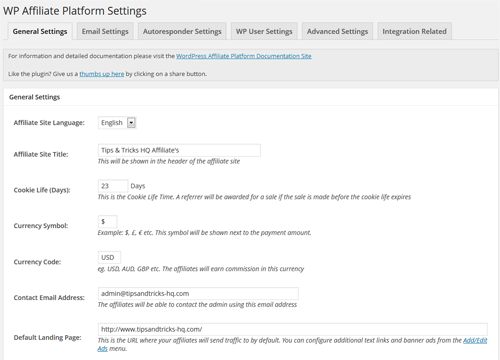
All the options are pretty self explanatory so you won’t have any problem configuring them. Browse all the settings tab and save the desired settings.
Step 2) The next thing you need to do is setup the dashboard area for your affiliates. The Setting Up the Affiliate View/Area post covers this topic in detail.
Step 3) Now that you have the affiliate area all setup you can start to configure some banners, links or creatives for the affiliates to use.
The banners, links, creatives can be configured from the “Add/Edit Ads” Menu. The How to Create Banners for Affiliates to Use page has instructions on how to create a product ad so that your affiliates can use that to send potential clients.
Step 4) Finally, you need to make sure that the e-commerce solution you are using notifies the WP Affiliate Platform when a sale is made. If you are using the WP eStore plugin then you don’t need to worry about anything as the WP eStore plugin is pre-configured to work with this plugin. If you are using some other e-commerce solution/plugin to sell your products/services then you need to check the “Integration” section from the documentation index page to find a suitable solution.
Hi, “Warning: cannot yet handle MBCS in html_entity_decode()! in /home/www/….plugins/wp-affiliate-platform/wp_affiliate_platform_menu.php on line 217”
This error is cause when you are using an older version of PHP (4 or lower). Using a out of date version of PHP is also a major security risk to you site.
The easiest way to fix this error is to contact your hosting provider and have them update your PHP to PHP 5+. This should only take them a few minutes. If you hosting provider is unable to do this please let us know.
Hi, I just updated to PHP5.2 and it is now working, thank you.
Gordian
Hi I get a:
Warning: cannot yet handle MBCS in html_entity_decode()! in /home/www/….plugins/wp-affiliate-platform/wp_affiliate_platform_menu.php on line 217
Message. How can I fix this?
Hi Kelly, I believe you just need an update. There is a option to use reCAPTCHA this option will help cut down the spam. Please see the following post regarding how updates work:
http://www.tipsandtricks-hq.com/forum/topic/how-and-when-do-you-get-an-update
i get a huge amount of spam accounts hitting and signing up for my affiliate program. is there anyway to avoid this? i have a spam filter on my site, but that just blocks out the spam comments. thanks….i’m so tired of the spam sign ups.
Hi Janice, Yes you can specify a commission per product. You can find this in the “Add/Edit” products menu. You can also set if you want one to be a % and one to be $ amount.
Let me know if you have anymore questions.
Cheers,
Ivy
Hi Babs, Please see the following post on how to do this: http://www.tipsandtricks-hq.com/wordpress-affiliate/affiliate-platform-integration-with-the-shopp-plugin-132
I will email you the plugin you will need to do this.
If you have any questions please let me know.
Cheers,
Ivy
Hi there
I am wanting to purchase the WP Affiliate Platform plugin but I want to know first if I can set different dollar or percent values for different products on the same website. For example I sell a workshop and want to give a $50 commission but when I sell a $20 download I may want to give a 25% commission. Does this software handle this?
Hello
I need to now get the eShop plugin working with the Affiliate system. Can you let me know what I need to do for that.
Thank you
Babs
WP eStore works with subscriptions.
http://www.tipsandtricks-hq.com/ecommerce/?p=400
If you want to use the affiliate plugin then you need to use eStore with the WishList plugin.
http://www.tipsandtricks-hq.com/ecommerce/?p=448
Looks like a great plugin. Something I have been searching for! Before I buy though do I need to have the wp estore to work with subscriptions or I can use Paypal, wishlist member, and wp affiliate platform? Thanks
Okies.. I think it’s time I take a look at your site to see what the issue it. I will email you.
Hey,
Okay I upgraded plugins as requested and I am still getting an error when I login. It’s having a hard time redirecting me. I can still get to the affiliate dashboard, but I have to click around. This is the error I got in the top header:
Warning: Cannot modify header information – headers already sent by (output started at /home/neathe/public_html/affiliates/lang/eng.php:1) in /home/neathe/public_html/affiliates/login.php on line 40
Hi Chris, I sent you an email to address your issue… obviously you didn’t receive that… I just sent you another one right now. Please let me know how you go.
Can you please respond to my comment?
Hi Robert, I haven’t explored Authorize.net yet.. just finished adding 2Checkout to WP eStore. Next I would like to add Google Checkout and Authorize.net payment so it is on my road map but it will take some time before I get to it.
Hi, do your plugins work with Authorize.net as a payment system? I prefer it over paypal. Any other features planned? Let me know.
It’s really upto you but I prefer putting some information about the program so people know what they are signing up for.
I’m so sorry.. I figured it out.. not that hard after all.. Do you reccomend just setting a button to the link instead of creating a whole page? Or would the page just have information about commissions… etc.?
Thanks!!!
@Alex, for the affiliate plugin you don’t need to put any special text (shorcodes) on any page or anything. You simply have to configure the settings and upload the banners/links and thats it.
After you have done that follow the instruction for “Testing the affiliate plugin” to see how you are going:
http://www.tipsandtricks-hq.com/wordpress-affiliate/how-to-test-the-wp-affiliate-platform-plugin-35
Hi again,
Sorry to sound stupid, but the wp emember and estore were much easier to figure out. i created a page for my affiliates, but I have no idea what to put inside. Is there a code? a function? a trigger? Where do I start? i went through the documentation but it seems everything is inside the settings? is that the case?
Thanks!
@Shahrul, I will email you the code and other details for changes “Fax” to “Account Number”.
Yes admin, i need the code to let affiliate track the sale for their visitor, 1 more, i try to change phrase “fax” in details.php and register.php to “Account number” since we not using any fax, but all your code were encode to ioncube, can i change it by installing ioncube to my windows and edit both files, or can u easily email me both files with the change already, so i can uploading to replace it just like that.. TQ and full of regards for ur fast response, good job admin!
I try to find phrase “fax” in lang file (eng.php) but its look the phrase are not there, so maybe it located in both files..
@shahrul, all the incoming affiliate clicks to any of you wordpress post or page are tracked automatically. Now, you can add a little bit of code (I will give you this code) in the Form7 plugin that you are using to track the sale/conversion when they submit the form. Let me know if this solution will help you or not.
the form page located at http://www.hafizjewel.com/sell-gold
Hi admin,
I just bought wp-affiliate platform today, just i need a help..
actually i dont sell any product yet, so i just want to intergrate with wordpress form7 plugin..
the affiliate just direct any customer to the form page which located in my blog, so how to do that, can affiliate view/received notice, when new customer submit the form.
Regards, shahrul
@Adrienne, It’s becuase you added an “Add to Cart” button on the page. You need to use the trigger text for the subscription button so the plugin knows you want to create a subscription button.
[wp_eStore_subscribe:product_id:1:end]
All the shorcodes for the WP eStore are referenced on the documentation site at the following URL:
http://www.tipsandtricks-hq.com/ecommerce/?p=460
Hmmm…new issue. I’m trying to set-up your shopping cart AND affiliate program to process subscriptions via PayPal. When I go to check out, I don’t get the PayPal subscription check out page, rather it just goes to a regular check out page.
Here’s teh URL to the membership page:
http://workingartistsnetwork.com/memberships/
Thank you!
A.
Thanks for your ultra fast answer (via email) Ruhul the problem seems to be fixed.
Ben
Hi Admin,
Please feel free to send me an email about making this thank you page more secure – I might consider paying for vbulletin accounts in the future.
For the moment, I don’t pay for vbulletin accounts created, but would use the affiliate program to connect an affiliate (and his/her email address) to an account.
Certain actions on my site generate buyer codes (for external products) that these vbulletin users will use, and the idea is to than send an email to both the affiliate and the (external) affiliate program to credit my affiliate instead of me for the sale.
As such, I have a no risk 100% commission affiliate program. The benefits for me are the community and the organic signups it will create, as well as scale effects (as aff programs pay a higher % for higher sales amounts I will be able to make the difference between the % my affiliates get and what % I get for the cumulative traffic I send). Also, the products I promote have 2nd tier aff programs, so I can be paid as someone who referred the AFFILIATE, not the buyer.
Hope my explanation is not too abstract. The site is being developed as we speak and I’d be more than happy to discuss with you. A bit of input from you now could save me tons of time and money down the road.
Hi John, The commission set on a praticular product takes precedence. So if a product has a commission set then this value is used to calculate the commission otherwise the affiliate will receive the commission based on the commission level specified in his/her profile. This is so you can offer different commission on some of your special products.
I noticed that there are 3 different places to set the affiliate commission. 1) On the product itself. 2) In the Affiliate Platform Setup and 3) On the Affiliate Profile.
My question is which one takes precedence?
Does the Affiliate Profile Commission over-ride the product affiliate commission?
What if I want to set the Affiliate Profile Commission to 25%, but I want to set one of the products to 15%?
How would I do it?
Hi PJ, Yes that would be one easy way to do it but you also have to be careful so people just don’t visit the “Thank You for registering” page and get affiliate commission without becoming a member. So you probably want to put a check their to make sure that the person visiting the “Thank You” page actually signed up for a membership. There are a few things you can do to make it more secure… let me know if you are interested and I will send you an email.
With ‘notification’ I mean whatever your plugin normally does to track a sale – with a ‘sale’ here being a new free vbulletin account made. The goal is to link these accounts to affiliates so I can credit them for all the revenue ‘their’ users generate. I guess the easiest way to do this is to add some WP Aff platform code to the ‘thank you for registering’ page from vbulletin ?
Hi PJ, sounds good… what kind of notifications are you after?
Hi Admin,
Fantastic product!
I will sell ebooks on my site eventually (so very interested in the combo plugin), but would like to start using the aff platform only to incentivize people signing up at my site.
I assume the necessary notifications can be done from some thank you page (or other method) after creating an account?
1. paypal, google checkout, and authorize.net
2. yes (if you mean can I php and work with apis)
thanks much!
Hi Mark, I will email you shortly but here are two questions that I will ask you.. so would be good if you have the answer ready:
1. Which payment getway do you use? (eg. PayPal, Google Checkout, 2checkout etc)
2. Do you have any knowledge of the post-payment processing that happens on the ecommerce (osCommerce in this case) plugin?
Just purchased. Use osCommerce (mandatory), and unable to change to your cart (though I bought it). *figured you were worth supporting for $4 more dollars*
how do I integrate affiliate/tracking/links/et al with osCommerce?
thanks for a speedy reply
Hi Mindi, yeah you can use it with a simple PayPal subscribe button (I will tell you what to do so you can award the affiliate commission after a sale) but why won’t you use the WP eStore to handle the subsciption button? I have added a new subscription configuration option in the WP eStore that can be used to create any type of subscriptipion button. This page should give you more info on this:
http://www.tipsandtricks-hq.com/ecommerce/?p=400
I’m considering using the affiliate plugin with another website, but this site won’t be using eshop. It will just be using a simple Paypal Subscribe button. Can I use the affiliate plugin with this?
Hi Mindi, Good point… I didn’t send the login URL assuming that if the customer just signed up then he/she should know how to browse back to that URL and log in. Besides anyone using this plugin will most likely add a navigational menu item called ‘Affiliates’ on their site/blog (similar to what I have on my main site http://www.tipsandtricks-hq.com)
Anyway, I will include this option in the next release and below is the URL that you can use to log in to my affiliate program:
http://www.tipsandtricks-hq.com/affiliates/
I just setting up my affiliate program with wp affiliate plugin, I need assistance.
When I subscribed to be an affiliate with you, it never sent me the link of where I go to log back in. It’s been several weeks and I’ve already forgotten the address. I am wondering if we can add a feature that includes the link to the login screen when an affiliate signs up. Also, please send me the link to your program so I can log back in 😉