
Simple WordPress Stats Plugin to show various vital blog statistics to your visitors. Currently it can be used to show off the following stats of you WordPress site:
- Google Page Rank
- Alexa rank
- Technorati rank
- Feedburner Feed Count
- Twitter follower count
- Google plus one count
- Number of Blog Posts
- Comments
- Trackbacks/Pingbacks
If you don’t want the hassle of updating your “Advertise Here” page of your blog every few days with the important statistics then this plugin will come in handy.
You can also show the stats widget on your sidebar.

Blog Stats Plugin Screenshot
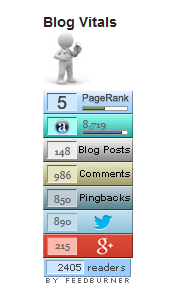
The plugin will show a widget/badge similar to the following:
Blog Stats Plugin Installation
- Unzip and Upload the folder ‘wordpress-blog-vitals’ to the ‘/wp-content/plugins/’ directory.
- Activate the plugin through the ‘Plugins’ menu in WordPress.
- Go to Settings and configure the options eg. which stats you want to show off, caching time etc.
- Use the widget, trigger text or call the php function to show the stats.
Blog Stats Plugin Usage
There are three ways you can use this plugin:
1. Add the following shortcode to a post or page to show the stats
[wp_blog_vitals]
2. Use the following function from a template (.php) file

3. Use the ‘WP Blog Vitals’ widget from the widgets menu
Blog Stats Plugin Settings
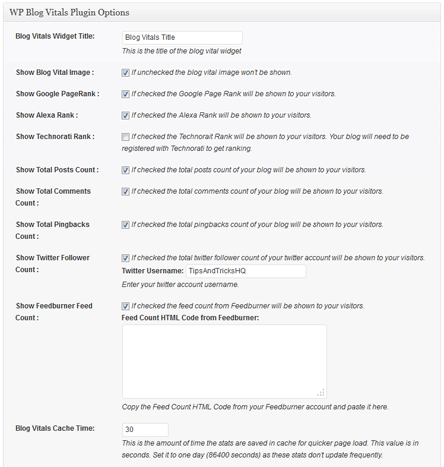
Here is a screenshot of the settings menu showing you what you can configure.
Additional Documentation
The following php functions can be used to display/retrieve specific stats:
- <?php echo vitals_getpagerank(URL); ?> – Displays the Google page rank of the URL specified.
- <?php echo vitals_get_cached_alexa_rank(URL); ?> – Displays the Alexa rank of the URL specified.
- <?php echo vitals_get_cached_technorati_rank(URL); ?> – Displays the Technorati rank of the URL specified.
- <?php echo vitals_get_cached_post_count(); ?> – Displays the total number of blog posts.
- <?php echo vitals_get_cached_comments_count(); ?> – Displays the total number of blog comments.
- <?php echo vitals_get_cached_pingbacks_count(); ?> – Displays the total number of trackbacks.
- <?php echo vitals_get_cached_twitter_count(“twitter_username”); ?>Â – Displays the total number of Twitter follower count.
Replace ‘URL’ with the actual URL of the site. For example, to show the Alexa Rank of tips and tricks HQ site I would use the following code in my .php (template) files:
The cached version of the function is used rather than the live one to improve page load time.
Getting Google API Key
You can retrieve your Google API key from the Google API console of your Google account. Enable the google plus API from the “services” menu. The API key can be found under the “API Access” menu.
Donation Option
Donation option can be found on my projects page.
Download Latest Version (v1.8)
Download the WordPress Blog Vitals plugin.
I will be updating this plugin over the next few months and add more stats and other options. Feel free to leave your suggestions in the comment area below and don’t forget to subscribe to stay upto date.
Checkout the list of best WordPress plugins to find out what other plugins you should be using.
An awesome widget that keeps me satisfied
Well I would say awesome widget.
outstanding widget
great widget, help us get report position our website, thanks guys
Awesome widget !
Awesome! You guys Rock!!!
Installed the new one, set my cache to 0 reloaded the page and had my PR back. Then reset it to 86400 seconds (1 day) and we are back in business! 🙂
Thanks guys!
We updated the plugin so it uses the new Google PR API. Please download v1.6 from this page and you should be fine (Just give it some time for the cache to expire though… this plugin caches the result to improve performance)
Using this, and loving it. Will there be an update that points the PR indicator to Google’s new pagerank server? I’m now showing everyone that I’m pr0 instead of pr3 and would like to fix it! 🙂
Thanks, cool plug-in.
Nice to have all important SEO ranks will be shown on screen.
I will try on my personal WP blog.
Thanks, I will check this out.
Great plugin. I installed it now.
Thanks!
This is awesome WordPress plugin, I am currently on blogger and very soon i will migrate to WordPress and than I will definitely install and try this blog vital plugin.
Im using this one and its perfect!
thank you Rahul for this plugin its now workin fine
Hello- I just sent you an email via your contact form, just letting you know in case it hits your spam folder! 🙂
Really like the look of this plugin, and hope you can help us out.
Thanks,
Jay
hey ive used this one truly workd great
I have tried this tool and its really great .Thanks for your advice,it really is impressive.
i was searching for premium plugins and i found this one. Looks like better then all those premium ones
Thank You Ruhul Amin for this. Working great. You are a great man.
nice plugins
I was searching it on Google from last 2-3 months!!!
Thanks for the awesome code. I was searching it on Google from last 2-3 months. You make my task easy, actually I’m using technorati and want to know the status of it on my blog. Thanks a lot for sharing with me.
This should be great to show future advertisers about our statistic.
Great plugin! I will be using it on all of my WordPress blogs..
Love this plugin saves so much time having all the stats built into one plugin Thanks!
I’ve just put this on one of my sites to try, I think this is one of the better plugins of this kind. Thanks for the hard work you put into building it. 🙂
What a nifty plugin. I really wish I had discovered this sooner, it looks like I can really put it to great use
great post thanks
Thanks for this great post – I will be sure to check out your blog more often ….
Blog Stats is the one of most important feature. We can know the development of our blog everyday, everyweek or everymonth.
Thank’s for your sharing. I like this posting about Stats. 😀
OK…all seem to work, except google rank.
I’m shure that it will be fixed in the next version.
Thanx
Thanks a lot.
😉
@divlinux, I just updated the plugin. Please download v1.5 from this page and it should address the image not appearing issue.
Hi all
I’ve the same problem wrote by Ark’s both with wordpress version and tipsandtricks version.
No image appears…Hot to fix it?
Thanx
Hi Icechen, Yes this is compatible with WP 3.0.1.
Is it compatible with WP 3.01?
nice pluign, thats wonderfull.
I will add the twitter and facebook ones later.
whats about twitter follower and facebook fans, i just miss it on my page!
This is a nice tool, I didn’t know about this until now I will give it a try to see how it’s works.
The stats are cached for the time you have specified in the settings menu. Give it some time so it queries the next time and it will automatically fix itself.
Installed latest version… No luck… And now Alexa stats read zero.
[http://loscuatroojos.com/]
In the sidebar towards the bottom… I’m downloading and reinstalling today… Hope it works… But please stop by and have a look. Thanks.
Please post a link to the page where it’s happening so I can take a look.
Installed fine … But the numbers in the Alexa box are gray. Other numbers are not black either. How do I change them to be readable? Thanks for a nice plugin!
another plugin that i’ll use for my blog… i hope it’ll work
thanks a lot…
*hmm.. i think i should subscribe to your blog…
i like the topic.. 🙂