1. Do you sell, or want to sell, digital downloads, digital content, products or services from your WordPress site on Autopilot while maintaining total SECURITY of your digital asset?
2. Are you frustrated with the e-commerce WordPress plugins you’ve looked at? Do you want a plugin with reliable customer service (where your questions get answered and issues get addressed)?
3. Do you hate the thought of paying ongoing fees and commissions to sell via a third party web site?
4. Do you hate having to buy many expensive addons after you install a shopping cart? and then pay a yearly fee to upgrade?
If you are still reading, then the WordPress eStore plugin may be just what you need!
Plugin Summary
In a Nutshell this powerful, sleek and conversion oriented WordPress shopping cart plugin allows you to sell any type of digital products and services from your WordPress powered site securely with complete automation.
Once you set it up, the whole process (the buying, payment verification, and the delivering of the product(s) without revealing the real URL of the product) works on auto-pilot. You can view a simple overview of the WP eStore’s digital delivery operations here.
Yes, you can sell physical (tangible) products with this plugin too as long as you don’t need complex shipping options.
Thousands of internet marketers use this plugin to sell their products from landing/sales pages.
Plugin Features
Below are just some of the notable features of the WP eStore Plugin (you can view a full list of features here):

Security of Your Digital Asset
Automatic instant digital product delivery upon payment through dynamically generated encrypted download link. This way the actual location of your digital product never gets revealed. The link expires after a configurable amount of time or specified number of downloads which ensures the security of your digital asset.

Sell Anything
Sell services, tangible and non-tangible products from your site. For example, you can sell digital downloads, videos, music, photos, subscriptions, tickets, serial numbers, web hosting, collect membership fees, and much more.

Secure Download Manager
WP eStore allows you to embed secure download now buttons for your free downloads (this will prevent hot linking to your files). You can also collect the user’s email address in exchange for the download (helps you build an email list).

Easy Streamlined Checkout
Simplest one-click checkout through PayPal, Authorize.net or Manual Payment. Customers can pay using a credit card or PayPal account. Don’t lose your customers to a complicated checkout system. Read the benefits of an express checkout system.

Lightweight Shopping Cart
WP eStore is a lightweight shopping cart solution. This lean shopping cart structure ensures that the plugin will not slow down your site.

Multi Site License
When you buy the WP eStore plugin you can use it on as many sites as you own (you gotta love that!). There is no “Developer Option” here. One low price entitles you to use the plugin on all of your sites.

Ease of Design and Usage
WP eStore seamlessly blends into your existing WordPress theme. You have the freedom of placing a Buy or Subscribe button for a product or service anywhere on your blog. Read the design overview here.

Autoresponder Integration
It can be integrated with Autoresponders (AWeber, MailChimp, Mad Mimi). This way the customers automatically get signed up to your list/campaign for email marketing purpose.

Elegant Product Display
WP eStore comes with elegant product display templates which you can use to display your products. Checkout the available fancy product display templates here.

Extensive Shortcode Library
With the library of shortcodes WP eStore provides, you can customize your WordPress ecommerce store exactly the way you want it. Designing your online store has never been easier. Checkout the available eStore shortcodes here.

Lots of Free Addons
WP eStore has many free addons that you can use to extend the cart behavior in various ways. You get access to all the free addons and extensions when you purchase the eStore plugin. See the addons list here.

Lots of Payment Gateways
The eStore plugin has free integration with a lot of popular payment gateways including PayPal, Braintree, Authorize.net, Offline payment methods (payment via cheque, cash or bank transfer), BitCoin via BitPay, eWay. There is a premium gateway addon module to add even more payment gateways if needed (example: Stripe, PayPal Pro etc).

Create Buy Now Buttons
WP eStore allows you to create buy now type buttons that offer a super fast product checkout. This type of button allows your customers to purchase a product without having to add it to the cart.

PayPal Subscription Button
You can create PayPal subscription buttons so you can charge recurring payments for a product or service.

Free Future Upgrades
Free future improvements and upgrades (there is no annual fee). You will always have access to the latest version of the plugin for free.

Plugin Stability
Our plugin code-base is very stable. We put a lot effort into testing and developing our plugins so it doesn’t break your site after you upgrade.

Save and Retrieve Cart
Ability to allow your customers to save their shopping cart content so that it can be retrieved at a later time.

Sell License or Serial Keys
You can configure a product with a bunch of serial numbers or license keys and the plugin will dispatch it to the customers upon purchase of that product. This feature can be useful to sell tickets too. View details here.

Discount Coupons
Create standard or conditional discount coupons using the discount coupon functionality. Use it to allow your customers to buy your products at a discount.

Customer Purchase History
Show customers their purchase history. They will be able to see which products they purchased from you in the past. Also allow them to re-download the digital items they purchased.

Sell Using a Link
You can use this plugin to sell your products via a link. This can be very useful if you have created a landing page using a landing page creator software and you just needed a link to accommodate the item purchase process.

Pay What You Want Price Option
You can enable a “pay what you want” or “custom” price option for your products so the customers can enter the amount they wish to pay for the item. You can specify a minimum amount for the custom price also.

Amazon S3 Integration
Can be integrated with Amazon S3 so that the downloadable files can be stored on your Amazon S3 account and served via secure encrypted download links.

E-Commerce Tracking
Integrates with Google Analytics eCommerce tracking. Your product sales will be tracked in your Google Analytics account (if you are using one).

Create Donation Buttons
WP eStore allow you to create PayPal donation buttons to collect one-time or recurring donations for a cause.

Shorten Encrypted Download Links
You can choose to deliver a shortened version of the encrypted download links. The links are shortened using the free Bitly link shortening service.

Works with HTTPS Pages
WP eStore works with https pages out of the box (useful if you are using an SSL certificate on your website).

Use inside a Pricing Table
WP eStore plugin is very handy when you need to put Buy or Subscribe buttons inside a price list or pricing table of your landing page.

Product Grid Display Option
Ability to list your products on a page using a grid display. There are a few pre-configured grid display templates for your to use.

NextGen Gallery Integration
Can be integrated with the NextGen Gallery Plugin to create a Digital Photo Store from the NextGen Gallery to sell photos from your WordPress site.

WP Security Plugins
WP eStore is compatible with most popular WordPress security plugins (including our free All In One WordPress security plugin).

WP eMember Integration
Can be integrated with the WP eMember plugin to create a WordPress store with membership capability. Creating a membership site with the WP eMember plugin is very easy.

Affiliate Software Integration
Can be integrated with the WordPress Affiliate Software Plugin. So if you decide to boost your sales by introducing an Affiliate Program later then you just have to activate the affiliate plugin.

Always Kept Upto Date
We keep our plugins upto date to work with the latest version of WordPress. We have been doing this for 5+ years so rest assured that our plugins will always be compatible with any future WordPress updates.

Detailed Documentation
Scared of getting worthless product documentation after you purchase the product? Checkout the shopping cart documentation before you make a purchase.

Great Support
Tired of listening to fake support promises? Checkout our customer only forum to see how we handle product related issues (usually within 24 hours). Our support forum is moderated by the developers who created the plugin(s).
View the full list of WP eStore plugin features.
Please see the documentation site to get a feeling for what this plugin can do (this will help you determine if this plugin will meet your needs).
WP eStore Plugin Demo
Click on the above live demo button to see how the Add to Cart, Buy Now and Subscribe buttons work.

You can also watch these set of video tutorials to see how easy it is to setup and use this plugin.
You can also try the free WordPress PayPal Shopping Cart Plugin to get a feel for how the shopping cart works. PayPal Shopping Cart plugin’s checkout is similar to this plugin (it just doesn’t have all the cool features that WP eStore does).
Purchase Demo Video
The following video shows a typical checkout process from a customer’s point of view when using PayPal:
The following video shows the customer’s point of view when checking out using the Stripe payment gateway:
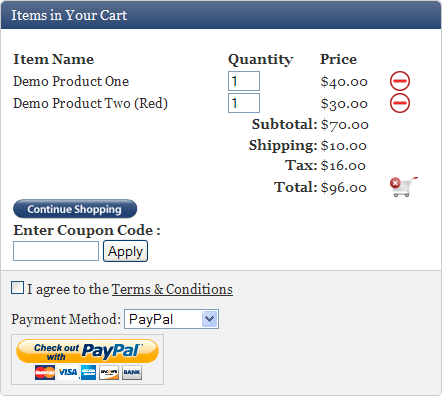
WP eStore Shopping Cart Screenshot
There are a few different ways to display the shopping cart. The following screenshot is one example of how the shopping cart looks when customers add product(s) to the cart:
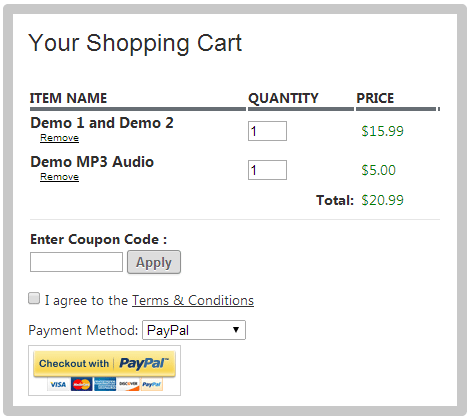
Below is a screenshot of another fancy cart:
Squeeze Page Type Form
The WordPress eStore Plugin can be used to insert a squeeze page type form in a post, page or sidebar to offer a free product to build email list for internet marketing purpose (view details).
Documentation & Technical Support
- WordPress eStore Documentation – WP eStore tutorials, how to’s, tweaks and everything else that you need to know about this plugin.
- WP eStore quick installation and Usage Video Tutorial
- WP eStore Forum – The WordPress eStore plugin is simple and easy to use but if you are facing an issue with this plugin then post it on the customer only support forum and we will address it.
Customer Feedback
We won’t waste your time with fake testimonials! Checkout the customer feedback page and see what some of our customers have to say about us.

Thank you so very much. I’ve just set up the new version of the plugin, and a new test PayPal button and as far as I can tell this solution works perfectly! I really can’t thank you enough. Your support has been very fast, and extremely helpful. This made my day!
Kat Landreth
http://pareandfocus.com
You can also check the comment section below for more customer feedback.
Get the WordPress eStore Plugin Now
Sell digital and non-digital products from your WordPress blog Securely. (Includes Free Lifetime Updates)
Sleep well at night knowing your digital asset is safe!
You will be automatically redirected to the checkout page once you add a product to your shopping cart. you can also find the shopping cart on the sidebar.
Frequently Bought Together
Bundle and Save
Sale Price: $79.95
Original Price: $99.90

Bundle and Save
Sale Price: $129.90 (35% Discount)
Original Price: $199
See the Products page for more bundled product deals.
I am not going to tell you that the WordPress eStore is the best WordPress Store plugin ever but for what this plugin does makes it gold.
If you want a WordPress Store plugin that is being actively developed and has someone behind it to offer support and troubleshoot issues then feel free to purchase this plugin.
When you buy this plugin you also indirectly support all my other free wordpress plugin development.
WP eStore Questions (F.A.Q)
If you have any questions please leave a comment below.
Thx admin. But it still got problem
here is the link
http://www.soccercapitalism.com/
You are welcome Pyro. I am not quite sure what you mean but I am guessing that you are trying to add the ‘add to cart’ button from a .php (template) file. To use the ‘add to cart’ button from a .php file use the following function:
given the product id of the product you are trying to add is 1.
It would be good if you could include the web page address so I could have a look to better understand what you are after. Thanks
Thanks for the nice plugin~
May I know how to show the add to cart button in front page?
After I put the trigger text it shows in the product/post page, but not in frontpage.
I realized that I forgot to upload the paypal.php file. I have deleted the plugin and reinstalled.Three Sales already! Magic? What do You think about a translation into German? I would like to do!
This plugin has the capability to let the user download a file or redirect them to a web page when they click on the encrypted link. You control the behavior through the settings of the individual product. When you configure/add the product there is an option to make it downloadable(eg. zip file) or redirectable(eg. to a webpage).
Hi, is it possible to redirect the buyer to a web page when they click on the encrypted link? There is no download in this case, I just want to be able to redirect them to a webpage.
@Sacha, I am implementing what you just asked for… it should be released in the next version within a few days.
Hello,
I just want a plugin with “buy now” button “(i have only one digital product to sell) without cart. So if my user press buy now, he is redirected on Paypal and not add the product in cart.
Can i do that with your script ?
Thx 🙂
Hello Mhehworld, a little bit more information on the question would help me answer better… what kind of inventory count are you looking for?
Hi,
I’m very new in this, just wondering whether this plug in have the inventory count in place?
Thank you
Hello Franz, I sent you an email but apparently you didn’t receive the email. Here are some common causes for not receiving the email after paypal paypment:
1) You didn’t tick the “Allow Auto Product Delivery” option from the settings menu.
2) The plugin directory is protected – if the plugin directory is under password protection then Paypal won’t be able to communicate with the plugin and you won’t get the email.
3) The Paypal email address used to receive the payment is different than the one configured in the settings menu. Make sure you are not using an alias email for paypal (This check is in place to stop anyone trying to scam the system)
Lets turn on the debug on the “paypal.php” script (this is the file that sends the email after verifying a few things) to see what it’s doing after the plugin receives the IPN from paypal.
To turn debugging on, just select the ‘Enable Debug’ option in the settings menu.
Now make a transaction and this time it will write the debug information to a file called “ipn_handle_debug.log” in the plugin directory. Send me that file and I will be able to tell you exactly why you are not receiving the email. Let me know if you are having any trouble with this.
Dear Sirs,
automatically emails to the buyer with an encrypted download link after payment
are not running. Payment OK; the buyer received not an email.
What can I do?
Thanks and Greetings from Vienna, Austria
Franz
YES..YES..YES, damn you IE,
Thanks heaps, love your site!
Hi Cameron, Just a quick question.. are you using the “Allow Shopping Cart Anchor” option? IE seem to have a little issue with that option (I am not gonna go into the whole discussion of how bad IE sucks 🙂 but try ticking that option off and let me know how you go.
Hi,
Congratulations on a great plug-in it’s worth every penny, well done!
I have small problem with my install it seems to break the theme.
I’ve tested on the default WP theme with same result.
When you Add to Cart, the Shopping Cart wants to display in the (page/post) area breaking the sidebar.
with: http://www.co-innovations.com/#wp_cart_anchor (loads properly in a fresh session)
see: http://www.co-innovations.com/images/add_to_cart.png
Properly loaded (in a fresh session)
I’m using IE7
see: http://www.co-innovations.com/images/cart_reloaded.png
Thanks.
Hey SuperFist, welcome back! I was wondering where you went. Some good suggestions there. I will go through all your entries and see what I can do 🙂
Hi Andrea, The cart works with any currency that is accepted by PayPal. so yes the Cart works with Canadian dollars (CAD). This plugin won’t add buyers to your aweber email list. It will email you the buyers details and what products they purchased though.
Does the cart work with Canadian dollars (CAD)? or do I need to use USD?
Also, can I set it up to add buyers to my aweber email list?
Love this cart!
PS: I read the whole thread – so I’ll make a little amendment.
@Admin + Francis – regarding splitting big files by offering several links for a single product… how to? That’s a very good question.
Please Admin, check the private email + link I sent you, I think there is an answer there somewhere.
@Admin + Alex. Admin has got a good point, of course, but how about offering both options anyway, and which ever expires first. Say you time limit at 24 hours and offer 4 downloads *within* 24 hours. Makes sense? Of course, splitting big files would help, as discussed above by Francis.
@Admin,
Regarding:
“…Automatic Link Expiration (The encrypted link the buyer receives also gets expired after a configurable amount of time (eg. 12 hours) so the link doesn’t get passed around)”
So you think you could possible add two more options like:
– Check IP, so that the link cannot be passed around…
and/or for those with dynamic IPs
– Download “X” amount of times, so “if” they do want to pass the link around, you can always limit to say two or three download.
I think that most people who purchase digital products are most likely to download straight away anyway, so “check IP” feature is quite good, i.e in case of dynamic IPs and download glitch/failure, they would probably stay connect and try again (same IP), so then comes the other option into play, and they can try again… be good to be able to set it to unlimited too.
What do you think?
@Admin, I have been away for a while and need to catch up, looks like you have been busy cooking up some amazing plugins for word press.
I shall say it; https://www.tipsandtricks-hq.com/ is THE place – right now.
You are amongst the very best – if not the VERY best!
Thanks – that was the problem. I didn’t know about IPN. That is also very reassuring – I assume by using IPN the transaction remains intact even if the user doesn’t use the return link. Cool.
Once I’d fixed the password issue the email arrived almost immediately.
Thanks for a really excellent plugin.
Hi Richard, The way this plugin works is that… as soon as the customer clicks the “Pay Now” button on the PayPal site, an IPN is sent to a script in the ‘wp-cart-for-digital-products’ plugin directory. The script then verifies the IPN and a few other things then sends the email with the download links to the buyer
In your case, it looks like when trying to access the script (which PayPal is trying to do after the payment has been processed) it’s getting a password prompt and getting stuck at the prompt. Is there a way you can configure your site so it doesn’t ask for a password when browsing/accessing the “http://www.your-domain.com/wp-content/plugins/wp-cart-for-digital-products/” directory or the files under it?
Hi
I’m testing the WP eStore on my site, but although everything appears to work, the email is never arriving.
Everything seemed to work OK – paypal notifications fine, return URL also worked fine. Note that password is needed to view/access any directory or page on my site. Could that be the problem?
Using WP 2.7.1
Any thoughts please?
Thanks Admin for you prompt reply.
Best,
Alex
Hi Alex, The answer is no. The reason I used a time based link expiration rather than click based is because click based restrictions have the potential to cause a lot of hassle. Let me explain a little bit more on that… say for example a customer purchased a digital product that is 10 MB in size. After the customer starts the product download, somehow the download gets interrupted (eg. computer crashed or restarted). Now the customer already used up his one download quota so can’t download the file anymore but he didn’t get the file in the first place! That was just an example… there are more ways a click base expiration can go wrong so I chose the time based expiration.
Hello Admin ,
Is it possible to allows the customer to download my psd files only one time and not
several times ?if yes how can I do it ?.
Best,
Alex
Thank you for the fast reply. Updated plugin received.
Hello Francis, Yes anything that’s available in the free version is also available in the paid version. I will check your email address against my paid customers database and if you have already bought the WP eStore plugin then I will email you the latest version of the WP eStore.
No, It is not possible to configure the plugin to send two different download links for one product at the moment. You can maybe make two separate products like part1 and part2 then when someone buys both they will get two links.
Very effective and simple script!!
I notice that you made some changes to the free script, like images, etc. Are the same changes available in the paid estore plugin?
I used the plugin to deliver digital downloads. Is it possible to configure it such that in a single purchase there will be 2 download links? The reason is that some fils may be very large and splitting it may be easier for the customer to download.
Thank you.
@Chris, yes you can use any http link.. as long as the link is valid and accessible. The way it works is that the buyer gets an encrypted link (the link to the download validation script and an encrypted key) of the product that looks similar to the following:
http://www.your-domain.com/wp-content/plugins/wp-cart-for-digital-products/download.php?file=kz35q4ZymGtoPBPyZx25a3BcQQk1maoPpoix
When the buyer clicks on that link the download validation script (download.php) decrypts the key and retrieves the true URL of the product from the database after validation (if the link hasn’t expired already). This URL can be any link.. for example http://www.some-other-site.com/products/music/awesome.mp3
Can you input the download delivery location as a http link rather than a relative path?
I host my digital products on 4shared file sharing server, this helps with keeping my bandwidth low.
Chris
Great! I can do it. Thank you very much for your kind prompt reply.
Chiaki
Hi Chiaki,
Don’t use comma (,) in the price field. Paypal doesn’t understand comma. So instead of using 3,780.00 as the price just use 3780.00
Update the price of the item by editing it and then it will be fine. Let me know how you go.
When I push the button of Paypal,such message become as follows;The link you have used to enter the PayPal system contains an incorrectly formatted item amount.
Could you kindly advise me?
@Jon, the answer is almost instantly. The email is sent using php mailer from the server as soon as the Instant Payment Notification (IPN) from PayPal is verified.
Hi, How long will it take to receive the email with the link after I purchase the plugin?
Hi Josh, Yes the WordPress eStore Plugin works on a WP MU installation
Does the WordPress eStore pluign work on WordPress MU install?
Hi Harris, with thousands of wordpress themes out there it is impossible for me to guarantee that it will work with every theme without testing it but I have never had a complain from any user regarding the plugin not working for a particular theme and there are quite a few number of users. So I am pretty sure it will work on any theme.
However, if you are unsure a good way to find out if the plugin will work on your theme is to install the WordPress Simple Paypal shopping cart plugin and see if it works. The paypal shopping cart plugin is similar to the WP eStore plugin except it doesn’t have the automatic secure digital product delivery after payment option. The script that handles the product delivery gets executed after the buyer has paid for the product in PayPal and that has got nothing to do with the wordpress theme you are using.
So bottom line… if the wordpress paypal shopping cart plugin works on your theme then the WP eStore plugin will work too.
Will this plugin support any theme?
Yes you can still use the WordPress eStore plugin even if you don’t sell digital prodcuts.
There are a few simple shipping options available in the pluign. Checkout the following URL to learn more on the shipping side of things:
https://www.tipsandtricks-hq.com/ecommerce/how-the-shipping-cost-calculation-works-in-wordpress-estore-50
Can I still use this plugin even if I don’t have digital products?
Thanks! I updated the url and its working now.
@Dave, when you enter a relative URL you don’t use the forward slash (/) at the beginning. So just edit/update the products URL to the following and it will all work perfect
downloads/ebooks/tips/150_tips.pdf
Remember you can always use the full URL if you are in doubt and that will work too. Refer to my WordPress eStore Startup Guide for step by step setup instructions. Let me know how you go.
Hi, I entered the following URL for the download link and the link that I get in the email didn’t work when I did a test run to see how everything works.
/downloads/ebooks/tips/150_tips.pdf
I get the following error
“Requested File Could Not Be Found”
What am i doing wrong?
Hi, Just the kind of plugin I was looking for. I have a few eBooks that I sell through your WordPress shopping cart plugin but this one is exactly what I need as it automatically emails the buyer an encrypted download link after payment!
Regards,
Korin
This plugin is just what I’ve been looking for. We’re looking at potentially selling ebooks and training programs and one of the hurdles we faced was finding a shopping cart tool to do so. We couldn’t find anything suitable until now! Thanks heaps!
I’ve been looking for a decent WP Store plugin for so long. Thanks a load.
This is very cool. I don’t need it just yet, but once I get a couple of eBooks written this will be an ideal way to sell them from my site.
I’ve been keeping an eye out for something like this for a while (with selling my eBooks in mind), and haven’t seen anything that’s quite the same. It’s a nice mix of light-weight (not the full-blown online store solution that wants to take over your whole site) and powerful (site-wide shopping cart, can put buy buttons anywhere, supports purchasing multiple items).
Can’t argue with the price, either.
Keep up the great work!