WP eMember uses a concept of membership level. This is designed to give you (the site owner) the ability to easily control and assign what content your members can and cannot see on your site.
When a visitor becomes a member, he is assigned to one of the membership levels you created. The member will then have access to the site’s content based on the permissions you defined in the membership level.
The membership level also controls how long a member of that level has access to the content. For example: if you have created a level with a 60 day duration, then members who belong to that level will get access to the content for 60 days from the date they joined. After that time, their account will expire and they will need to renew or upgrade their account.
You can create as many membership levels as you want to. So create a membership level for each different variations of access that you need to offer on your site. Then you can assign members to a membership level based on the kind of access to content and expiry you want for them.
Creating a Membership Level
To add a new membership level, you need to browse to the “Membership Level” menu of the plugin.
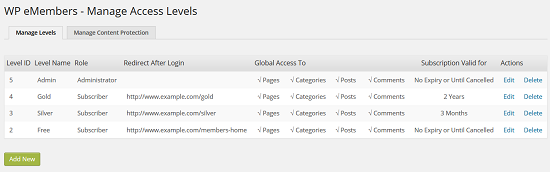
From the “Manage Levels” tab you can click on the “Add New” button to add a new membership level.
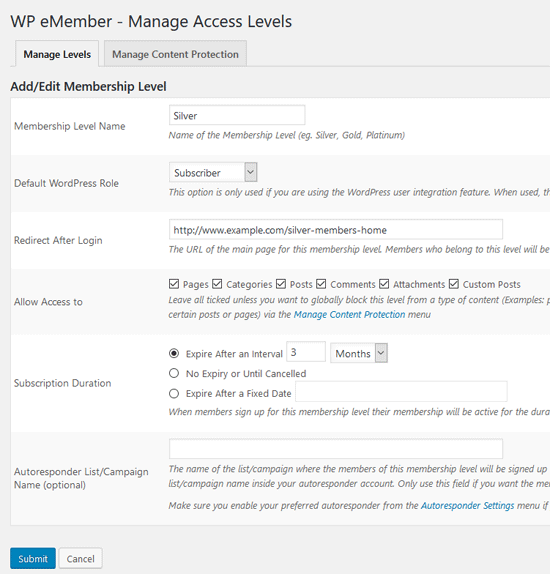
The Membership level addition menu has help text next to each field to guide you. You can edit or delete an existing membership level from this “Manage Levels” interface too.
Understanding the Account Expiry Condition
The expiry of a member’s account is controlled by the membership level assigned to that member. So the value that you set in the Subscription Duration field will control how the account will expire.
Read the following resources to get a better understanding of this so you can set the Subscription Duration value for a membership level according to your needs.
- Manually activating expired account
- Difference between Buy Now and Subscription buttons
- Membership time after subscription cancellation
Video Tutorial
Read the manage content protection documentation to learn how to apply protection to your content for different membership levels that you create.
Additional Resources
The following documentation is good to read if you want to configure notification email before account expiry:
@Den, Yes it looks like you need an update for the eMember.
You can get an update for all your plugins here: http://support.tipsandtricks-hq.com/update-request
I’m not seeing the option mentioned by Ivy in the eMember settings – “Manually Approve Member Registration.” Do I need an update of the plugin, or could I please get information on how to activate this feature? Using version v6.4.3
Hi,Yes we have recently added the following checkbox in the settings menu of the membership plugin to handle this option:
Manually Approve Member Registration
Is it possible for a free membership site, to have an Administrator approve each members registration?
Hi Kelly, Members can be members of different memberships at the same time. They just need to be logged as a member at the time of the purchase.
If we have a membership level set up for a service and want to allow members the option of purchasing a second service how do we go about doing this? They would need to be able be members of different membership levels.
@J-P, Yes, eMember can protect custom posts that you create. The custom posts will show up under the “Posts” menu for protection settings.
Is there an option to grant access (or not) to custom post types as well?
Thanks,
J-P
Hi, The following forum post will explain how to do this:
http://www.tipsandtricks-hq.com/forum/topic/manually-approving-a-user-after-registration
Is it possible for a free membership site, to have an Administrator approve each members registration? I want to restrict registration to certain people, however I’m not sure how to protect the registration page from others.
Hi Grahame, Please see the following video “5. How to Manage Content Protection in eMember” on this page:
http://www.tipsandtricks-hq.com/wordpress-membership/wp-emember-quick-setup-and-usage-video-tutorial-132
Hi
Great plugin – however we are having a problem with membership upgrades.
We have three different sales pages.
1. workshop program
2. Presentation program
3. Workshop & presentation programes together.
We have hit a problem when a buyer purchases one of the single programs ie workshop and later decides to buy sa the presentation program.
This software shows an upgrade but does not allow access then to the page with both programs.
We are looking to go live tomorrow and your help would be greatly appreciated so we can get this right.
Regards
Grahame
You can have as many membership levels as you want. Nope, you won’t be able to have the discount scheme you explained with eMember and eStore.
I want to offer a discounts to my members according to their membership level – Free members pay full price, subscribers get 50% off. I am looking for a membership plugin / shopping cart combination that lets me do this – Can eMember / eStore do this ?
How many membership levels are allowed ? Can I manage a member’s “memberships” together. I am thinking of allowing subscribing members access to updates and upgrades for products they have already bought – I sell bundles of related MP3 tracks which can be added to periodically – but if one of my subscribers stops subscribing, then I’d like to turn off all of the memberships.
@John, Yes, members can be a member of multiple membership levels.
@john Thanks for visiting. We don’t provide API call for our plugin yet. So you’ll not able to get very tidy syntax for finding membership level. You can find membership level id though using the following code:
global $auth;
$levelId = $auth->getUserInfo(‘membership_level’);
Thanks anyway.
Also, can members be a member of multiple membership levels? Want to make each membership level a different product… so, I need them to be able to be a member of different membership levels, so they can purchases and access different products.
What are the php calls to find out what membership level a member is a part of? I want to be able to display certain sidebar content based on what membership level a member is using if else statements, but I need the call for the if part.
Thanks!!
John