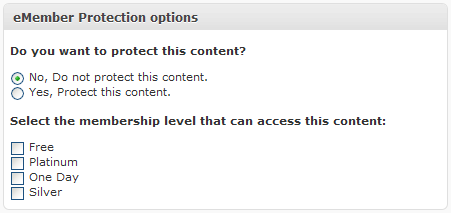
WP eMember allows you to protect a post or page while you are editing it. When you are editing or writing a new post simply scroll down to the “eMember Protection Options” section shown in the following screenshot and apply the protection you want (it will display all the membership levels you have configured on your site so you can easily pick which levels you want to give access to):
Hi, I believe you need an update as this feature was recently added. Please fill out the following form and I will get an update out.
http://support.tipsandtricks-hq.com/update-request
Ivy,
Is there a setting somewhere that needs to be turned on? This option isn’t showing up in my posts, new or old.
Thanks
Dennis
Hi David, The following forum post will explain how to customize text messages in the eMember:
http://www.tipsandtricks-hq.com/forum/topic/how-to-customize-various-textmessages-displayed-by-the-plugin
Hi, I am wondering, if I set this page to only be viewed by a certain membership level, is there a way I can customize what it says to the user if they are not logged in? Currently it says
“Please Login to view this Content.(Not a member? Join Today!)” But I would like to expand on this? Thanks
Oh, that’s a great plus for the eMember plugin.
Thank you for doing it.