Sell anything from your WordPress website easily.
The WordPress Simple PayPal Shopping Cart is a very easy to use and lightweight WordPress plugin that allows you to sell products or services online in one click from your WordPress blog.
Plugin Description
WordPress Simple PayPal Shopping Cart lets you add an ‘Add to Cart’ button anywhere on your blog. This plugin also allows you to add the shopping cart anywhere in a post or page or sidebar easily. The shopping cart shows the user what they currently have in the cart and allows them to add or remove items. The payments are processed by PayPal.
Plugin Documentation
Go to the WP Simple Shopping Cart Documentation page to read the plugin documentation.
Screenshots
Product Display Box
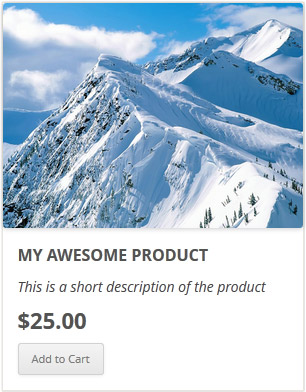
Simple Product Display

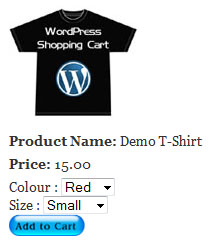
Product Display with Variation Control
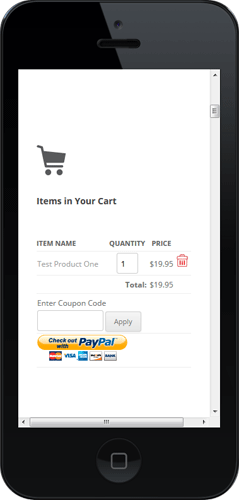
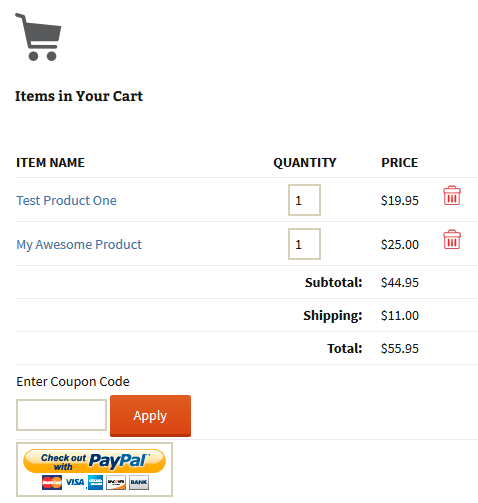
Shopping Cart Screenshot
Below is a screenshot of how the shopping cart looks when customers add products to the cart.
Demo of the WordPress PayPal Shopping Cart Plugin
I am using the WordPress eStore (plugin to sell digital products securely) which is a premium version of the WordPress PayPal Shopping Cart plugin. So I had to disable this simple shopping cart on this blog as I didn’t want to run two WordPress shopping cart plugins on the same site but you can visit the WordPress eStore plugin page and play with the add to cart buttons to see how this plugin works (It will give you a good idea as the “add to cart” feature of both these plugins are similar).
Shopping Cart Installation and Usage (Video)
The following video tutorials on the plugin installation and usage guide is a good starting point:
Basic Installation and Setup
Quick shopping cart plugin installation and configuration video tutorial
Using Product Variations
The following video shows how you can use product variations
Charging Shipping For Your Physical Products
How to setup shipping charge for your tangible products:
Selling Digital Media Files
The following video shows how to setup the plugin to sell digital media files from your site:
Display a Nice Product Box for your Items
The following video shows how you can create a product box on a WordPress page for your items:
Create a Specific Checkout Page
The following video shows how you can create a specific checkout page for your products:
Using Discount Coupons Feature
The following video shows how to use the discount coupon feature of the shipping cart plugin:
Detailed WP Shopping Cart installation and usage instructions can be found on the Documentation Page
Documentation & Technical Support
What Currencies are Supported?
You can sell products in any currency that is supported by PayPal. Currently you can sell using the following currencies:
- Canadian Dollar
- Euro
- British Pound
- U.S. Dollar
- Japanese Yen
- Australian Dollar
- New Zealand Dollar
- Swiss Franc
- Hong Kong Dollar
- Singapore Dollar
- Swedish Krona
- Danish Krone
- Polish Zloty
- Norwegian Krone
- Hungarian Forint
- Czech Koruna
- Israeli New Shekel
- Mexican Peso
- Brazilian Real (only for Brazilian members)
- Malaysian Ringgit (only for Malaysian members)
- Philippine Peso
- New Taiwan Dollar
- Thai Baht
- Turkish Lira (only for Turkish members)
Selling Media Files
You can sell digital media files with this plugin. Check the usage documentation to learn more.
NextGen Gallery and WordPress PayPal Shopping Cart Integration
NextGEN Gallery (developed by Alex Rabe) is a fully integrated Image Gallery plugin for WordPress with a Flash slideshow option. Instructions on how to do it can be found on the sell photos from WordPress tutorial.
Download Latest Version
Download the WordPress PayPal Shopping Cart Plugin.
Shopping Cart Plugin Change Log
View the change log here.
You can also try the WordPress Easy PayPal Payment or Donation Accept Plugin that can be used to Accept PayPal payment for a service or a product or Donation.
If you are looking for a professionally supported, feature rich and robust way to sell products or services then checkout our WP eStore plugin.
@John, this plugin doesn’t have a disable option like you explained. However, you should be able to use CSS tweak to hide the button (to achieve a similar outcome).
stupid question, i know this is a paypal cart plugin, but am i able to disable the Paypal checkout button on the checkout page?
Thank you for quickly answer (got by email) ! It’s the first time I got an answer about a problem on WP plugin in a so short delay ! Thank you very mutch.
@Robin, Looks like the price that was actually paid was altered by the user (dynamically changing price is not allowed to protect the merchant from getting scammed). Some customers will try various techniques to pay a lower amount. So the plugin has a verification process to make sure that doesn’t happen. Who was this customer and and why did he pay an amount different than what you specified in the payment button? Send an email to this user and ask to get more clarification as to what he did.
Hi,
A customer paid but order did not go through. She received notice from paypal that she paid but there is no cart order record showing this transaction.
Error log shows this:
[08/08/2020 3:32 PM] – SUCCESS :Checking price. Original price: 50. Paid price: 10
[08/08/2020 3:32 PM] – FAILURE :Error! Post payment price validation failed. The price amount may have been altered. This transaction will not be processed.
[08/08/2020 3:32 PM] – FAILURE :Original total price: 50. Paid total price: 10
Why would there be an incorrect original total price?
@Jeff, The plugin has an option to export the Orders data to a CSV file. You can find the option in the following interface of your admin dashboard:
Simple Cart -> Tools -> Export Cart Orders Data
HI. Been using your great plugin for several years. Is there a add-on that exports the orders to csv?
@Pierre, What do you mean by “the arrow keys no longer adjust the value”? You can’t change the count using the arrow key or entering the number in the field?
Hi,
It appears that with the recent change (4.4.6) “Changed the quantity input field to be a “number†type field. Customers will be able to change the number value easily.” the arrow keys no longer adjust the value once there is more than one item in the cart.
Regards,
Pierre
@Ryan, Please check to make sure the PayPal IPN feature is enabled in your PayPal account (so our plugin is receiving the payment notification after a payment):
https://www.tipsandtricks-hq.com/ecommerce/how-to-setup-paypal-ipn-notification-2796
Hi,
I have ticked the box to send the buyer an email once payment is complete, but no emails are coming through.
Any ideas of how I can fix this as it is vital. Also, where will the custom fields entered with your additional plugin appear?
Thanks.
@Konstantinos, The purchases go to the “Orders” menu in your admin dashboard. You can edit some details there.
how can I check if the transaction is completed? I have set up paypal IPN, but I would like to update user info when a purchase is made.
@Dirk, That portion of the video is showing how you enable the IPN feature in your PayPal account. You just have to use the home page URL of your own site. The following page talks more about enable the IPN feature. Hopefully that will be more clear to you:
https://www.tipsandtricks-hq.com/ecommerce/how-to-setup-paypal-ipn-notification-2796
Hi,
Having trouble with the video “Selling digital media files” or to be precise the Paypal configuration. At 1:02 the speaker says “and here you can paste the grumbleflutebeep of your website”. I listened again and again but I cannot understand the word (sorry, not a native speaker). It appears the speaker paste a URL into the field but which? The grumbleflutebeep of my website? But if I fill in grumbleflutebeep I get an error. What shall I do now?
@Heather, You should be able to use the following addon to collect additional data from the customer during checkout:
https://www.tipsandtricks-hq.com/ecommerce/wp-simple-cart-collect-customer-input-in-the-shopping-cart-4396
Is there a way to collect address and phone number (mostly as an alternate means of communication) info from a buyer on the Simple Paypal Shopping Cart regardless if there is no shipping being included in the purchase?
@vgrayson, The email settings menu of the plugin allows you to customize the outgoing sale notification emails to the customers.
hello, really like your simple shopping cart. Is it possible to customize outgoing emails to customer and notifications? Maybe with CSS?
THANKS IT WAS SO USEFUL
@RU, All you have to do is enter your PayPal in the email settings menu. Whenever someone pays, the money will go to that PayPal account.
Hi,
How can I connect the Paypal account to the Shopping Cart/Button?
p.s. Instant payments enabled. Email address in the settings is also added.
@Maxim, It means you are using some kind of caching on this site. That is making the button have stale nonce value. You can go to the settings menu of this plugin and check the following checkbox to disable the nonce check on your site:
`
Disable Nonce Check for Add to Cart
`
Hi,
How to solve this error? Error! Nonce Security Check Failed!
Thank you,
Maxime
@Bert, only numbers are valid for the quantity field. What kind of items are you selling?
Hi, great plugin.
Have you experienced difficulties when selling quantities with decimal places (e.g 1.75)?
@Cherri, You can also create a very simple one file custom plugin and put the code in there.
I am trying to change out the default button for the Check out with PayPal for something more flat and modern. I followed your instructions to add the code provided with the URL to my image in the media library but the theme will not accept the code. Is there another option?
@Paul, The customer info will come from PayPal and the plugin will capture it with the order details (in the orders menu). You can also collect additional custom data using the following addon:
https://www.tipsandtricks-hq.com/ecommerce/wp-simple-cart-collect-customer-input-in-the-shopping-cart-4396
Is there a way of integrating a payment form so the customer can leave their details (name address etc)? I’m wanting to use this plug in to enable payments for workshops that I run and would need a one click payment and customers details all in one, if that makes sense?
@Darren, Are you trying to do the following?
https://www.tipsandtricks-hq.com/ecommerce/simple-shopping-cart-creating-a-specific-checkout-page-4116
Hi, need some help here. I can’t seems to link my add to cart button to the check out page. Anyone know what’s wrong with my code?
@Elise, Go to the settings menu of this plugin. Then look for the settings field called “Paypal Email Address”. Enter you paypal email address (where the money should go to) in that field.
Hi ;
I just set up this plugin in my word press sight, easy peasy, thank you. My concern is, I cannot find where to enter my PayPal account information in order to receive payments into my PayPal account. Please point the way.
Thank you,
Elise
@Hannah, Which shortcode is it? Please edit the page in “text” mode (from the WordPress editor) to make sure you don’t have any hidden HTML tags wrapped around the shortcode (that can break the shortcode’s functionality).
When I add the shortcode to a page the icon comes up but when I click it, I do not get directed to a Paypal page. It just reloads to the page the button is on. Can someone help with this?
@malgal128, Yeah this plugin can handle the selling of digital products. You specify your download link for the product in the shortcode. Each product can have different download links. After the sale, the plugin will send the digital product’s URL (for the product the customer purchased) to the customer’s email.