This WordPress plugin allows you to list all of your posts or pages alphabetically (using a nice and compact A to ZÂ listing widget).
Having a listing of your content in alphabetic order allows your visitors to browse and access your content easily.
- You can list your WordPress posts alphabetically
- You can list your WordPress pages alphabetically
- you can list your WordPress categories alphabetically
- You can list your posts from a particular category
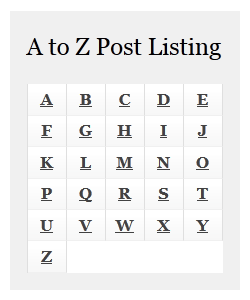
Download the Alphabet Listing Plugin
Plugin Compatibility
Works with the latest version of WordPress.
Plugin Requirement
Requires WordPress 3.0 or higher.
WP Alphabet Listing Plugin Installation
- Go to the Add New plugins screen in your WordPress admin area
- Click the upload tab
- Browse for the plugin file (wpbuttoncreator.zip)
- Click Install Now and then activate the plugin
WP Alphabet Listing Plugin Usage
Use one of the following shortcodes where you want to embed an alphabetic listing of your content.
[atoz][atoz type="page"][atoz type="category" title="A-Z Category"]
Note:
default values are
type=”post”
title=”A to Z listing”
Show a Posts Listing From a Category
If you want to show an a-z post listing from a particular category then use the following shortcode:
[atoz category="Wordpress plugin"]
“WordPress plugin” is the category name in the above example.
Adding the Listing to a Sidebar Widget
Step 1) Go to the widgets menu (you can find it under the Appearance menu)
Step 2) Add a standard wordpress “Text” widget to your sidebar (where you want to show the listing)
Step 3) Use any of the above mentioned shortcodes in this text widget
Check out our WordPress plugins page for more cool WordPress plugins.
@Michale, That means the shortcode isn’t even rendering. Are you using the shortcode inside a WordPress post or page?
@admin
There is no alphabet at all. On top of the page there is the shortcode [atoz], and below is the list of users.
@Michael, What does it do when you hover over the alphabets? Does it show the pages that start with the alphabet when you mouse over it?
I have a page on my site that displays my users (WordPress subscribers).
I tried [atoz] to display the users in alphabetical order, but the shortcode doesn’t work.
@Jack, Can you post a link to the page where you are using it so I can check what it is doing?
I have this plugin installed and the default settings seem to be working fine.
I have another plugin installed called Post Tags and Categories for Pages which simply allows me to add categories for pages.
So I put the shortcode in on the particular page I want the a to z list to appear, selected what category I want it to show, and it only shows 5 pages in total and in not particular order either. Is there any reason why it is only showing 5?
I thought it could be to do with my reading settings as they are set to 5, but I increased that and still only 5 pages showed in the a to z search.
Any help would be greatly appreciated.
Thanks
Jack
@Kal, How did you install this plugin? Did you use the wordpress’s plugin upload interface to install the plugin?
For some reason the plugin installs in the plugin directory BUT the link to the settings file is in the ‘wp-admin’ folder. Subsequently cannot use it- get 404 page. Plugin cannot be deleted because the delete routine is looking for the plugin in the wrong place. Any ideas?
was looking for a plugin like this, let’s give a try.
Hi, thanks for sharing this wordpress plugin.
@Jozef, It doesn’t do the post listing like the way you explained it but that is a good idea so I will keep that in mind when working on the next version.
Hi there,
Thanks for the plugin, I love it, but I have a question… Is it possible to click on a letter and see the list in a page instead of hovering? That would be so so welcome…
thanks for the plugin. could you please make it support custom post type. that will be super.
@Thibault, I have updated this post with some instruction to show the listing on a sidebar widget. Check the “Adding the Listing to a Sidebar Widget” section above.
Souns like an awesome plugin!
I want to display the widget only for the category ‘games’ on my website. But where can I find the widget? And where do I have to add the shortcode?
Many thanks in advance!
@Andy, Just added a new option in the plugin to show posts from a particular category. Download the new version of the plugin from this page then read the “Show a Posts Listing From a Category” section to learn how to use it.
I really wanted it to show all the posts in a specific category. I am building a review site and would like all the film reviews to be in the A-Z but not the music reviews. they each have separate categories and separate pages . So when you were to go on the Film review page the there would be an A-Z featuring just film reviews. If you get my meaning .
@Andy, It will show a list of all the posts that are published by default. Or you can show a listing of all your pages or all your categories.
What short of specifics you had in mind?
Can you get this to show posts just from one page or category ? Got it running at the moment but it shows every post and wondered if I could get it to be more specific?
@Andy, What stage are you in? Have you activated the plugin then used one of the shortcodes mentioned in the usage page?
Hi I have installed the plugin but struggling to get this to work. Please can someone advise how to how to install and get to work . I need it to alphabetize post going into a page .
Wow…This seems to be nice especially for some special sort of blogs. Nice work Tips-n-Tricks Guys! Cheers
@Bob, when you hover over a letter, it should show you a list of all the posts/pages that starts with that alphabet. You can then click on the title and it should take you to that page.
should clicking a letter in the index result in a page with a list of post beginning with that letter?
The url’s are not working properly on a single post page(ex. click a link in the index, goes to that post, click a link in the index on that page goes to full list again.
Any help?
Nice plugin. As a variant, I wonder if having all the titles of the posts listed under the letter would be better for SEO. Hve the letters across the top and the bottom of the page and then headers like ‘ All posts starting with A’ to split up the titles. That way the users will know what they are clicking on
Hey thats a very nice plugin. I searched some months before something like that, but thats great, works within the article also!
This is the best post listing plugin out there. I couldn’t find a single a to z post listing plugin to create a directory listing type site. Thank you for making this plugin!
I was searching for this! Thank you 🙂