The WordPress Affiliate Platform works like most other affiliate recruitment, management and tracking program.
- Potential affiliates visit your (the admin who installed the wordpress affiliate platform) site and decide to become your affiliate to promote the products/services you offer.
- They can sign up for an affiliate account to become your affiliate.
- The affiliates can can now get affiliate ad code (banners/links) for your products that they can put on their websites to direct traffic to your site.
- A potential customer visits this affiliate’s website and clicks on an affiliate ad banner/link (WordPress affiliate platform tracks this click).
- The customer decides to buy product(s) from your site and makes a purchase (WordPress affiliate platform tracks this sale).
- The WordPress Affiliate Platform rewards the affiliate (who directed the customer your way) with a commission.
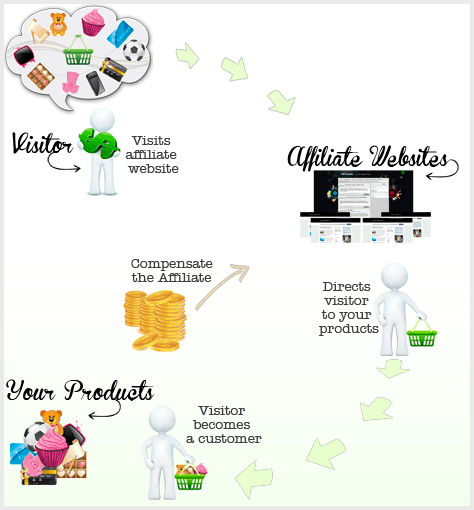
The following diagram illustrates how an affiliate program works
The following Video Uses Simple Examples to Explain How It Works
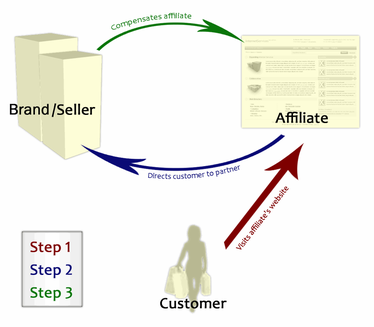
The following diagram illustrates the concept of affiliate marketing
Track Online Ad Conversion
The WP Affiliate Platform plugin can be used to track online ad conversion too. The following link explains how this is done:
@Syahreza, Yes you can do that. Check the “Additional Integration Options” section from the following documentation to learn more:
https://www.tipsandtricks-hq.com/wordpress-affiliate/woocommerce-and-wp-affiliate-software-plugin-integration-557
Hi can i use a coupon code in woocommerce for my affiliate ? Im planning to set each coupon for each affiliate.
@Randy, You can specify how long you want the cookie to last in the Affiliate Admin settings. Most the time it is something like 30 days however you can make it anything you want.
How long does the cookie last? Sorry, could not find the answer in the documentation
@Nicola, Yes the cookie will be tracked for the entire site.
Does the cookie for this plugin work for the entire site? So if the affiliate sends the visitor to my home page that is a squeeze page, but buys a product on any of the other pages in the site, does that still get tracked?
@Brodie, Yes this is correct. The eStore will override the commission set in the Affiliate.
Hello,
I’m loving your work, so easy to use.
Just a quick question, if I have the default commission % set to 20 (as in 20%) but choose to offer (let’s say 30%) against a specific product in the WP eStore – Product Specific Commission – Primary Commission = 30
I am assuming that the affiliate would get 30% because of the setting against the product. If I set nothing then they would get 20%.
Is this correct?
Thanks.
Hi Mike, The following link will explain about creating affiliate links:
http://www.tipsandtricks-hq.com/wordpress-affiliate/how-to-create-banners-for-affiliates-to-use-153
Is it possible to set the affiliate link for each user yourself to an of site page? Or redirect the link?
Hi, Yes as long as the cookie is present and active. The cookie life is usually 21-30 days however you can adjust this in the settings of the Affiliate plugin to whatever you would like it to be.
Hello,
What happens if client comes from affiliate but make purchase next day by logging directly to my website? Does it track the IP address and will the affiliate get commission anyway?
Regards,
Ingars
The Shopp plugin integration should work for any payment gateway. Please refer to the shopp plugin integration documentation here:
http://www.tipsandtricks-hq.com/wordpress-affiliate/affiliate-platform-integration-with-the-shopp-plugin-132
Hi, I notice someone above ask about integration with the shopp plugin above, your response wasnt clear enough for me, so if we stuck with PAYPAL payments, then we could integrate this plugin? but if you used a merchant account or other payment gateways it may not work or would require further investigation? Thanks
Hi, The Affiliate does not make automatic payments. You would need to generate a Mass Payment via PayPal or you can manually paye your affiliates via check or other payment option you choose. You can set a minimum payout amount with all of these options.
Does this plugin automatically pay affiliates or is payment a manual process? If automatic can terms be set, eg, payment over a certain amount earned etc.?
Hi Judith, You can set the Affiliate Cookie length to whatever you want it to be with the Affiliate.
Is the cookie for affiliates only good for 30 days? Or can I set a longer time?
Hi Matthew (again =)). The Affililate will email out one email with the Affiliate login details. The affiliate does not have a built in AutoResponder.
Hi Matthew, No the Affiliate does not need to have a site they can email or personally hand out their affiliate ID.
Hi again,
Does it have auto responder features ie. when an affiliate signs up does it send an auto email with link and customizable details? And can you queue other follow on auto emails?
Matthew
Hi,
Does an affiliate need to have a website or can they just email out their affiliate link to friends/family etc.?
Matthew
That’s great, thanks Ivy.
Hi Chris, As long as the cookie is present this will get tracked. When the customer first comes to the site the cookie is set and will award commission for all sales that happen during the cookie duration (example: 30 days).
My affiliates will be sending people to an opt-in squeeze page and they will then get a series of autoresponder follow up messages. These will direct them to the sales page, which is on the same domain.
Will the affiliate commissions be tracked if I do this?
Hi Kit, You can create as many creatives as you want. So I am not sure what you mean by added another page to the drop down menu in the creative. Can you please explain this a little more?
Hi, Go to “Manage Banners” next to the banner you want to delete click “Edit”. Down towards the bottom of the “Edit Screen” there is a “Delete Banners Button” click this and then confirm you want to delete the banner.
Does anyone know how to delete creatives after they’ve been added but not approved?
How can I add more pages to the dropdown in the creative? I’d like allow my affiliates to connect to one product instead of just the blog index and the products page.
Hi Duane, All of our plugins are compatible with the latest version of WordPress.
Does this plugin work with 3.0
@Sean, I believe you are after Pay Per Lead model. Let me know if this link answers your question:
http://www.tipsandtricks-hq.com/wordpress-affiliate/how-to-use-pay-per-lead-affiliate-model-114
Hi there.
Am interested in purchasing just wanting to make sure the plugin will do what Im hoping.
I sign an affiliate up he refers people from his site, visitors to my site decide if they join up, once joined if the user meets certain usage requirements my affiliate gets paid.
There is no actual financial transaction taking place on the site.
Can your plugin track visitors, and assign them to an affiliate for as long as it takes for them to complete the usage requirements easily?
Thanks alot
Nope, the affiliate plugin needs to be installed on the domain where the actual sale is being processed.
Hi, I bought your plugin and here’s my question. If affiliates are sending visitors to an opt-in squeeze page first and then after opting in they are re-directed to another website at which they can purchase, does your plugin still track the sale?
Thanks,
Betsy
@ismail, yes if you use it with a PayPal subscription button. Here are your two possible solutions
1) Use WP eStore to create a subscription button (http://www.tipsandtricks-hq.com/ecommerce/?p=400)
2) Use a plain PayPal subscription button (http://www.tipsandtricks-hq.com/wordpress-affiliate/?p=168)
@Nugie, okies
Hi..
I was wondering if i could use your script for recurring payment..actually i wanted to setup an affiliate program that pays every time the person that he sponsored a certain percentage of commission..glad to hear if this script support that feature..
thanking you in advance.
I don’t think I will need international money transfer for the population of more than 250 million people here. My country is big enough. We mostly use bank transfer locally for online transactions. Paypal is also used for my English websites version but it’s not my concern at the moment.
So, what do you think if I use “Payable To” field for bank accounts then? I don’t really like this way actually as I will need to enter the data manually.
Please consider regarding the bank accounts field for the next version if possible. That would be useful for people like us. TIA.
It is a common practice to pay affiliates via “Cheque” or PayPal. Usually you will always have affiliates that are outside of your country and paying them via bank transfer is not practical because:
1) International money transfer via a bank is expensive
2) Different countries will have different set of banking information that is needed for the money transfer. How are you going to fit them all?
If you really need to use bank transfer then this can be accommodated as it is a matter of collecting banking details from the affiliate.
I don’t see any bank account field in Affiliate Profile. How can I let the affiliates to enter their bank accounts?
At the moment the affiliate plugin do not do anything special for W-9 as different country has different tax laws and forms.
Hi:
I have an income issue/question. I am doing affiliate programs for some other products for other people, and we have to fill out a w-9 form that we return for tax purposes on the income we make from selling their product. Does this affiliate program software provide that information and form, or is it something that we have to add on ourselves? Thanks!
You can customize the index page content from the settings menu of the Affiliate plugin. Look in the “Affiliate Center Index Page Options” section.
“where do I change the top banner link?” – The look and feel can be controlled by modifying the CSS file. The css file is named “style.css” and is stored in the “affiliates” directory.
I bought your Affiliates plugin (and others) and found the index.php file in the link you gave, so that works for me now. Now where do I find the content text on that page so I can customize it? And where do I change the top banner link? Thanks.
Hi, Yes this is our plugin (http://www.ninjablogsetup.com/affiliates/) for the most part this is what the affiliate sign up page looks like. You will need to change some CSS to make this look how you want. You can see the default sign up page here: http://tipsandtricks-hq.com/wp-content/plugins/wp-affiliate-platform/affiliates/
Cheers,
Ivy
I LOVE the affiliate info page at http://www.ninjablogsetup.com/affiliates/
Is that a template you provided? How can I get that same look?
It turned out that people can use Pay per lead model with the existing structure anyway so didn’t need to implement that. This URL should explain more on this:
http://www.tipsandtricks-hq.com/wordpress-affiliate/how-to-use-pay-per-lead-affiliate-model-114
In your case you will award the commission later so I would have your registration form email you the “Affiliate ID” so you can manually award the commission later from the admin dashboard. Yes, you will always know who referred who even if they leave the page and come back later.
Hi webmaster, I noticed the comments about the additional lead functionality and was wondering if that’s in place. Reason being I would want to use it for selling my services but of course they are on a quote for quote basis so any commissions wouldn’t be paid until both a quote had been made, and full fee received. Would I be able to log who referred who? Even if they leave the contact page, look at my portfolio and then return to the standard contact page to get in touch?
Thanks, and keep up the awesome work, I’m very interested.
Hi Eric, The Affiliate Platform does not integrate with Wishlist directly. You will need to do this via a payment processing method such as the eStore.
You can find out more about how Wishlist integrates via the eStore here: http://www.tipsandtricks-hq.com/ecommerce/wordpress-estore-and-wishlist-plugin-integration-448
Please let me know if you have anymore questions.
Cheers,
Ivy
Hi,
I just bought the plugin and it work wonder at my membership site.
The ONLY question I have is how do I integrate the plugin
with the wishlist membership plugin?
Thanks,
Eric
Hi Justin, Please see the following post on how to integrate with WP-eCommerce:
http://www.tipsandtricks-hq.com/wordpress-affiliate/wp-affiliate-software-integration-with-the-instincts-wp-ecommerce-plugin-70
Let me know if you need anything else.
Cheers,
Ivy
Will this work with wp-ecommerce [instinct.co.nz/e-commerce/] or getshopped [getshopped.org]?
An affiliate marketing business can be a profitable business if you have a site that offers important information and can make business connections with the right merchants, the right content on your website is what will attract visitors.
Hi John, the automatic commission awarding works based on the referrer value (depending on which affiliate sent the traffic). So if you want to award different commission to different affiliate in the same transaction it won’t work.
You can however customize the plugin so each product can have the authors information saved with the details so after a sale instead of giving the commission to the referrer it will give it to the author that you have specified.
We sell ebooks using your very nice WP eStore plugin. Currently, we manually pay commission to the ebook authors. Can we use your WP Affiliate Platform Plugin to automatically pay the authors a commission whenever we sell their ebooks?
For further reference, it might be typical for a purchaser to have 3 items in their cart: 1 is authored by us and 100% payment would go to our PayPal, 2 could be authored by person A and a we would like to pay them a 60% commission to their PayPal while retaining 40% in our PayPal, and 3 could be yet another person who receives 30% commission. This was all mentioned to illustrate we may have different commission structures, and the unit prices can be different also.
I am eager to hear if you may be able to provide the solution we are looking for. Thank you.
This sounds fantastic! I have a couple of questions. I use ejunkie and paypal will this work with ejunkie? Thanks!
Hi David, I understand that many people like to customize the plugin to their needs so I do not put any restriction on what customization you do with the plugins for your own use.
With that said, its hard for me to tell you how easy or hard it would be to hook to an API without knowing what you are actually going to use. If you have PHP programming experience and you know about their (your email provider) API then I don’t see why you can’t do it.
Number 2 again depends on your implementation. The plugin was developed for a common usecase:
i) a person becomes an affiliate
ii) the affiliate refers other visitors to the main site
iii) a visitor makes a sale or becomes a member
iv) the appropriate affiliate is awarded a commission for the referral
The tools are there but it will require tweaks to achieve what you are looking for.
The affiliate plugin only tracks incoming referrals that lands on any WordPress post or page (It doesn’t track referrals on a standalone HTML page as it’s not part of WordPress)
Hello Admin,
I have a variation of a newsletter marketing business and my wordpress site serves as a location for subscribers to sign up and modify their subscription. I had originally intended to use wishlist to manage my subscriber base but have found it to be too closed to modification for my needs, especially in regard to affiliate tracking. I’m considering a combination of WP eMember and Affiliate platform for my needs. I have a few questions before I make a decision:
1. Can WP eMember easily hook to an API from my email service provider so that my member database can communicate with their database?
2. I want to use the affiliate platform to track all referrals made by my members. Essentially, every time a member signs up, they would automatically be enrolled in the affiliate program and when they use the on site sharing tools (an invite a friend field that sends a pre-written email) it will track any conversions. I also want to track at least 2 tiers. How difficult a project would an integration of both plugins be for a semi-experienced programmer, or is it even possible to do what I’m trying to?
3? Can the registration be linked to any HTML form? My registration forms currently exists in a jquery colorbox popup.
Thank you in advance for your prompt reply
@Khalid, I have sent it to your email.
@Admin, what is the code?
Thanks.
@Rob, this URL should answer your question..
http://www.tipsandtricks-hq.com/wordpress-affiliate/integrating-the-wp-affiliate-software-with-a-3rd-party-plugin-61
@Khalid, yes it should work for any contact form as long as you can put the integration code in properly.
Admin,
If using only the affiliate plugin – how does it know when a sale is completed? I plan to use google checkout.
Thanks.
Hi Admin,
You mentioned to a user earlier that the software could track submissions on a submit button – will your code edit work with WordPress Contact Form 7 or any other plugin for example?
Also, just wanted to register my interest for the software to be able to track leads. This is what I need it for. I guess the above edit would work though.
Khalid.
This is on the index page of the affiliate view. For example on my site it’s at the following URL:
http://tipsandtricks-hq.com/wp-content/plugins/wp-affiliate-platform/affiliates/
you just have to replace my URL with your site’s URL and you will see this.
Hello,
I see in the settings this text that is said to be seen on the index page of the affiliate center :
Join our affiliate program and start earning money for every sale you send our way! Simply create your account, place your linking code into your website and watch your account balance grow as your visitors become our customers.
How Does it Work?
The process is very simple:
1. Visitor clicks on …….. Etc.
I cannot see this text nowhere. Not when someone wants to know more about the program and clicks on AFFILLIATES nor when I am logged in the affiliate center.
Can you please tell me where this text appears exactly? I would have expected it on the login/signup page.
Thank you!
Hi Mario, Not sure what you mean by the “code that triggers the payment to the affiliate”… can you please explain what you are trying to do?
Can you please give me the code and instructions that triggers the payment to the affiiliate so I can place it into my site. Thankyou
Ziddha, You can pay the affiliate payments any way you need to. The only thing is this will have to be done manually (you will have to write a check or transfer the funds) for each affiliate that needs to be paid.
Ivy
Can I set bank accounts and local currency for payment? Frankly, credit card or paypal is not widely used for online payment in my country. They prefer to use bank accounts :).
omigosh, yes… please, please do! I’m sure I am not the only one who would snap it up and who has (urgent) need.
🙂
I did some investigation and found out that it was going to be a lot more work then I initially thought so I put it on the back burner and completely forgot about it 🙂
I will sit down again and see what I can do.
Is the leads database now ready?
@Naomi, there is no trick affiliates can do to steal money. Commission is only awarded after a sale is made and the payment is verified. So affiliates can try all their tricks but they can only get money after you get money from a sale 🙂
What security features are included in this software? i.e. to prevent scammers from signing up as affiliates and doing their tricks to get your money.
Hey webmaster just realised that this plugin is a paid plugin not a free plugin. I made a mistake in my blog post about this wonderful plugin saying that its free, but have since editted it. Sincere apologies and I will be buying this plugin as soon as I set up my web store blog in the next month 🙂
Thanks Nathan
This looks like a great plugin and I am looking forward to trying it out on my web store running WordPress. I have never seen anything like it before and I must applaud you for you for your effort! I have given you a mention on my website. Definitely hope to see more development and updates!
Once again kudos for working on a GREAT PRODUCT.
Please let us know here when the leads database feature has been added. Thanks!
Leon McKee
Sounds like you’ve just about got the feature set that I asked about in post #42 here:
http://www.tipsandtricks-hq.com/wordpress-affiliate-platform-plugin-simple-affiliate-program-for-wordpress-blogsite-1474#comment-3230
Please add a change log to the Affiliate plug-in documentation site so we can determine what new features are added and when. Thanks!
Leon McKee
WOW! That’s service!
Thanks 🙂
should be able to add this in this weekend.
Thanks for your reply.
Do you now when the leads database might be ready?
Hi Leslie, not yet… I am working on adding a “Leads” database table so the leads can be stored here. Once this is done you will be able to follow the “Pay Per Lead” model with this affiliate plugin.
Hi, I’m trying to put together a WP site that will run an affiliate campaign. However, there is no immediate product sale, just an enquiry form. If the user ends up buying, then I need to know which affiliate directed that enquiry so that I can pay commission.
Can this be set up easily using the platform?
@Entrepenur, not right off the bat but it can be integrated… it depends on what short of post payment options you have. It depends on the post payment processing cause the commission is awarded after a payment is confirmed.
Is this software compatible with the Shopp plugin for WordPress? Can it track sales if I use the Shopp plugin in my website?
Thanks
@Andrea, sent you the code in your email.
Thanks Admin for your fast reply.
I actually added an hidden field in the form that get the cookie value and send it to the leads database but I’d like to integrate it with your plugin to see wich one of the visits generate leads.
If you can please send me the code and maybe I can explain you better the system I use.
@Andrea, The affiliate software stores the data of a referred sale in the sales database. In your case you can treat this sales database as your leads database as you do not have any actual sales happening.
Basically when someone hits the “Submit” button on a contact form or on a Newsletter subscription form, that is the point of conversion and you can add it to the sales database at that point meaning you have had a conversion.
I can give you a bit of code that you insert in your newsletter subscript form which will get executed when someone hits the submit button and at that point it will check to see if this visitor was referred by anyone, if true, it will record this conversion in the sales database (the commission amount column will show 0 as no sales really took place). you can then see how many conversions you had from whice affiliate in your admin area.
How can I integrate a lead (example with newsletter subscription) with the affiliate plugin ?
Hi Dan, I am a little confused after your explanation 🙂 … lets handle one site at a time. The affiliate software works on a per domain basis. Say for example you have installed it on Site A.. is it tracking the clicks when a referral is made to that site?
Hi Again, 🙂
Yes – the landing page is a wordpress page and the affiliate platform plugin is installed and activated on both.
I noticed that it is tracking the clicks now but not where I signed that affiliate up (author source), it is tracking the clicks on the sponsorshipmarketing.biz affiliate back end. Is this the way it should be tracking?
Is the page thats acting as your landing page a wordPress page or post? Is the affiliate platform plugin installed on this wordpress install where you have the landing page?
Hi there – thanks so much for your quick reply.
No – its not in use with the store (though we did buy both) – we are promoting a product on a seperate sales page on another domain (that is ours) which i have of course uploaded as a banner link in the admin panel.
I signed up as an affiliate to test it and though i’ve used the both the direct link (with my id in) and clicked on the banner I created it several times and it’s not tracking at all..
http://sponsorshipmarketing.biz?ap_id=dcs74
I feel as if I’ve missed a critical step but can’t think of what it is.
Again – thanks so much for your help – I love the plugin – it will be perfect if I can sort this out…
Hi Dan, please post a link to your site where you are testing it so I can have a look. Are you using the plugin with WP eStore?
Hi there – purchased the affiliate software but it doesnt seem to be tracking – any ideas what is going wrong and what I can do to resolve it?
Thanks so much
Hi Krista, at the moment it doesn’t do tier affiliate commission but I am working on adding a 2nd tier affiliate feature to this.
I was wondering if there was a way to add a 2nd and/or 3rd tier…. I have been playing with it and see nothing.
thanks. thank you for getting me the updates for the wp-affiliate platform and wp-estore.
You are a king.
Hi Patrick, You should be able to search for an affiliate by “User ID” or “Name” or “Email address”. Also when you go to the Manage Affiliates page it will display a list of all the affiliates (this page is paginated).
I want to see a complete list of my affiliates registered. Currently I can only see the top 20 registered and I know of several more including my own demo account, that I forgot the password to and need to reset, but cannot find it in the list even if I use the search feature.
RECAP:
Problem 1 – want to see ALL affiliates registered in scroll down page or additional pages
Problem 2 – search feature is not locating additional affiliates registered (even though I know they exist since she made a sale to herself and earned a commission)
Please help at your earliest opportunity. this is a killer plug in and everyone should be using it.
Thank you.
Also much to the same as “Priyanka Says: ” I would like to see Custom Headers for our Affiliates Home page. I got the rest set up it is pretty much a walk thru issue that Priyanka needs to go thru step by step. Priyanka, go to the WP affiliates tab in your wordpress admin and click on each sub-tab and it will work perfectly. really easy.
@Priyanka, what kind of help are you after?
Hello,
Plz plz help me
I want to make plugin same as this WordPress Affiliate Platform so can u guide me how to make this type of plugin,
Here are some features to add to my plugin
Track clicks.
Sales amounts.
Commissions.
Set Commissions levels per product.
Custom header and footers for the back end affiliate center.
Ability to manage affiliates – Set different commission amounts for each affiliate.
Add affiliate accounts manually.
Create and edit links and banners.
Click Throughs screen lets you see all the traffic your affiliates are sending to your site.
The Sales Data screen.
The Manage Payouts menu
Pay out history screen
@ Gambling SEO, Yeah, you can assign different commission level to different affiliates with the Affiliate software. If you use the WP eStore plugin then you can set product specific commissions for the products too.
@GG, yeah you can use it for click throughs only as the plugin records each clicks from each affiliates. The only concern is that you are exposed to click frauds so people can do false clicks.
Hi
wondering if the plugin has support for different revenue shares for each affiliate dependent on diff rev share levels on various products which customers referred by affiliates are using? [assuming the system is not a CPA type system, or flat rev share system]
Hi, can this affiliate plugin be used even if there is no product? For instance, I have a clients that wants an affiliate program and pay out with each click through.
Yes, perfect.
Thanks a lot for your answer admin.
Hi Ben, Glad to hear you like the wordpress affiliate software. The simple answer is B. The reason is that the cookie gets overwritten. Let me know if that answers your question.
Hi
Congrats for your plugins, they seem very appealing, and well built!
One question concerning the affiliate plugin. Let’s say someone reaches my site using an affiliate link, let’s call it link A. After this, the same person clicks on another affiliate link – link B, then decides to buy.
Which affiliate will get the purchase? A or B?
Thanks!