WordPress eStore and WishList Members plugin Integration
Categories: Uncategorized
Integrating WishList with the WP eStore plugin is very easy. First you should read the integration scenario post from the following URL to get a visualization of what to expect from this integration though:
WP eStore and WishList integration scenerio
You also need to make sure that you have the latest version of WishList Members pluign. Move to the next section when you are ready to do the integration.
What will you need?
You will need 3 piece of information from WishList to configure a “Subscribe”, “Buy Now” or “Add to Cart” button that integrates with the WP eStore plugin
- The Post URL
- The Secret Word
- Membership Level SKU
All these information can be found on the “Integration” tab of the WishList plugin (Select Generic System integration)
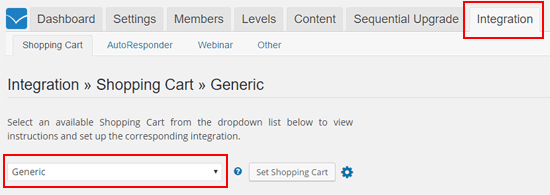
WishList Integration Tab
WP eStore Settings for WishList Members Integration
- Go to the “3rd Party Integration” tab from the settings menu of WP eStore plugin.
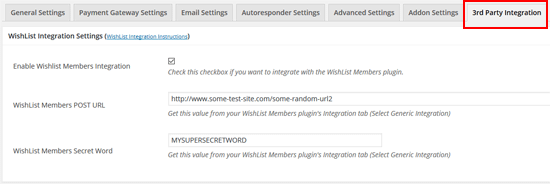
- Check the “Enable Wishlist Members Integration” checkbox from the “WishList Integration Settings” section.
- Fill in the “POST URL” and the “Secret Word” in the corresponding fields and save the settings by clicking the “Update” button.
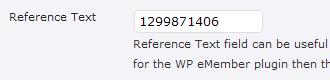
- When configuring a payment button, use the Membership Level SKU in the “Reference Text” field under the Additional product details section.
Now when someone pays using that button the plugin knows which membership level to create for that user. Once the user makes a payment the plugin will talk to the WishList plugin to create a membership account and send an email which will have a link to complete the registration.


August 19th, 2009 at 4:10 pm
Hi there
Well we took the plunge and purchased to check this out further, in the case of a buy now button and wishlist …. what needs to be configured ??
Regards
Kb
August 19th, 2009 at 4:31 pm
I should add we are not doing subscription on a particular product
Thanks
Kb
August 19th, 2009 at 11:18 pm
Hi Kevin, WishList integration is done through a subscription button but I understand your requirement. I can modify the code a little bit so Wishlist integration can be done through a “Buy Now” type button too.
Here are some concerns though… How do you deactivate/cancel the member account when his membership period is over.. do you do it manually? In the case of a subscription button, PayPal sends a notification to the plugin when a member cancels their subscription or the membership period(eg. 6 month) is over which the plugin uses to communicate with WishList and deactivate the member’s account (this functionality is not available in “Buy Now” type buttons as they are for one off payment).
August 20th, 2009 at 11:14 am
Hi there
Wishlist will de-activate this in the database as you can set expire dates to membership levels
So customers buys product a , he is allocated membership A for 3 months , after that its automatic as far as I can tel
Regards
Kb
August 21st, 2009 at 12:36 am
Okies.. i will work on it to give you a custom solution for this
August 27th, 2009 at 4:31 pm
Any news on a solution for Buy Now button to WishList
Regards
Kb
August 27th, 2009 at 11:55 pm
Hi Kevin, Yes, I have implemented a solution for you.. I sent you an email that should explain everything.
September 26th, 2009 at 3:45 am
sounds like what I wanted…adding an affiliate system to wishlist member! please send me the “integration” package…and any documentation you can to make it clear.
can I sell individual products on the site, AS well as a membership subscription? or would the change/edit that needs done make the ipn good only for the membership?
thanks,
KEY
September 26th, 2009 at 1:26 pm
Hi Key, It’s just one file that I give you and you just put in the plugin folder and thats it (no extra documentation needed for that).
Yes, you can sell individual product on the site as well as membership (the integration doesn’t affect the product selling side of things)
December 13th, 2009 at 2:09 pm
Hello,
I am using WishList w/ WP eStore + Affiliate Program. I am having a hard time with the integration. I followed the steps, and it doesn’t seem that the membership is created when someone pays. Instead, I have to put the registration link under the digital product URL. This works well enough, but paypal isn’t communicating with WishList and when someone cancels their subscription their membership remains.
I would like to integrate them so that when they cancel their subscription their Membership Level is automatically removed.
P.S. I did do the integration as you outlined already on this page, replacing the URL and Secret Key
December 14th, 2009 at 1:37 am
Hi Justin, something must be missing somewhere.. the debug file should reveal what it is. Refer to the testing post to understand more on the debug file thing:
http://www.tipsandtricks-hq.com/ecommerce/how-to-test-the-wordpress-estore-to-make-sure-everything-is-working-properly-35
Lets see what this reveals… if this doesn’t help then I will take a look at your system to see where the issue is.
January 24th, 2010 at 5:27 am
Hi,
Can you please send me the integration plugin? and you may recall helping me with the the JROX affiliate plugin http://www.tipsandtricks-hq.com/forum/topic/integration-with-jrox-jam-affiliate-manager/page/3 (I’m Wisconsin). Will the integration with wishlist affect the integration that we did with JROX?.
Thanks,
Chris
January 25th, 2010 at 12:52 am
Hi Chris, emails sent to you are bouncing back. Please use the contact form to contact me and give me your correct email address.
“Will the integration with wishlist affect the integration that we did with JROX?”
Not if it’s done properly
we will just need to handle it delicately.
January 28th, 2010 at 2:33 pm
The new 3rd Party Integration works perfectly! Thank you so much for such an excellent plugin, perfect integration with wishlist, and the best support I have ever received!
Chris
March 25th, 2010 at 1:35 pm
Hi,
I’m trying to figure out how to integrate between wishlist Member + eStore + Affiliate program. Any detail documentation? Because I still have to put registration link and manually activated their subscription.
Thanks.
March 25th, 2010 at 11:41 pm
Hi, The following post will explain how to integrate WishList with eStore: http://www.tipsandtricks-hq.com/ecommerce/wordpress-estore-and-wishlist-plugin-integration-448
You do not need to integrate the Affiliate with Wishlist it already does this through the eStore.
Let me know how this goes.
Cheers,
Ivy
May 3rd, 2010 at 11:13 am
I am building a membership site that has the option for a 1 year payment in advance.
How would you advise me to approach the renewal? Would it be wise to use an “expired” (name only) membership level and “upgrade” them to that level if they do not renew?
Thanks
May 4th, 2010 at 6:40 am
You shouldn’t have to manually change the membership level of expired members. If you have specified the subscription duration in the membership level to be 1 year then their account will automatically be inactive after that time if they don’t renew.
May 4th, 2010 at 6:47 am
Naturally if I set the membership (WishList by the way) to 1 year then it would expire on it’s own, but I want it to auto renew UNLESS the member has manually canceled.
The whole idea is to have everything working automatically as much as possible.
What is the best solution in your opinion?
Thanks
May 4th, 2010 at 8:00 am
Use a subscription button for the membership payment that has a recurring billing set to 1 year. You can use eStore to create subscription buttons (similar to what you have done for “Buy Now” buttons:
http://www.tipsandtricks-hq.com/ecommerce/how-to-add-a-subscription-button-for-recurring-payment-400
June 8th, 2010 at 10:13 am
Membership to my site exists on 2 levels (silver and gold). I have set it up just like in the tutorials, so their Subscription will be renewed automatically unless they cancel. So it is a recurring payment.
I would, however, like to give the customer a chance to upgrade. If they do so, do I create regular “subscribe” button that will charge them the difference in price between gold and silver? If I do this, will the upgrade cost also be recurring?
Is there a way to allow them to upgrade (pay the difference in the two packages), and then automatically keep billing them for the higher package? In other words, once they have chosen to upgrade to the gold membership, they will always be automatically charged for that gold membership. So, they will not be charged for the silver any more.
I know I can do this manually; however it would be great to figure out how to configure the “upgrade” button, so that everything works a little more automatic – for the user and for me.
Thanks,
July 8th, 2010 at 6:48 pm
Hi,
I am trying to find out how to make a custom subscription button work with eStore. Any help will be appreciated.
Thanks
July 8th, 2010 at 11:48 pm
Hi Ashley, In the “Add/Edit” products menu under “Additional Options” there is a option called “Button Image URL” . Enter the URL of the image that you want to use for your custom button here.