What auto upgrade does is that it upgrades the member of any membership level to another membership level automatically in the background based on what you have scheduled (you as the admin can schedule and setup these upgrade paths).
How Auto Upgrade Works
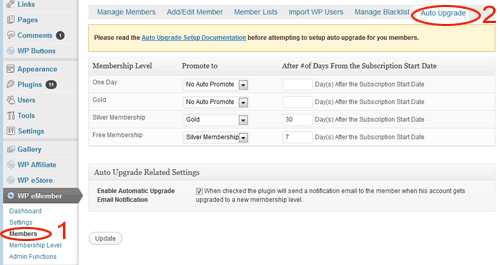
Auto upgrade works based on the time duration that you set in the configuration. This time duration is specified by the admin in the “Auto Upgrade” tab under the “Members” menu.
Auto Upgrade Starts Date
The auto upgrade date is calculated from a date value called the “Auto Upgrade Starts” date.
By default, the auto upgrade starts date value is set to the date the member registers on your site.
You can edit a member’s record from the admin side and view the value of this field (you can edit this value also if needed).

When you see a reference like “auto upgrade level after 7 days”, it means the level will be upgraded 7 days from the date you see in the “auto upgrade starts” date field.
Auto Upgrade Configuration
So for example, let’s say you have three membership levels:
- Basic Membership
- Premium Membership
- Ultimate Membership
Now let’s say you have set the auto upgrade so that a member will get automatically upgraded to premium membership (from basic member ) after 7 days. This same member will get upgraded to the ultimate membership after 14 days.
Basic Membership -> Premium Membership = after 7 days
Premium Membership -> Ultimate Membership = after 14 days
If Joe signs up to the “Basic membership” on 1st January 2016, then he will get upgraded to the premium level on the 8th and then he will get upgraded to the ultimate level on the 15th.
If someone joins the “Premium Membership” on 10th January 2016, then he will get upgraded to the ultimate level on the 24th.
Once a member gets upgraded to the next level he/she gets access to the new content based on this new membership level. This is why this feature is very handy when you are developing a membership site that will be used to deliver an online course and you want to drip the course content over a period of time.
So using the above example model, if you want a member to be upgraded to “Premium Membership” after a week and then to “Ultimate Membership” after another week, the corresponding “number of days” value for the auto upgrade settings will be 7 and 14.
Important Note
It is important to keep in mind that the “number of days” value that you use when configuring auto upgrade settings is an absolute value from the “Auto Upgrade Starts” date. This value is not based on when a member’s account got upgraded to the next level.
Where is the Auto Upgrade Configuration Menu?
You can find the auto upgrade menu at the following location:
WP eMember -> Members -> Auto Upgrade
Hi Carol, Yes thats exactly what you need to do for your scenario.
Hi – If I want people to drip feed for the first three months and then after that they are given access to every module on the site, would I simply add a level 4 /All access level that they auto upgrade to at the end of the 3rd month and then use no auto promote once they reach level 4 so they remain a member and can simply access everything after that time (obviously I would then select all new modules added as available for level 4 from that time on)
@Carol, Yes you can easily modify this text. The following forum post will explain how to do this.
http://www.tipsandtricks-hq.com/forum/topic/how-to-customize-various-textmessages-displayed-by-the-plugin
Is it possible to change the message members see when they are not yet ready to move to the next level? Currently is simply says you do not have permission but I would like it to be personalised to say – you do not yet have permission to access this module or similar
Thanks for your help
Carol
@Ozen, Yes you can make it so they can no longer access the previous content once they are upgraded.
While using drip-content, let say the user is upgraded to the new level, can we limit the content of the previous level to be restricted?
What I mean is the content of the first level membership should be accessible only for 1 week for instance. After that, members move to the second level and can’t
access level one any more.
@Ivy What determines the “primary membership”? Is it the first membership assigned to the user?
@John,
The auto upgrade applies to the primary membership only. You can have multiple membership levels but only the primary membership level will be auto upgraded.
How does this function when the system is set to handle multiple membership levels at the same time?
This is brilliant! Thank you so much for wonderful software and awesome online resources and support. Greatly appreciated.
@Camaleo, Membership levels are unlimited. So you can have as many as you would like. =)
This sounds like the perfect solution for me. Given people may be staggering their membership. Wonderful.
I have a customer that is willing to sell a membership that will show new contents every month for one year, so he basically needs 12 levels.
How many subscription “levels” are available?
thanks
The account never gets deleted unless you delete it from the admin dashboard. The status of the account gets set to “expired” or “unsubscribed” which means they won’t be able to see the protected premium content. As soon as they renew the membership or upgrade to another membership, their account status gets updated to “active” again.
So if the entire account is deleted, then there is no way for them to preserve their user data (forum comment ownership etc) if they leave the subscription to buy into the yearly plan or to revert to the free plan? That doesnt sound so good.
Kimberly
The “Auto Upgrade” happens based on the the scheduled time interval that you specify when you configure it. As long as the person in question is an active member he/she will traverse through the auto upgrade path that you have specified.
It doesn’t have anything to do with he subscription payment interval or the receipt of the payment. If the subscription payment is cancelled by the user then the whole membership account will get deactivated so you don’t have to worry about the auto upgrade there.
Is it possible to drip feed someone that’s on subscription or does that confuse the whole subscription process? I assume it would be changing from one subscription plan to another equally priced (and configured) plan, paypal would just keep working in the background, unaware of what was being done?
Kimberly