WordPress Membership

Easy to use WordPress Membership plugin

  • Documentation
  • WP eMember Plugin
  • Projects
  • Home

Setting Up “Before” and “After” Member Account Expiry Notification Email

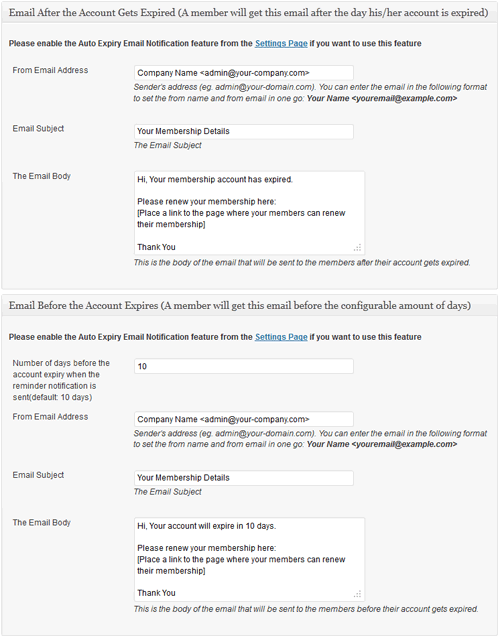
WP eMember can notify your members whose account is about to be expired or has just expired. You can use this feature to automatically prompt your members to renew their membership or take some other actions.

Do the following to use this feature:

  1. Enable the auto expiry email feature by checking the “Enable Auto Expiry Email Notification” checkbox in the eMember settings menu
  2. Customize the email from address, subject and the body.
  3. Save everything

Member account expiry notification email

Filed Under: Design & Usage Tagged With: auto expiry email, WP eMember

Leave a Reply

Your email address will not be published. Required fields are marked *

Get the WP eMember Plugin

Get WP eMember

Categories

  • Additional Resources
  • Content Protection
  • Design & Usage
  • eMember Addon
  • Installation
  • Integration
  • License
  • Testing
  • Uncategorized
  • Video Tutorial

Recent Comments

  • admin on Giving a WordPress Admin User Access to All Protected Content
  • Ramona Hapjke on Giving a WordPress Admin User Access to All Protected Content
  • admin on Overview of the Available Content Protection Methods
  • Ramona Hapke on Overview of the Available Content Protection Methods
  • admin on Giving Other WordPress User Roles Access to Your WP eMember Admin Dashboard

Featured WordPress Plugins

WP Express Checkout Plugin
wordpress_estore_icon
wordpress membership plugin icon
wordpress_affiliate_plugin_icon

Copyright © 2026 | WP Membership Plugin