How to Integrate WP eStore with AWeber

Categories: Additional Resources

The WP eStore shopping cart plugin can be easily integrated with AWeber (Email marketing and Autoresponder service).

Step 1: Create an Email Parser

AWeber use email parsers in situations where you want subscribers to add to your list via an email from a third party, typically a payment processor, rather than the subscriber sending an email directly from their email program.

To add a new custom email parser select “Email Parser” from the “My Lists” menu and choose “Add New” from the “Custom Parsers” section.

  • My List -> Email Parser
  • Custom Parsers -> Add New

The new email parser configuration will look similar to the following (Click to enlarge)

New Parser

New Email Parser

There are only two fields (Description and Trigger Rule) that need changing here.

  • Give a description for this parser, eg. eStore Parser
  • In the Trigger Rule field, replace the “user\@domain\.com” with the email address that you have specified in the “From Email Address” field of WP eStore’s settings menu (This step is very important).

For example, the email address I have specified in my “From Email Address” field is admin@tipsandtricks-hq.com so I need to replace:

user\@domain\.com

with

admin\@tipsandtricks-hq\.com

Below is a screenshot of my email parser (click to enlarge):

My Email Parser

My Email Parser

Adding an Email Parser is really simple but even a small error can throw everything off.

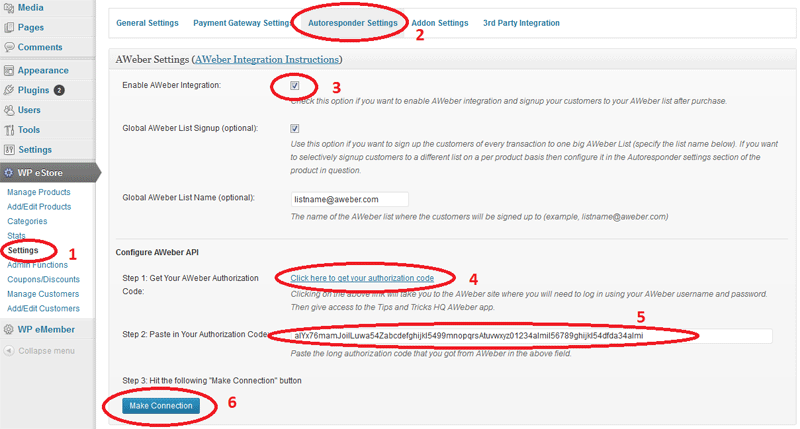
Step 2: Configure the WP eStore’s Autoresponder Settings

Now all you need to do is specify the AWeber list name that you want your customers to be signed up to and enable AWeber Signup Globally or Specify it in the “Autoresponder Settings” of the product if you want to selectively signup customers to a specific list on a per product basis.

AWeber Settings Menu

AWeber Settings Menu

Related posts

Subscribe to Tips and Tricks HQ to stay informed

twitter_icon

28 Responses to “How to Integrate WP eStore with AWeber”

  1. Linda Says:

    Hello, can this be set up using any of other Email marketing and Autoresponder services?
    Thanks

  2. Md Says:

    Yes,

    I was wondering the same thing. I use GetResponse.

  3. admin Says:

    @Linda and Md, I have plans to add integration option for other Autoresponder services but I can only do it if the autoresponder you are talking about allows 3rd party integration (Aweber allows this so I have added this feature).

  4. Linda Says:

    Hi, yes, I’m using infusionsoft and they say I can use Application Programming Interface (API).
    I’m allowed to pass order data into Infusionsoft from another shopping cart, just don’t know how to do it.

    Thanks

  5. admin Says:

    Hi Linda, please post a link to the documentation of their integration option and I will take a look (if they have API’s then it should be doable)

  6. Ninja Blog Setup Says:

    When you have a repeat customer, what happens? Since they will already be in the Aweber list, are they still allowed to check out?

  7. admin Says:

    Yeah the customer can checkout fine… AWeber simply won’t add that email address to the list as it’s already there.

  8. Donna Says:

    I was wondering if you’d be willing to add MailChimp integration to eStore? I’ve purchased the plugin and so has one of my clients on my recommendation. I’ve decided to go with MailChimp and let go of aweber, I’m pretty sure my client will as well.

    MailChimp allows 3rd party integration, I think they actively encourage it. They have their API published here:
    http://www.mailchimp.com/api/rtfm/

    I’ve found them to be really great to work with, and they are keen to integrate with lots of great applications.

    Thanks!

  9. admin Says:

    Hi Donna, I have received good feedback about MailChimp. Their API looks pretty neat.. I will definitely integrate this.

  10. Donna Says:

    Excellent news, thank you Amin! I’ll let my client know too.

    Will you post here when you have finished the integration? By the way, does the plugin automatically notify us when there is an upgraded version? I know some do and some don’t.

    Thank you!
    Donna

  11. admin Says:

    I will let you know when I finish working on this integration. I send emails to my clients with the updated version when I release a new version.

  12. Matthew Says:

    Looking forward to Mail Chimp which is a great little app.

  13. entrepeneur Says:

    Dear Admin,

    I’ve purchased both WP estore and Affiliate platform. Everything’s great so far! One question: I already have a list in aweber that contains everyone who signs up for my free newsletter, in my website. I want to create a parser for that same list, so that when someone makes a purchase he is added there.

    Would there be any problems if his email is already in the list because perhaps earlier he has signed up for my newsletter, before he bought the product?

    I know maybe this is something I should be asking aweber, but I thought you might already know.

    Thanks

  14. admin Says:

    @entrepeneur, there won’t be any problem with repeat emails. If an email address already exists in the list the AWeber will simply ignore it.

  15. Aswad Says:

    Hello Amin,
    Happy new year !
    One thing I wonder. What’s the easiest and simplest procedure if I have 3 different products and want the buyers to be registered on 3 different lists according to their purchase ?

    Thanks for your answer.
    Aswad

  16. admin Says:

    Hi Aswad, Happy new year to you too. You simply specify the list name for that specific product in the “Autoresponder Settings” section of that product.

  17. Chuck Says:

    Hi,

    set up the Aweber parser as described. Went through two test transactions.

    1st test subscribed “wordpress” name@domain.com as the aweber list subscriber.

    Here “wordpress” has been given as customer name and the email address is the same as the from email address setting in wp-eStore.

    second test did not subscribe a new person even though a different email addr was used.

    Did receive the below email from “WordPress” (will get your other plugin)

    ## Below is a forwarded email from your AWeber
    ## account fw-estore. It is the original email that the
    ## lead emailed to fw-estore@aweber.com

    This is an automatic email that is sent to AWeber for member signup purpose

    Email: xxx@xxxxxxxxxxx.com
    Name: Charles Kissee

    But that name was not signed up.

    How do i get customer name and email to aweber and will this (if a match) unsubscribe the aweber customer from other lists? (if desired in aweber)

    thanks much

  18. admin Says:

    When the “Aweber Integration” option is used the customer name and email address is automatically signed up to the specified AWeber list.

    No, the eStore do not do anything that will unsubscribe the customer from a list.

  19. John Says:

    Hi admin

    I want cutomers to be signed up to a dedicated aweber list depending on the poduct they have purchased. Do I have to set up separate parsers in aweber or can i use the same one for all products?

    Cheers

    John

  20. admin Says:

    You only need one parser.

  21. Hthys Says:

    Success can happen with internet marketing, but contrary to what many people believe, success does not materialize like magic overnight. You have to work your way to achieve it.

  22. Phuong Roop Says:

    This blog post is simply out of the box. Many other posts i have seen on this topic but this is the one i was searching for. I would like to subscribe to your feed and bookmarking the site now. Thanks for posting.

  23. Gary Says:

    Hi there.

    I found out that as my products have a free 7 day trial then an email is not getting fired for notifacation of the sale. So I have changed the trial to £0.01 and it works great now. I’m trying to get them onto an AWeber list as well. that works but I have the same issue as Chuck above.

    It is signing up WordPress to the Aweber list, the sign up email is being sent to me rather than the customers email address.

    Can you tell me what i am doing wrong?

    Cheers, Gary

  24. admin Says:

    When you use free trial the email will get fired when you actually receive the payment for the first installment (in 7 days time). Basically, the actual transfer of money triggers it.

    You need to make sure that the “from name” in the email is as you specified in the filter. you can use this plugin to customize the details:

    http://www.tipsandtricks-hq.com/wordpress-plugin-change-wp-email-from-details-1883

  25. bill winn Says:

    Hi,
    I have the a squeeze page with an Aweber sing up window, so they get put on my list
    before they purchase, Do I need to set up a parser? I’m using eStore to hide the URL,
    Thanks
    Bill

  26. admin Says:

    You only need to setup a parser if you are using AWeber integration with eStore. This includes using the eStore’s squeeze page form.

    If you are using the plain Squeeze form that you got from AWeber then you don’t need to follow this instruction.

  27. Carrie Isaac Says:

    Any idea if you can turn off double opt-in for Aweber when people are added to the list? As it is right now, I have double opt-in turned off, but it only seems to be turning it off for the web signup form, not when they’re automatically added to the list upon making a purchase.

  28. Ivy Says:

    Hi Carrie, This is something you would have to ask AWeber. eStore does not have any control over the AWeber double-opt in feature. The eStore just tells AWeber what list to add your customers too.

    Cheers,
    Ivy


Leave a Reply

Featured Posts

Tips and Tricks Hot Items

wordpress_estore_icon
wordpress membership plugin icon
WordPress PDF Stamper Plugin
WordPress Affiliate Link Manager Plugin
infinity remix wordpress theme
wordpress_affiliate_plugin_icon