If you are setting up a revenue sharing site (to split profit with a partner) whereby you want to share the profit of the products with the author/creator of the product then you can use the “Revenue Sharing” feature of WP eStore.
How Revenue Sharing Works
WP eStore allows you to setup a revenue sharing site with the help of the WP Affiliate Software. Basically, you setup your authors as an affiliate then specify the affiliate ID of each author to their corresponding products when setting up the product in eStore (this links the author with a particular product). When a product is sold, eStore checks to see if this product is using revenue sharing. If revenue sharing is used for that product then it awards the appropriate amount to the corresponding author of the product in the form of affiliate commission. The commissions will keep accruing whenever this product sells. You can then payout all the outstanding commission (the authors share) at the end of the month or week or whatever.
How to Use the Revenue Sharing Feature
Step1: Enable the revenue sharing feature from the “AddOn” settings menu of WP eStore

Enable Revenue Sharing
Step2: Create an affiliate account for each of your authors/product creators (You can create affiliate account from the “Add/Edit Affiliates” menu of the WP Affiliate Platform plugin)
Step3: Specify the corresponding affiliate ID in the “Author ID for Revenue Sharing” section of the product when configuring the product in eStore.
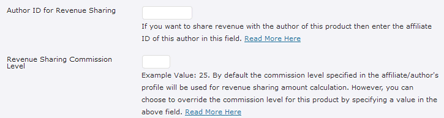
Linking a product to a revenue sharing author
Additionally, you can override the commission level to be used for this product’s revenue sharing calculation by specifying a number in the “Revenue Sharing Commission Level” field. This field is not mandatory. If you do not specify any value in this field it will simply use the commission level specified in the author/affiliate’s profile for revenue sharing calculation.
How the Revenue Sharing Cuts Work For Normal Transactions
The revenue sharing for normal transactions are very straightforward. The “author/partner” gets the percent specified in the revenue sharing section for the product.
For example, lets say it is a $100 Product and you have specified the author/partner to get 50%. The calculation will look like the following:
- 50% author’s cut (so the author of the product gets $50)
- The leftover is for the house ($50 in this case).
How the Revenue Sharing Cuts Work When Used Together with Normal Affiliate Commission
When revenue sharing is used in conjunction with a normal affiliate campaign then the calculation works like the following:
For exmaple, lets say it is a $100 Product and you specified the author to get 50% and the affiliates to get %50. The calculation will look like the following:
- 50% affiliate commission (so affiliate gets $50)
- 50% author commission (the author of the product gets 50% of profit). The affiliate commission is deducted from the product price and then the author gets 50% of the left over. So in this case the author will get 50% of ($100-$50) which equals to $25.
- The leftover is for the house ($25 in this case).
Note: We provide technical support for our premium plugins via our customer only support forum