How to Use/Configure Sales Tax (Regional or International) When Selling Through PayPal

Categories: Shipping & Tax

Please see the WP eStore Tax Calculation article to learn more on eStore’s built-in tax feature.

Configuring sales tax (regional or international) when selling through PayPal is really easy if you want to use it. After you configure the sales tax, PayPal will automatically charge customers the appropriate amount when they pay for your products or services on PayPal.

sales-tax-icon

Configure Sales Tax in PayPal

  • Log in to your PayPal account by visiting www.paypal.com.
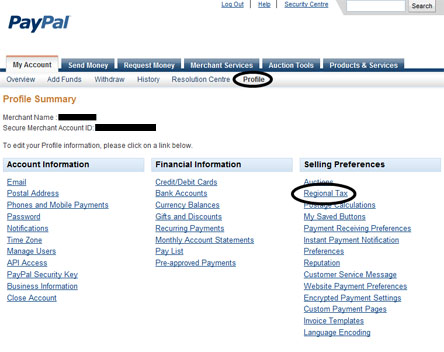
  • Go to ‘Profile’ from ‘My Account’ (My Account->Profile)
paypal-sales-tax-calculation-settings-4441

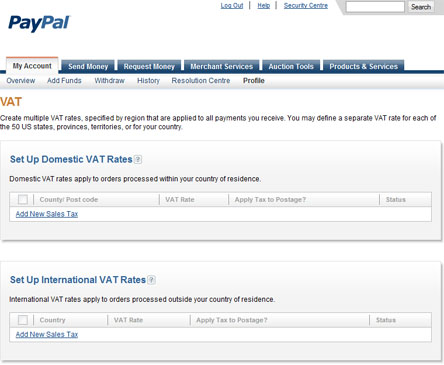
  • Click on the ‘Regional Tax’ link and you will get the following screen
paypal-sales-tax-calculation-settings-page2-444

  • Now you can add regional or/and internation sales tax in this screen.

After you configure the sales tax when a customer goes to pay for a product by clicking the ‘Checkout’ button of the WP eStore shopping cart plugin, PayPal will automatically charge the customer the appropriate tax.

If you do not wish to charge tax for a particular item (for example: a digital item) then set the individual item tax of that item to 0 (zero) and it will not charge any sales tax on that item. You can set the individual tax of a product from under the Shipping and Tax section of that product.

Please note that sales tax will be applied to the shopping cart after the customer fills in the credit card details (if paying by card) or logs into his/her PayPal account (if paying from paypal account). This is so paypal can work out the appropriate tax amount based on the customer’s location.

Subscribe to Tips and Tricks HQ to stay informed

twitter_icon

13 Responses to “How to Use/Configure Sales Tax (Regional or International) When Selling Through PayPal”

  1. Cindy Says:

    Thank you for posting a reply to the “tax” thing. Awesome support!

  2. John Says:

    I see adding state sales tax when the customer gets to paypal.. but in MN state sales tax is only applicable to certain things.. For example a PFD (life jacket) is taxable but basic clothing is exempt from state sales tax. It looks like if you set up charging sale tax in paypal.. all items are taxed. Is there no way to set up charging sales tax for sales within my state on an item by item basis before it gets to paypal?
    Thanks

  3. admin Says:

    Hi John, no, eStore doesn’t have the option to do item by item sales tax.

  4. Michael Oeser Says:

    Hi,

    this simply doesn´t exist in my PayPal account. Any idea why? Is that a US feature only (I live in Germany)

  5. Ivy Says:

    Hi Michael, This should be a global setting. Log into your PayPal and go to the “Profile”. Once you are on the main page of the “Profile” settings it should be under “Selling Preferences” as “Regional Tax”.

  6. Michael Oeser Says:

    But that´s the point. There is no “Regional Tax” in my PayPal Profile :-(

  7. Ivy Says:

    Hi Michael, The eStore only does tax through PayPal. We do have plans to add a tax feature in the future (eta is unknown at this time as our to do list is always changing). One solution is to add the tax into the price of the items. For example you have an item for $5.00 and your tax is 10% this would make the item then $5.50. If a majority of your customers are out of your region, say 1 in 5 then you can make this $5.10.

  8. Michael Oeser Says:

    Thanks ivy. Unfortunately German taxrules are not that simple :-(
    Anyway I will find a solution for this.

  9. Mitch Slater Says:

    In the United States, you are only required to collect sales tax in states where you have a presence. We only have a presence in one state: Ohio.

    How do we configure the WP eStore to ask for state and only charge it for those customers who declare that their state is the same as ours, ie, Ohio?

    Help

  10. Ivy Says:

    Hi Mitch, You would need to set this up in PayPal as the eStore only has simple tax options.

  11. Jonathan Says:

    In the UK that option within your Paypal profile is called set up VAT rates. But that’s not really workable for my site – I need the VAT to show up in the cart on my website as normal.
    If selling to consumers, the UK has a legal requirement to show the price including any VAT, so adding it on right at the end in Paypal is a none starter!

    Reckon that’s a pretty important feature to have in plave (in my opinion!)

    Regards

    Jonathan

  12. Ivy Says:

    Hi Jonathan, I believe this maybe what you are looking for:

    http://www.tipsandtricks-hq.com/forum/topic/display-ttc-price-tax-included-on-product-page

Who is Linking?

  1. WordPress eStore Frequently Asked Questions (FAQ) | Tips and Tricks eCommerce Site

Leave a Reply

Featured Documents

Tips and Tricks Hot Items

wordpress_estore_icon
wordpress membership plugin icon
WordPress PDF Stamper Plugin
WordPress Lightbox Ultimate Plugin
infinity remix wordpress theme
wordpress_affiliate_plugin_icon