WordPress eStore Product Categorization
Categories: Installation and Usage
You can categorize your products into groups to help your customers browse them easily.
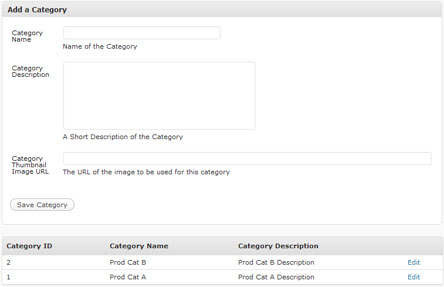
Product Category Management Menu
Once you create a product category from the Category Management menu you can assign a product to that category when configuring the product details.
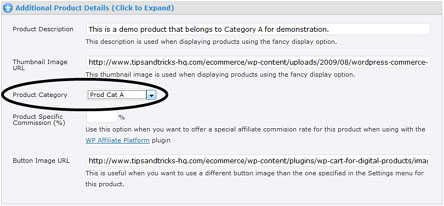
Assigning a Product to a Category
You can display all the product(s) from a particular category using the following shortcode:
“1″ is the category ID of the category (category IDs can be found on the category list screen).
There are many more shortcodes available to utilize product categories.
I have created a demo category called “Prod Cat A” and assigned two products to this category. The products are displayed as the following when using the above shortcode.


August 17th, 2009 at 2:52 pm
I have just tested this and it would also be nice if you could have the options for:
1. Display categories and maybe a certain number of items within or all products
2. Display products using a drop down of categories.
September 7th, 2009 at 5:00 pm
Is there anyway to sort the category list?
September 8th, 2009 at 12:03 am
Hi TJ, no the category list cannot be sorted.
November 25th, 2009 at 11:50 pm
Can a product be added to more than one category? Or would you have to create multiple (duplicate) products to do that? I have a site with physical products that would have a limited number so it would be best if I could avoid duplicates so that the sold out function will work.
November 26th, 2009 at 6:59 am
Hi Donna, no this is not possible… I haven’t really made the product categorization that robust (something to work on in the future).
November 26th, 2009 at 7:18 am
Okay, thanks for getting back to me so quickly. I couldn’t find a way, but I thought there might be a trick to it. It just means well thought out decisions around the taxonomy for now. But I think different ways of categorizing each product in order to use the category display shortcodes would be a great feature.
December 4th, 2009 at 4:09 am
Hi there
Is there a way to have one product listed under multiple categories without having to add it singly each time?
December 4th, 2009 at 8:54 am
@Alexia, this question has been answered two threads above.
December 8th, 2009 at 12:15 pm
Easy implementation so far. I used the free Simple Paypal cart before so I think that helped.
I’ve gotten handy at customizing the loop in wordpress. Does this plugin create a similar loop? I want to add weight and have that feed to paypal, to show recommended related items using a custom code.
With some experimentation, I think I can do this, but I need a starting point. Is there a section of code that is central to displaying products the way the loop is in wordpress?
December 9th, 2009 at 8:30 am
Hi Cindi, eStore doesn’t use any loop… I am going to add an option for displaying related products later (this will be a while though cause my to do list is huge)
December 29th, 2009 at 6:29 am
Use the following shortcode to display a list of Categories:
[wp_eStore_list_categories_fancy]
January 26th, 2010 at 5:56 am
For “Quantity” how would one go about making it infinite? Or do I have to put a max number on the product?
Thanks
January 26th, 2010 at 6:31 am
Hi Scott, For an infinite quantity all you need to do is leave the field blank.
Ivy
June 21st, 2010 at 7:19 pm
I want to use [wp_eStore_category_products:category_id:1:end], but i don“t like the design (which is shown above).
Can I modify the template for this trigger text. (For example I need pictures with 250x188px).
In which script I can find this template structure to change it?
I hope you know what i mean…
June 23rd, 2010 at 3:27 am
@Shina, you should be able to change the style by modifying the CSS. To change the thumbnail image size, look for the following CSS in the “wp_eStore_style.css” file:
.thumb-image{
width:125px;
height:125px;
}
August 28th, 2010 at 7:20 pm
Hi, do you have a short code to display the products in a category in “fancy” mode. You have the double option for all other uses except this one. Any chance? Thanks Joe
August 29th, 2010 at 3:25 am
Hi Joe, Yes we do. You can find a list of all the shortcodes available in the eStore here:
http://www.tipsandtricks-hq.com/ecommerce/wp-estore-shortcodes-and-functions-reference-460
Make sure to checkout the extra shortcodes plugin for eStore (see the link above also for this).