Charging sales tax for your products when using WP eStore plugin to sell your product(s) is very easy. There are a few ways you can use the tax feature of eStore:
- Use the built-in tax feature of eStore.
- Use the PayPal’s profile based tax feature.
- Use the table rate tax addon.
- Use the TaxCloud integration.
Using the Built-in Tax Feature of eStore
Simply enable the tax calculation option from the settings menu and specify the tax rate for your store and that’s it.
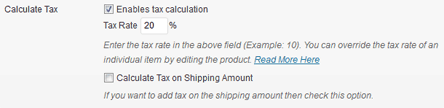
WP eStore Tax Settings
Sometimes you maybe selling product(s) where sales tax is not applicable or you may want to charge a different tax rate for a particular item. With eStore you can achieve that by overriding the tax rate for a particular product from the individual product’s tax option:
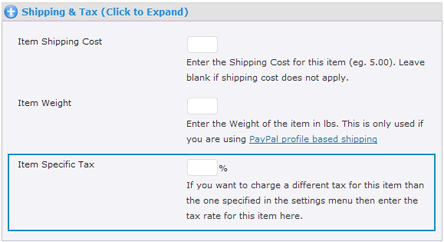
Overriding Sales Tax for an Individual Product
The sales tax is displayed in the shopping cart when the tax feature is enabled (the following is an example screenshot of the shopping cart with tax feature enabled)
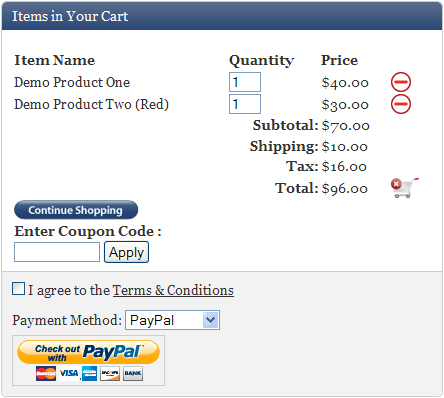
WP eStore Cart Screenshot
Using the PayPal Profile Based Tax Feature
Please see the how to use regional or international sales tax when selling via PayPal post for this option.
WP eStore Table Rate Tax
Table rate tax allows you to charge tax in the shopping cart based on the customer’s country. See the table rate tax addon page for details.
Table Rate Tax by Item Type
The Table Rate Tax by Item Types addon allows you to charge tax in the shopping cart based on the user’s country and type of items they are purchasing.
Using TaxCloud Integration
WP eStore has an integration with TaxCloud, a free sales tax management service, to automatically calculate tax for every address in the United States.
View the eStore TaxCloud addon page to get more details on this integration.
Note: We provide technical support for our premium plugins via our customer only support forum