If you have a membership site with multiple premium memberships then you probably want to offer your members an option to upgrade their account. Upgrading an account is very easy.
Creating Upgrade/Renewal Payment Buttons
1) Option A – PayPal Button for Membership Renewal/Upgrade
Step #1) Create a payment button the same way you created it for your membership joining page.
Step #2) Enter the URL of this newly created upgrade/renewal page in the “Membership renewal Page” settings field of the plugin and save the settings.
When a member wishes to upgrade his/her account, all this member has to do is click on the payment button and make the payment. After the payment, the plugin will use the payment email address to identify the correct member account and upgrade or renew the account automatically.
2) Option B – Using an eStore Button for Membership Renewal/Upgrade
Step #1) Create an eStore payment button the same way you created it for your membership joining page.
Step #2) Enter the URL of this newly created upgrade/renewal page in the “Membership renewal Page” settings field of the plugin and save the settings.
When a member wishes to upgrade his/her account, all this member has to do is click on this button and make the payment. After the payment, the plugin will use the payment email address to identify the correct member account and upgrade or renew the account automatically.
WP eStore’s payment buttons are a little more advanced than a standard PayPal button in the sense that it can carry more data. So when using an eStore button it is also possible to upgrade the member account that is logged into the site at the time of making the payment (In this case it doesn’t matter which email address the payment is coming from).
When logged-in members make a payment, the plugin will apply the payment to their exiting account profile.
What if the Member Account is Expired?
What about the members whose account is expired? They can’t log into the site anymore. We have thought about that too. Simply go to the eMember settings menu and check the “Allow Expired Account login” field from the “Account upgrade and renewal settings” section.
Don’t worry, just because they can log into the system doesn’t mean they can view the restricted content. Expired member accounts will not be able to view any protected content. They will see a message that tells them to renew the membership. You are allowing them to log into the system so the plugin can recognize their account profile.
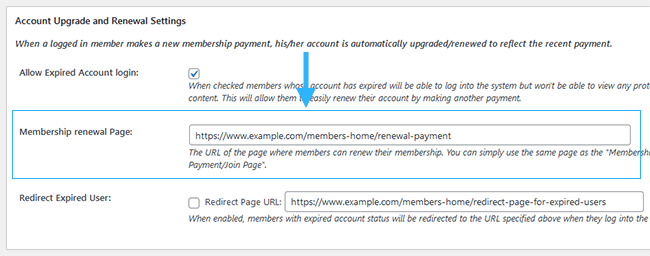
The following screenshot shows where you can configure the renewal page within the plugin’s settings.
Adding More Flavor to Your Upgrade/Renewal Buttons
If you want to add a little bit of flavor to your membership upgrade path then create special payment buttons that are just like the payment button for the normal premium membership but with a discounted price. Then place it on a page that only premium members have access to. You can create a special page with all these discounted prices.
Now, your members can make payment using these buttons to upgrade their accounts at a discounted price. Since this page (that contains the buttons) can only be viewed by a premium member, an anonymous visitor won’t be able to signup at this special discounted price.
@Terry
Yes this is the case the start date of the paid membership will be from the day they paid. If they are upgrading a free membership to a paid one the terms of the paid membership will be applied or added depending on your setup (1 membership level or multiple memberships allowed at one time).
If a free member is upgrading to a paid membership does their membership date change to the date they upgrade and the paid membership starts from then? I’m thinking this must be the case since free often implies “forever” and we need a start date for the paid membership, right?