The WP eMember membership plugin can be easily integrated with AWeber (Email marketing and Autoresponder service) so that your members get signed up to your AWeber list when they register for an account.
AWeber recently added the capability to add subscribers to a list via their API. We have updated the eMember plugin to use this new API for AWeber integration.
AWeber Integration Steps
Step 1) Make a Connection to the AWeber API
First, you need to connect with the AWeber API. In order to connect eMember with the AWeber API, go to the eMember Settings -> Autoresponder Settings menu and authorize the “Tips and Tricks HQ” app.
Click on the “Make Connection” button to start the process (see the following screenshots).
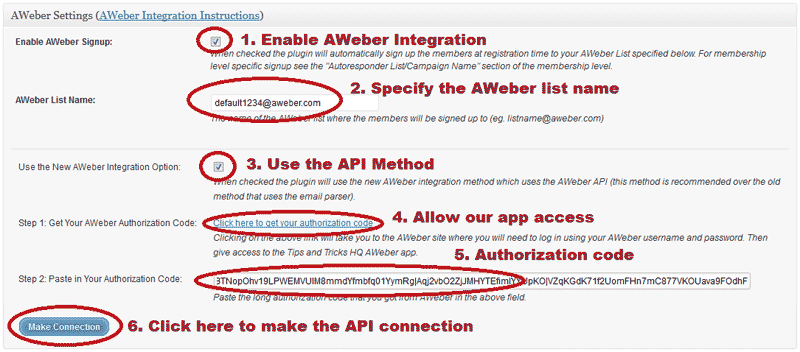
After you hit the “Make Connection” button you should see a message saying “AWeber Authorization Success” given you provided the correct authorization code. Save the settings.
Step 2) Enable the Integration
Make sure you have checked the “Enable AWeber Signup” option in the settings to enable the AWeber integration.
Step 3) Specify the AWeber List Name/ID
Next, you need to specify the AWeber list name/ID so the plugin knows which list it should signup the members.
Below is an example of how an AWeber list name/ID looks like (you get the list ID value from your AWeber account):
awlist1234567
You can specify a Global list name in the “AWeber List Name” settings field so all members get added to that list. Remember to save the settings after you make changes.
Alternatively, you can signup your members to different AWeber lists based on their membership level also. For membership level specific signup, specify the list name in the “Autoresponder List/Campaign Name” section of the membership level in question.
Hey what a fantastic suite of plugins. I have it all up and running. I am just attempting to integrate with aweber and I noticed they currently have 10 different membership solutions pre-listed (including memberwing). I just thought that it might be useful if you approached them to see if you could get eMember listed there. A suggestion only – as I said you have an absolutely excellent and highly useful set of plugins.
The member still stays in the datbase but the status is set to “expired” this way the member can reactivate the account in the future.
AWeber does not let you change the email address once it’s subscribed. It’s their policy. The members will have to subscribe again with the new email address.
I understand that when a member cancels their subscription, it does not automatically remove them from aWeber – does the member stay in my DB, but with a different status (or something similar i.e. canceled) so that I can manage this or is their record deleted?
At least I would be able to pull up all cancellations since the last mailing.
Also, when a member MODIFIES their account (i.e. their email addr), does it modify their record in aWeber too? I am guessing no. This could get messy.
Thank you….
You do such fantastic work! Thank you
@Velma, Nope.
When a member cancels their membership, are they automatically removed from the aweber list?
Thanks.
Thank you.
Hi Daniel, no you don’t need to purchase again (I offer free update for this plugin). This URL will guide you:
http://www.tipsandtricks-hq.com/forum/topic/how-and-when-do-you-get-an-update
I don’t have the aweber settings in the 3.4 version I use. I purchased it in December 2009. Do I need to purchase it again to get the new version with the aweber included or do you offer free upgrades?
I couldn’t find any information about it.
Thanks,
Daniel
Found it! Thanks
I can’t find the aweber settings menu. Where is it