Please use the new instructions to create a PayPal button or use integrations with our WP Express Checkout plugin or WP eStore plugin.
A lot of people use the WP eStore plugin to create payment buttons for membership as it has a range of benefits but you can use a PayPal payment button (“Buy Now” or “Subscribe”) that you create in your PayPal account to accept payment for your premium members too.
Buy Now Type Button or Subscription Type Button?
Video Tutorial Showing PayPal Button Integration
Setup Preparation
To create a membership payment button using PayPal, you will need two pieces of information:
- The URL of the IPN handling script
- The ID of the membership level that you are creating this payment button for
The above two pieces of information will go in the “advanced variables” field of your PayPal button. WP eMember has a settings menu that will allow you to generate the advanced variables code easily so you can copy and paste it into your PayPal button.
Step 1) Go to the following area of your WP Admin dashboard:
eMember Settings -> Gateway Settings -> Direct PayPal Integration settings
Step 2) You can find the ID of a membership level (example: 4) in the “Membership Level” menu of the WP eMember plugin.
Enter the Membership level ID in the appropriate box then hit the “Generate Code” button to generate the advanced variables code that you need to use in your PayPal button.
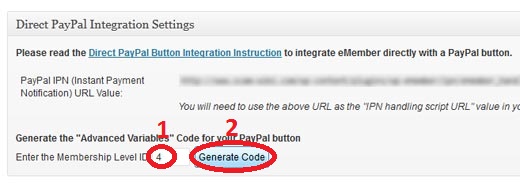
The advanced variables code it generates for your site should look something like the following (you will need to copy this code so you can use it in your PayPal button):
notify_url=http://www.your-domain.com/?emember_paypal_ipn=1
custom=subsc_ref=4
Specifying the “Advanced Variables” Code in the PayPal button
When you create your button on PayPal from the “Merchant Services” menu, you will be able to specify some advanced variables in “Step 3”.
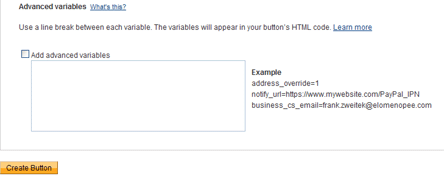
Specify advanced variables
- Check the add advanced variables checkbox
- Copy and Paste the text from the notepad saved earlier into the textarea.
Now, you can copy the button code that PayPal gives you and paste it in your “Membership Payment” page. When someone makes a payment using this button it will automatically create a membership for the membership level that is specified in the button.
Your PayPal Profile Settings
Make sure that the Instant Payment Notification (IPN) is enabled in your PayPal profile (this is enabled by default). You can enable it by going to the profile menu in your PayPal account.

If the IPN is disabled in your PayPal Profile then PayPal won’t send any payment notification to eMember after payment. This will cause the registration process to not work as usual and your users who pay you won’t get any email form eMember.
Creating a Thank You Page
You should create a generic thank you page for your membership site. Use this page as your return page in the PayPal button (so the user goes to this page after the payment).
Explain what the user can expect next in this “Thank You” page. Instruct your users to check their email and click on the link to complete the paid membership registration.
The following is an example of the type of message you should put on your thank you page:
You will receive an email shortly which will contain the details of this transaction.

You will also receive an email containing a special link. Click on that link in the email to complete your paid membership registration.
Advanced Integration with a PayPal Button (An Alternative Integration Option)
This section is only for users who are looking for an advanced integration option.
If you want to create a PayPal button that both your new users or existing members can use to pay or renew membership then use the following option. This is also useful when you want your existing members to be able pay using a different PayPal account or email address. It can also track the affiliate commission if you are using our affiliate platform plugin.
Step 1) Edit your PayPal button and remove any value from your PayPal button’s advanced variables section. If you are creating a new PayPal button then you can skip this step.
Step 2) Edit the WordPress page where you will add the PayPal button code for membership payment.
Step 3) Add the following shortcode inside your PayPal button’s HTML code.
[wp_eMember_paypal_fields level_id="2"]
In this example, 2 is the membership level ID for this button so you will need to change it for your site.
Your final PayPal button code on the page should look something like the following example:
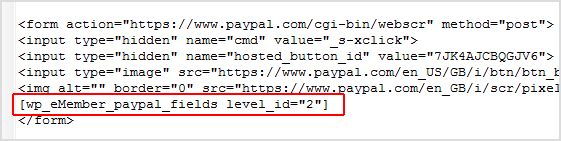
It works just like a normal membership payment button for new users. However, when your logged-in members use this PayPal button to Pay, it will upgrade their existing membership profile to the newly paid level or renew the existing level. It will also work with affiliate tracking (if you are using our affiliate tracking plugin).
Video Tutorial (Using a PayPal Buy Now Button)
Video Tutorial (Using a PayPal Subscription Button)
Note: Once the button code is generated in your PayPal account, make sure that it is not “protected” (Click the Remove code protection option if it is encrypted). You also need to make sure that the website tab is selected (not Email) so PayPal shows you the full button code.
@Silvio, Simply change the premium user registration scenario to the 2nd one (see the following documentation):
http://www.tipsandtricks-hq.com/wordpress-membership/a-typical-member-registration-flow-96
You won’t have the issue you explained after you do the above. When a user is logged into the site and make a payment, the plugin doesn’t have to rely on the PayPal email address anymore.
Hi Support,
First of all, I request a free-registration (mandatory), in a second time users can upgrade to a payment subscription.
All works fine, but some users pay (PayPal) using an email address different from which used during the registration, so they are not upgraded.
I read that you suggest to use eStore button but my site is not an e-commerce, so I do not need eStore plugin functionalities, can you help me, please ?
Excuse my bad english.
Best regards
If you are using the WordPress user integration feature of eMember then all your members should have one account throughout your site. When they log into one system they will be logged into all the other systems too.
Another question has come up….
I’m thinking about installing buddy press on my site. I just wanted to check that the page containing buddy press can be made a member only page like the page with the digital content? Also, I assume that they wouldn’t have to sign in again to access buddy press once they’ve logged in as a member?
Thanks again for your help.
Hi, The eMember is not pre integrated with PayPal Pro at this time. You would need to do the integration for this or hire a developer. You would need a good amount of PHP knowledge for this. We do plan on adding PayPal Pro to the eStore in the near feature so the eMember would be able to do this via the eStore. The ETA for this feature is unknown at this time as our to do list is always changing.
is this plugin compatible with paypal pro?
OH, I see, that’s something that I do on paypal, not in the plugin options. Oops! 🙂
by “this option” are you referring to the “PayPal advanced variables”?
I don’t see where this option is.
Can I get a hint?