WP Shopping Cart and WP Super Cache Workaround

Categories: Additional Guidance

If you are using the WP Super Cache plugin on your WordPress blog together with some WordPress Shopping Cart plugin (eg. Simple WordPress PayPal Shopping Cart) then there is a good chance that you are experiencing some funny behavior (eg. the shopping cart doesn’t show the products after item addition) with your shopping cart plugin.

The Problem

The reason behind this is that the WP Super Cache is a static caching plugin. It generates HTML files that are served directly by Apache without processing PHP scripts. So when a visitor on your blog adds a product to the shopping cart and is wondering why it’s not being displayed in the basket is probably because he/she is still loading the static HTML (cached) file of that page.

The Workaround

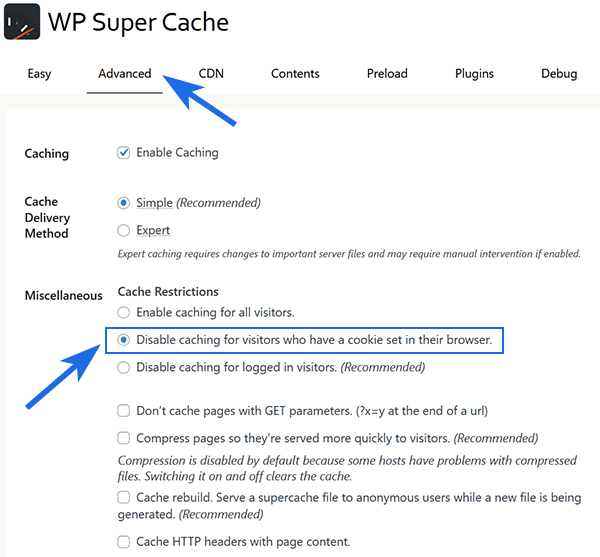
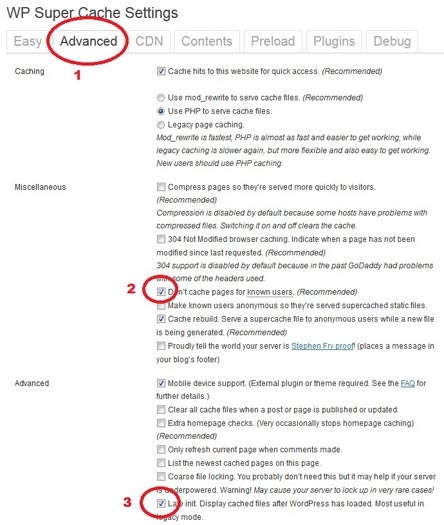
You basically need to tell the WP Super Cache plugin to not cache certain pages (pages where you are displaying the shopping cart eg. checkout page).

Super Cache allows you to specify a string that forces a page not to be cached. For example, if your URLs include year and you do not want to cache last year posts, it’s enough to specify the year, i.e. ‘/2008/’. WP-Cache will search if that string is part of the URI and if so, it will not cache that page.

So in your case you can use a unique string like ‘wp-shopping’ (eg. www.your-domain.com/your-page-title-wp-shopping) in the URL of the pages where you have the shopping cart displayed so those pages are not cached. Then enter that string (wp-shopping) in the Rejected URIs field of the WP Super Cache settings.

shopping-cart-wp-super-cache-workaround

If you are displaying the Category in the URL then you can create a special category called ‘NoCaching’ and add the posts/pages (that you do not want Super Cache to cache) to that category. This way your URL will look similar to the following:

www.your-domain.com/NoCaching/checkout-page
www.your-domain.com/NoCaching/all-products-page

Feel free to leave a comment if you are having any issues with this workaround.

Visit the WP Shopping Cart plugin page.

Subscribe to Tips and Tricks HQ to stay informed

twitter_icon

8 Responses to “WP Shopping Cart and WP Super Cache Workaround”

  1. Mindi Says:

    what if your shopping cart is in the sidebar widget? Is there a workaround for that?

  2. admin Says:

    LOL.. I don’t have a workaround for that. Sometimes you gotta sacrifice something to get something :)

    It’s just how caching works.. if a page is cached then you can’t expect dynamic behaviour (eg. when your customer clicks the add to cart button) from PHP. I am thinking of creating a Javascript version of the shopping cart later which might solve this problem though.

  3. Ester Graells Says:

    I’m ready to set up wp-super-cache for my site. Any recommendations except for those provided on this thread?

    Thanks,
    Esteve

  4. Incoterms 2000 Says:

    One more comment, could be wp-super-cache or any other plugin that offers the same functionality.

  5. Mindi Says:

    Could you do it so that it didn’t cache the file the calls on the Sidebar?

  6. admin Says:

    Hey Mindi, That’s something the caching plugin will have to do. The eStore plugin is not doing the caching so it doesn’t have any authority over what will and will not be cached.

    If you are still using the wp super cache then you seriously gotta dump it and start using w3 total cache and read these posts :)

    http://www.tipsandtricks-hq.com/forum/topic/using-the-plugins-with-w3-total-cache-plugin

    http://www.tipsandtricks-hq.com/plugins-to-speed-up-your-wordpress-site-2303

  7. Mindi Says:

    Don’t worry..I’m not using it.. I was just revisiting the idea of it and saw your post.. I will check out W3 total cache. Thanks for the tips
    Thanks
    Mindi

Who is Linking?

  1. WordPress eStore Troubleshooting | Tips and Tricks eCommerce Site

Leave a Reply

Featured Documents

Tips and Tricks Hot Items

wordpress_estore_icon
wordpress membership plugin icon
WordPress PDF Stamper Plugin
WordPress Lightbox Ultimate Plugin
infinity remix wordpress theme
wordpress_affiliate_plugin_icon