PDF Stamper Miscellaneous Usage

The WP PDF Stamper can be used in many ways; the main usage of the PDF Stamper is to help secure your PDF eBooks from being shared on file sharing sites. Here are some other ways you can use the WP PDF Stamper: Brand your eBook Brand your company information on PLR (Private Label Rights) eBooks Personalize the eBook Trademark or Copyright your eBooks in one easy step Add Author information Add...
readmore

Minimum Requirements for the WP PDF Stamper Plugin

The WP PDF Stamper plugin requires the following installed on your server Recent Version of WordPress (Version 3.0 or higher) Recent Version of PHP (Preferably PHP 5 or higher) IonCube Loader (this should be installed by default on most servers) CURL Library (this should be installed by default on most servers) mbstring extension of PHP (this should be installed by default on most servers) If...
readmore

WP PDF Stamper License Agreement

WP PDF Stamper (Single Site License) End User License Agreement Copyright, Tips and Tricks HQ (http://www.tipsandtricks-hq.com/) All rights reserved. By using the software, you agree to be bound by the terms of this license. If you have any questions about the terms below, please contact tipsandtricks-hq.com for clarification. 1.) You must have paid tipsandtricks-hq.com to use the software. 2.)...
readmore

Why Brand Your eBooks?

Branding your eBooks is very important. Making a name for yourself in the eBook industry is very hard if you do not brand your books. With the PDF Stamper you can easily brand your PDF eBooks with just a few simple steps. When you use the PDF Stamper your eBooks will be automatically branded with your specified text information and the buyer’s personal details. This plugin is also very...
readmore

WP PDF Stamper Admin Screens

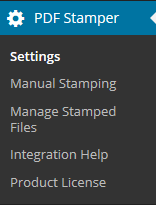
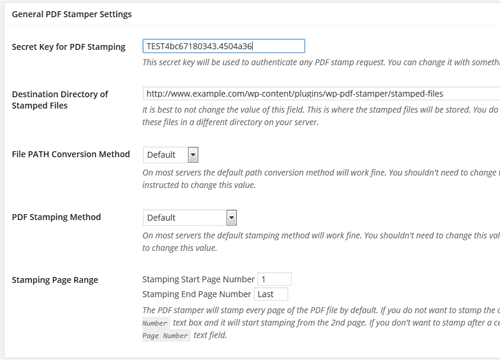
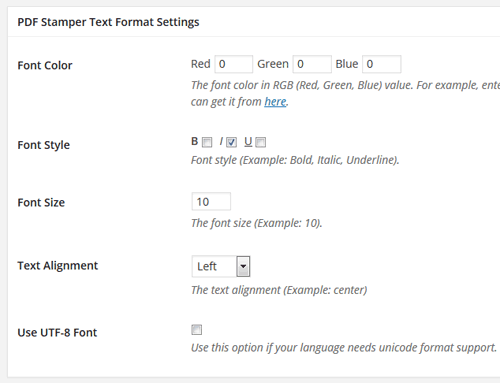
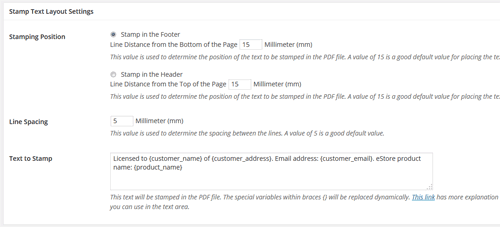
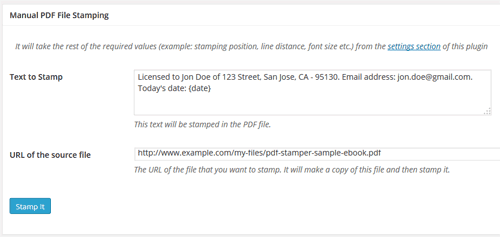
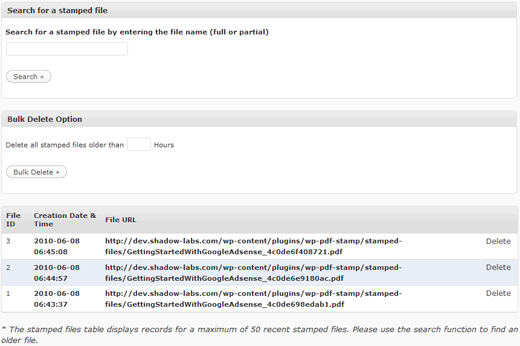
After you activate the WordPress PDF Stamper plugin, the settings/options menu can be found on the left hand side menu similar to the following screenshot (on WordPress version 2.7 or above) PDF Stamper Admin Dashboard Menu The Settings Menu This is where you specify all the general settings for this plugin. PDF Stamper General Settings Text Format Settings Footer Text Layout Settings Manual...
readmore
Page 1 of 212
line
footer
Copyright © 2012 Tips and Tricks ® All Rights Reserved