In this article I will share a few simple upselling tips that I personally use without irritating the customer and have had success with. Please note that my goal with upselling is not to trick a customer into buying something or sell them some junk.
My aim is to show the customer additional products or services that might better meet their needs or will add value to the product that they are already buying. It’s a way of demonstrating that I am aware of my customer’s needs and care about their satisfaction.
What is Upselling?
“Upselling is a sales technique whereby a salesperson induces the customer to purchase more expensive items, upgrades, or other add-ons in an attempt to make a more profitable sale. Upselling usually involves marketing more profitable services or products, but upselling can also be simply exposing the customer to other options he or she may not have considered previously.” – Wikipedia
Upsell and Cross-sell Techniques
1. Place Offers on the Checkout Page
There are many places on your website where you can upsell. The most common would be the view cart/checkout page. Visitors who come to your checkout page are potential buyers and most likely have the credit card ready. So it is a lot easier to upsell them something relevant as it will most likely benefit them.
You can also introduce an upsell page that the customers have to pass before they can go to the “Checkout Page”.
2. Offer Bundle Product and Discount
If you have multiple products that are relevant then offering bundled/packaged product at a special price works very good.
Giving out coupons that offer discounts when buying multiple items work well too. Most e-commerce software will let you configure coupons so use them. If you are using the WP eStore plugin then you could configure conditional coupons that gives discounts like the following:
- Give 25% discount if the total amount is greater than $50.00
- Give 20% discount if the total number of items in the cart is more than 5
- Give free shipping if the total amount is greater than $100.00
3. Offer Special Discount Coupon
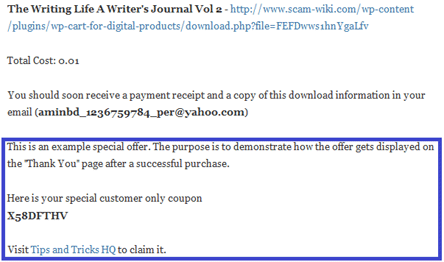
You can give special discount coupons or promotional offers to customers after they make a purchase. This usually gives them incentive to buy more from you. All you have to do is place your offer on the Thank You (Post payment landing page).
Again,if you are using the WP eStore plugin then you can configure a block of Text/HTML (your customer only special offer) that automatically gets displayed to the customer with the transaction result on the “Thank You” page like the following screenshot:
4. Use words like “Special Offers” to communicate
Use words like “Special Offers”, “Great Deals” to draw customers attention. It is very easy to communicate “savings”, “value” using those words and everybody likes to save.
5. Slightly Advanced Option for Upselling
You can use the following feature of eStore to design your flow of checkout so you can upsell products along the way.
This option is useful if you are trying to create multiple different pages with upsell offers and then every page has an option to checkout or add another item by going to a new page (which adds the new item to the cart in the process).
For example: You can have a landing page that has two links for two products (one link goes to page A and adds product A to the cart, the other goes to page B and adds product B to the cart). Now on these pages, you can have other upsell product links. One can be a link to the checkout page (so the customer can go there if he doesn’t want to take the offer), the other link can be an offer to purchase another product (so it will be a link to Page C which adds product C to the item). And so on.
6. Use a Sidebar Widget with Popular Items
You can have a small list of your popular products on your sidebar (using a widget). This allows your customers to see your popular products when they are on your site.
7. Use a Sidebar Widget with Random Items
Similar to the popular items widget, you can have a small list of random products on your sidebar. This allows your customers to see a different set of products randomly when they are browsing various pages of your site.
WP eStore plugin has a shortcode that you can use to show a small number of popular or random products on a sidebar widget.
Video Tutorial
The following video shows how to apply the up-selling tips mentioned above:
Some Things to Keep in Mind
- Don’t be unethical… you want to give customers more than what they pay for so they go away happy. Never sell them unnecessary items just to make a sale.
- Don’t be too pushy and make your checkout page like GoDaddy (I am not sure if I am the only one who gets annoyed with their checkout system).
- Don’t overdo and clutter your page with every offer you can think of.
- Don’t promote competing products on the view cart page.
As a general guideline… try to keep in mind that the key to successful upselling is to focus your efforts on meeting the customer’s needs, rather than simply pushing more products and services.
I have shared some of my upselling tips now it’s your turn. Please share your upselling tips in the comment area below so I can learn more.
I am guessing you are referring to the eStore plugin here. When you make the button redirect URL you can use eStore’s “Add item via a link/URL” feature. So for example if your upsell page’s URL is the following:
http://www.example.com/upsell
Instead of using the above link in the button redirect URL field you would use the followoing:
http://www.example.com/upsell?wp_eStore_add_to_cart=1
This will redirect the user to your passthrough page but at the same time add item 1 to the shopping cart too. Please see the eStore’s shortcode page for more details.
Oh, and I also wanted to add that I am using the Variations feature for upsells, too…which is pretty darn cool and seems to work great for what I can do with it. Still, a passthrough page would be my next wish. Something that puts the product in the shopping cart, but displays another page of products before taken to the shopping cart.
Andrea
What’s the best way to introduce a passthrough page on the way to the Checkout page? I was thinking that I could create separate passthrough pages for each product with related products, and then use the “Button Redirect Target URL” field to put the passthrough page url into. However, it doesn’t add the original product to the cart, so I’m thinking that’s not what that field is used for (the instructions for that field indicate that’s what would happen, but I had to try it anyway :))
While I do have upsell items available on the checkout page, I was hoping to use the passthrough pages instead so I can display different products on each passthrough page.that more closely relate to the product.
Anyway. I’m hoping there is a simple solution to what I’m looking for. If not, I’ll stick with putting the upsell items on the checkout page.
You’re suggestion in #1 intrigued me enough to see if it was something I could accomplish fairly easily.
Thanks in advance!
Andrea
I know that upsells are statistically valid and that they have been proven to increase sales, but they are so annoying! I often become quite frustrated with a salesman when they try 5 or 6 annoying upsells
Good Tips. I think cross selling is a great idea without being to aggressive. We sell a range of products that can easily be cross sold. I’ll need to look for a mod that will allow our shopping cart to do this !!
Hi Amin and Ivy, I can relate to the special offers idea; or in other words quantity discount structure e.g. buy 5 get 20% off from the total – one item free value instead of purchasing 6. Going to get from you also the Affiliate and the Membership plugins today, sending you email about it right now. Thank you.
Excellent tips! I’ve seen upsells down well and done badly, and GoDaddy is a good example of badly IMO, but I guess they are doing well overall so it’s working for them. 🙁
I still have a small number of domains with GoDaddy which, like Donna, I should move to Namecheap. Namecheap is a LOT better. GoDaddy’s prices are awful by comparison.
“Don’t be too pushy and make your checkout page like GoDaddy (I am not sure if I am the only one who gets annoyed with their checkout system).”
You’re certainly not alone there! I hate using GoDaddy simply because of that! In fact, I moved all my domains (and I had about 50 at the time) over to Namecheap because I couldn’t stand GoDaddy and all the time I was wasting trying to navigate their system to figure out what I needed to do to get the free year’s worth of whois guard that they advertised, and make sure that they didn’t ‘trick’ me into buying things I didn’t want because they set it as a default.
Yeah and given that you can outsource this printing and shipping bit of work, it is very easy to add this option for extra revenue without much overhead.
I’ve seen people doing some cool upsells with eBooks lately. Their checkout page allows you to add an audio-book of the eBook to your order, or to get a hard-copy printed and bound version of the eBook sent to you, both for a pretty reasonable additional amount.