
The Category Specific RSS feed subscription WordPress Plugin allows you to add a menu with multiple RSS feed subscription option to your site in addition to the normal RSS subscription option. The category specific RSS feed menu can be added to a post, page or sidebar. Through this menu your visitors will be able to subscribe to the RSS feed of a specific topic/category of your blog that particularly interest them.
You can also create a tag specific RSS feed menu or a tag rss feed cloud using a shortcode.

Why use category specific RSS subscription?
The reason is very simple… you don’t want to be served with Meat when you are a Vegetarian! If your site covers multiple topics then your subscribed readers may get annoyed when you update your site with content that they are not interested in and they get a notification in their RSS reader. With category specific RSS subscription option, your readers can choose which topic they want to subscribe to and will only get notified when you update/add content to your site with that specific topic.
Apart from the Search Engine Optimization (SEO) advantage, this is a much more neat and clean RSS subscription option. Most of the time, your visitors will not subscribe to your RSS feed if they can not choose a topic/category specific subscription, specially when your site covers multiple topics which are not related.
Category Specific RSS Plugin Installation
- Go to the Add New plugins screen in your WordPress admin area
- Click the upload tab
- Browse for the plugin file (Category-specific-rss-wp.zip) then hit the “install” button.
- Activate the plugin through the ‘Plugins’ menu in WordPress.
- Go to Settings and configure the options. Example: your category names and RSS link of the specific topic.
- Optionally, go to the Widgets menu and add the ‘Category Specific RSS’ widget to the sidebar or add the shortcode to a post or page where u want the RSS feed widget to appear.
Category Specific RSS Plugin Usage
There are three ways you can use this plugin:
- Add the Category Specific RSS Widget to your sidebar from the Widget menu.
- Add the shortcode [category_specific_rss_menu] to your WordPress posts or pages.
- Call the function from template files: <?php echo show_cat_specific_rss_menu(); ?>
- Use the [tag_specific_rss_menu] shortcode to your posts, pages, sidebar widget to add a tag specific rss feed menu
- Use the [tag_specific_rss_cloud] shortcode to your posts, pages, sidebar widget to add a tag cloud with rss feed of each tag
Plugin Screenshot
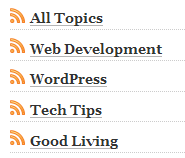
Download Latest Version
Download the Category Specific RSS plugin.
Plugin Compatibility
Works with the latest version of WordPress.
Plugin Requires
Requires WordPress 3.0 or higher.
Additional Documentation
Display category specific RSS for all categories
To show a list of all categories and a RSS feed for each of them simply check the ‘Show Category RSS for All Categories’ option from the settings menu.

You can also toggle the display of the current count of posts in each category from the settings menu of the plugin.
Changing the default RSS image
To change the default RSS image simply overwrite the ‘rss_small_icon.png’ image in the plugin directory with the image that you want to use
Why doesn’t the Plugin Give an RSS feed?
One thing to keep in mind is that the ‘Category Specific RSS’ plugin won’t be able to give you an RSS feed if you are using the default dynamic URL structure (eg. ?cat=7 or ?p=127 etc.)
Change your permalink structure to fancy permalink (eg. www.yourdomain.com/title-of-your-post instead of www.yourdomain.com/?p=12)
You should be using fancy permalink for Search Engine Optimization too (read the following post when you get some time )
Search engine optimization tips for WordPress blog
Change your Permalink structure from the Settings->Permalinks menu (choose anything but the default one and then the feed will work fine).
Check out the list of Best WordPress Plugins to find out what other plugins you should be using.
Great plugin!! Thank you!!
Can you please let me know if there is a way to use different icons for different post categories?
Thank you very much in advance!
Very nice and easy to use plugin.
I have some feature requests:
It would be nice if the admin could combine categories (via selecting from a setup menu at the admin backend) to build customized feeds, like
– combine category A with D and F
– always add category A (“Default”) to any feed
Also a list that would display the categories and it’s ID’s would be nice to have at the admin backend to build the custom feeds.
Extending the ability to create more than 8 customized feeds.
An option to add the customized feeds in front of (or below) the automated categorie feeds.
Not only the RSS Icon also the category name should point to the RSS feed.
@rosdeal, You can do it for all your categories. There is an option in the settings of this plugin.
Wunderfull Plugin! One qestion: is it possible to use the script for more than 8 categories?
Great plug-in!
FYI: it works OK even with default permalink settings.
We can only guarantee that it will work with the latest version of WordPress.
This is great for huge sites that cover a multitude of topics. Users can now customize what kinds of news or updates that gets served to them, with having to sift through all the other topics that hold no interest to them. Is this compatible with all versions of the wordpress, or only the latest ones?
I am so in love with this plug-in!! Thank you so much! Downloaded, installed and works like it should. We needed to have a way to have many categories on a residential community type site. Wed tested other plug-ins but they did not perform how we needed them to.
Thanks again!
I really like this plugin. It helps me organize my feeds and categories very nicely. Currently perusing your site for more of your awesome plugins.
thnks
sean
So nice of you, thanks for great work,
Oh man, your plugin saved my day. I have been having major issues with my wordpress feed, and so I decided to push it over to feedburner. However, when I do this, it only showed the latest 10 posts. The posts are to be imported onto another blog, and now, thanks to your plugin, I can pull over several RSS feeds, getting all of my posts, vs. only the last 10. Thank you so much for this plugin. A true life saver.
This software surely did the trick for me. Many of my subscribers and clients found it very useful to subscribe to all the topics in my blogs and sites. When they wanted to talk about e.g. new electronics that have hit the market, they would only get notified about that topic only, nothing else.I recommend this for everyone who deals with SEO.
Thanks!
this is a very useful tool for my blog..
Big thanks!
Exactly what I was looking for.
Different feeds per category are essential from an usability point of view and it’s also useful for “theming” in search engine optimization.
thank you. very nice rss plugin
Nifty plug-in, this’ll be useful for many of my clients. As a matter of fact, I’ll be recommending it to a number of my favorite blogs, as I don’t always want all of their RSS topics, just some of them.
thanks for the info bro
Excellent plugin works like a charm -now I have a great feed for every category -wonderful addition to SEO.
Aha…ok! I found out that we can actually put any RSS link on “RSS Link” space..
But then how to make it more than 8? x)
Because my pages are really a lot… close to 50…
Thank you very much!!
Wonderful plugin!
But by the way, is there any way of having page-specific RSS feed? (Or any other RSS in the website? I am using Simple Press Forum and I wonder if the RSS at each of the group/topic in the forum can be gathered in a list)
Thanks a lot!
Keep up the good work!
wow been looking for wordpress category specific RSS solution for days! Thanks loads!
For those who may wonder if Category Specific RSS feeds are of any benefit, let me tell you that they are. I recently switched from a single feed to the Category style feed, and I can’t tell you how many people have told me how much they have enjoyed being able to get only what they want. I think the “Meat to a Vegetarian” scenario is a perfect example. By allowing specific feeds, you can increase your following by picking up those people who didn’t want all the “noise” that comes along with subscribing to an all inclusive feed.
Interesting, I never knew this was possible. I personally think it’s easier just to subscribe to one conglomerated feed of all the posts, but I suppose for sites with a very broad array of topics, this could be quite useful