It is surprising to see how many of my customers/users do not use a properly coded WordPress theme. Using a properly coded theme on a WordPress powered site is very important without any doubt. So I wanted to quickly make a blog post to highlight a few points to make sure you don’t go down the path of using a wrong WordPress theme only to regret it later. Remember, just because a theme looks good to the naked eye does not mean it has been properly coded.
Also, just because you paid for a theme doesn’t mean it is a properly coded one. Usually premium products are of good quality but there are always exceptions. So make sure to do a little background checking on the developer of the theme so you know who you are buying it from.

Why is It Important to Have a Proper Theme?
Before I talk about some of the main points, here is the summary –
The amount of time you will be spending to fix issues that all stem from the bad theme is just not worth it!
Issues with WordPress Plugins
It is common to have issues with WordPress plugins that uses JavaScript for example to do various things when your theme is poorly coded. So you will think that the problem is with the plugin but actually the theme is the true culprit here.
Example1: I have had many clients who complained about the WordPress Simple Shopping Cart’s variation not working properly on their site. After I finished my troubleshooting, it turned out that the theme was missing the following piece of code in its footer file (footer.php)!
<?php wp_footer(); ?>
This piece of code tells WordPress to add certain bit of code to go in the footer of the page (e.g. load a JavaScript file). So any plugin that tells WordPress to do some stuff in the footer will not work because the above code is missing from the theme.
Example2: Similar sort of event happened with another plugin and it turned out that the theme was missing the following bit of code in its header file (header.php)!
<?php wp_head(); ?>
Example3: A lot of theme developers do not seem to know the proper way to include the popular JQuery library to the theme so that it doesn’t create a conflict with other plugins running on the site. These theme developers tend to include their own copy of the JQuery library in the theme rather than using the one that ships with WordPress! The following post explains this in detail:
The JQuery library that ships with WordPress runs in no conflict mode by default.
Example4: Some developers do not seem to understand the concept of running JQuery code in no-conflict mode. Whenever you are adding JQuery code anywhere on your WordPress site you need to make sure it is running in no-conflict mode so you don’t cause trouble for other plugins or themes.
Some of these issues may be minor in your case but the point is that it can waste a lot of your valuable time figuring out what the issue is when you can avoid all these issues just by making the right choice at the start.
SEO Related Reason
If you don’t care about the above reason because you don’t use many plugins then that’s fine but what about the SEO (Search Engine Optimization) of your site? Don’t you care about the search ranking?
Having valid HTML code for your site is good for SEO so why not go for it? Not all HTML errors are fatal but some of them can be, so it is a good idea to aim for having no HTML code violations on your site.
Browser Rendering
If you have valid HTML code then it is likely that your web pages will be rendered properly on all browsers. Not all of your customers will be using the same browser as you, so it helps if your web pages render properly on all major browsers.
How to Ensure that You are Choosing a Properly Coded Theme?
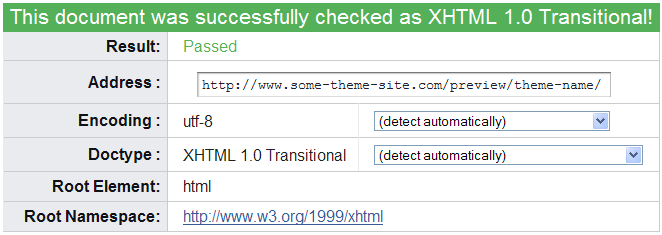
- It is very easy to check if a theme code is valid or not. All you have to do is head over to the Markup Validation Service by W3C and enter the URL of the site where the theme is being used. The World Wide Web Consortium (W3C) is the main international standards organization for the World Wide Web (abbreviated WWW or W3). Pretty much every theme will have a live demo, so you can use the URL of that demo site to see if the theme code is valid. If the theme has valid HTML code then you will get the following output:
- There is more to it than just validating the theme on the W3 Markup validation site. If you want to dig down into this then read the 10 Checks to the Perfect WordPress theme from Yoast.
- The WordPress theme choosing tips and tricks article that I wrote a while back is also a good read.
- Should WordPress themes include plugin functionality is another very good read.
I have got nothing against free WordPress themes (I love free things like everyone else) but a lot of the free theme developers usually copy another theme which wasn’t properly coded in the first place then make some tweaks and release it. If you are going to be using it just make sure you have checked the different aspect of the theme first.
You can also purchase a theme if you can’t find a good free WordPress theme. There are many fine WordPress theme selling sites these days. To be honest with you, I don’t think investing $20-$50 for your online business is such a bad idea if you are serious about your business.
Would you prefer to have a doctor who has never done a surgery before to operate on your heart? Probably not :)… then why are you taking chances with your online business? I am sure you care about your online business as much as you care about your own health 🙂
Anyway, my point is… please do not just look at a theme and put it up on your site just because you fancy it. Feel free to share your experience in the comment section below.
Nice article. I agree that it is important to have a properly coded WordPress theme and plugins. Usually at the development phase, themes and other tools go through many checks to measure the performance. It is important to select the themes developed by authorized sources or use the WordPress native themes. CMS Developers can choose to modify those themes or even inherit them to design a child theme that copies entire code of parent theme. Proper coding is important as it ensures website security. There have been issues with native themes as well but it is mainly because of the addition of in-compatible source codes or inappropriate plugins. Make sure to identify right set of tools that delivers the expected results.
Does anyone have a recommended theme for use with the tipsandtricks plugins?
Great tip about visiting W3C to “stress test” a theme before using it. I’ve really been to he** and back with some of these great-looking, but buggy themes. Right now I’m dealing with WPZOOM evertis, they don’t even have the functionality correct on their demo!
Subscribed to your feed, very interesting especially the analytics stuff as well. Take a look at woopra.com if you haven’t already – REALLY good. But not free like Google. Lastly, I also installed the subscribe to comments plugin, it’s easy to fix it so it’s pre-checked.
As a blogger articles like these only add to my knowledge base. I claim to not be a PRO coder, but as the years go by I am learning more and more. The more I know the better suited that I am to setup my Word Press blog(s). Great article and I will be checking my blogs to ensure that no small errors are present that could be slowing down my blog and causing it not to function correctly.
Not all violations are fatal. It’s a good practice to aim for no violations but if you know that a particular violation is minor and won’t cause any other issue on the page then I don’t see why you need to get rid of it.
An interesting post. I suspected that there were errors in the myriad of themes that I have played around with in the past. What surprised me was that there are so many errors in my official Word Press theme after I installed lots of plug ins etc. However, I was consoled by the fact that your website also has some errors! Perhaps the lesson to be learned is that nearly all website WILL have errors. I’m not sure that it is worthwhile doing anything about them unless they are serious but where would you draw the line?
Thanks for sharing the tut with me/us. It was beautifully described. Well done. Looking forward for more tuts from you!
Although I agree with much of what you are saying Ruhul, the truth is valid code is not that important. Google’s site is not valid, for example. The validation Police IMHO is a waste of time. For example, adding code to have a link open in a new window requires _blank, but the validation Police say this is wrong, and you need to add _new. Both work, but you have to meet the VP’s standards.
This is very important and useful thread to me. I got my site validated but got some warnings in CSS formating.
I am gonna correct it now.
thanks a lot.
Nice post, this became my inspiration, to change my wordpress theme , Thank!
Hi,
Great blog, I’m going to have to figure out what the heck you’re talking about, but I can see the value of it without getting all the technical details.
All the best,
Alan
I agree all you told us and thanks for the markup validation tools, it really works.
Nice post! I wish I read this article before I selected my wordpress theme!
Thanks for this nice educational post on WordPress theme. I just found out that my theme had 84 errors! Time to look for a new theme!
I couldn’t agree with you more. I was the victim of a bad theme when I first started blogging. I added the WordPress.com stats plugin and the stats just won’t show up. The same plugin works without any issues on one of my other sites which was using a different theme. At that time I didn’t know any of these so I spent a lot of time trying to find a fix for the WordPress.com stats plugin when the issue was with the theme I was using!!