1. Are you selling eBooks or PDF files from your WordPress site?
2. Are you concerned that one of your customers might upload your eBook on a file sharing site and you will lose sales?
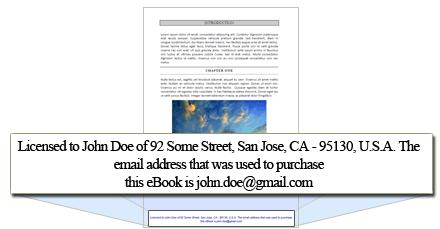
3. Would you like to automatically stamp the header or footer of your PDF files with the customer’s personal details (example: name, email, address) upon purchase to discourage sharing?
If you have answered “yes” to all of the above then the WP PDF Stamper plugin will be the perfect solution for your site.
Plugin Summary
The WP PDF Stamper plugin allows you to dynamically stamp a PDF file with the customer’s details (example: name, email, address etc.) upon purchase. The PDF stamper then sends the stamped copy of the PDF file (your eBook) to the customer via email. If you are wondering why it is important to stamp the PDF eBook before giving it to your customer then this page is for you.
Additionally, you can password protect the stamped PDF files with the customer’s email address and encrypt the PDF files to prevent users from being able to copy, modify or print the content of the file.
Plugin Features
Below are just some of the notable features of the WP PDF Stamper Plugin:

Easy Installation
Easy installation like any of our other WordPress plugins.

eBook Protection
Protect your eBook(s) from being shared on the file sharing sites.

Password Protect PDF Files
Password protect your stamped PDF files with the customer’s email address or with a fixed password.

Stamp eBooks
Stamp the customer’s details to the header or footer of every eBook (PDF file) that you sell.

Encrypt PDF Files
Automatically encrypt the stamped PDF files to prevent users from being able to copy, modify or print the content of the file.

Supports All Adobe PDF Versions
The PDF stamper plugin supports all Adobe PDF versions and formats.

Stamp Encrypted Customer Details
The PDF stamper plugin allows you to stamp encrypted value of the customer details. For example: instead of stamping a plain email address, you can stamp an encoded version of the email address. You will be able to decode it to get the original value.

Preserve PDF File Content
The stamper plugin will preserve the content of your PDF files. So it will work fine even if you have links, bookmarks, multimedia elements, forms etc. in your PDF file.

PayPal Buy Now Integration
Can be easily integrated with a PayPal “Buy Now” button. If you are selling PDF files using a PayPal button then this option will be very useful for you. Read details here.

Easy WP eStore Integration
Pre-integrated with the WP eStore (WordPress Shopping Cart) plugin so your PDF eBooks will be automatically stamped upon purchase then delivered to your customer via secure encrypted link.

Easy WooCommerce Integration
The PDF stamper plugin can be integrated with Woo-Commerce. So your PDF eBooks purchased via that plugin will be stamped with customer info and then delivered to the user.

Works with HTTPS Pages
PDF Stamper plugin works with https pages out of the box (useful if you are using an SSL certificate on your website).

Great Support
Check out our customer only forum to see how we handle product related issues (usually we reply within 24 hours).
Plugin Demo
Footer Stamp Visual Overview
Language Supported
The stamping supports English language only at this time.
Documentation & Technical Support
- Documentation site (Contains all the documentation for the WP PDF Stamper plugin)
If you are having any issue with this plugin then feel free to leave a comment in the comment area below or post it on the customer only support forum.
Get the WP PDF Stamper Plugin
Please contact us if you want to purchase the PDF Stamper plugin.
@Karie, If the PDF was created with Canva and hosted on your site, then yes, this will work. However, if the PDF was created and hosted on Canva, then no, it will not work.
Hi, will the stamper work with a PDF created on Canva? Thanks.
@June, The plugin has no limit, however your hosting provider may have a limit on the size of the file.
What is the maximum storage per file per upload?
@Elena, Yes this only works with PDF files at this time.
I guess this works only with PDF files, not ePubs, does it?
@George, You can use it for as many eBooks as you like (on one site). The PDF Stamper is only restricted to a single site install per license.
If I buy PDF Stamper Plugin, can I use it to sell a single book on my blog, or for everyone I want? Is there a maximum number of books to use your PDF Stamper plugin in a blog?
@admin Thanks for your prompt reply!
Second link seems to be the solution for the project of my client. Rest assured that we will be buying the plugin within few days!
@Adriano, The following WooCommerce integration should work for any items that you are selling via WooCommerce:
https://www.tipsandtricks-hq.com/wp-pdf-stamper/woocommerce-and-pdf-stamper-integration-197
The following option can also be helpful if you just want to allow the logged in customers to be able to stamp and download a PDF file:
https://www.tipsandtricks-hq.com/wp-pdf-stamper/pdf-stamper-creating-a-download-now-button-for-wp-users-242
The plugin looks great and it seems to be the solution I’m looking for but…
Can I still stamp PDF files if the price of the file is zero (free)? I’m currently using WooCommerce and need to stamp my PDF files which are free.
@Michael, Not at the moment. We recommend using it with our WP eStore plugin.
Can this plugin be used with WP Simple Payment Shopping Cart?
@Rob, Yes you can access stamped files.
Can I access PDF Files that have been stamped?
@Chris, Yes you can encode some of the stamped information.
https://www.tipsandtricks-hq.com/wp-pdf-stamper/stamping-encrypted-or-encoded-customer-details-value-in-the-pdf-file
I want to encode the information that is stamped. I want to do this so I track the PDF’s but keep the persons information private.
@Dariush, Please send us the URL where we can go and see the price display issue and we will look into it.
Hi we are having an issue with the PDF stamper and the Price Display Settings in eStore.
When a product is tagged to be stamped the Price Display Settings set in the admin section do not work any more.
Can someone help please.
Thanks
@Alex, Will you be using the WP eStore plugin to sell the PDF file? eStore has free integration with Mailchimp and AWeber. So it will work like the following:
1) A customer purchases the PDF file via eStore.
2) He will get signed up to the autoresponder list.
3) eStore will stamp the PDF file and then deliver it to the customer via an encrypted download link.
Hello, Can I integrate with aweber or mailchimp? After the purchase I want to put a customer in another list.
@Jennifer, Yes you can do that. Please take a look at the following documentation:
https://www.tipsandtricks-hq.com/wp-pdf-stamper/pdf-stamper-creating-a-download-now-button-for-wp-users-242
Can I stamped a PDF file from a WordPress user’s record?
Excellent and very well done… I spent two whole days trying to code the same thing struggling with wordpress and woocommerce screwed APIs, decided to buy this one, and can confirm it is well worth the money, I wish I chose to buy it before wasting my time, kudos for the smooth work !
@Bonnie, Yes you can have a download button with member stamping when you used these 3 plugins together. This will allow your members to get updates and still have the file stamped.
If I use the eStore, PDF stamper and eMember can I give updates of my eBook that are also stamped?
@Manny, Yes we have WooCommerce integration now. You can read about this on the PDF Stamper documentation page.
Can the PDF Stamper be used with WooCommerce yet?
Manny
@Jay, yes you can do that.
Can I install this on a multi-site network but only activate and use on a single site as it states (single site)?
I want to say I love all your plugins. You guys do great work. I just purchased this plugin to add to my collection of Tips and Tricks plugins. Again you have not let me down, everything integrated seamlessly and your documentation made it easy to set up this plugin.
Thank you ,
Kurt
@TwilightFan, Yes you can stamp member details in a PDF file when using all 3 plugins together.
Can you stamp member detail when using the eMember, PDF Stamper, and eStore?
This plugins has worked perfectly out of the box and every time I update the plugin. I want to thank you guys for making great plugins I never have to worry about.
Fabian
Hi Jima, This plugin will work fine with a responsive theme.
@Gayle, You can stamp any text that you want. The customer’s details are additional content that you can add to the stamp. Take a look at the pdf stamper video tutorials which will give you a better idea:
https://www.tipsandtricks-hq.com/wp-pdf-stamper/wp-pdf-stamper-installation-and-usage-video-tutorials-155
Hello team,
I’m thinking selling eBook, eMag on my website. My website is going responsive, I want people to reach me on their mobile devices. The question is would the plugin be effective with a responsive theme. I want to know before I buy it. Sorry to ask the question if it is already answered.
Can I stamp with anything other than the standard paypal fields?
I am using the full set – emember, estore, pdf stamper but rather the print the customer’s details, I want them to be able to provide a few words to be stamped. I am using this to personalise the ebook more than stop them copying.
I use this with the eStore and it works seamlessly on my eBook site.
Thanks
Martin
Just wanted to give this a thumbs up. I love your plugins and use most of them on my sites.
The PDF Stamper is just what my eBook site needed. It has been a great plugin from day one.
Ricky – satisfied customer =)
@Lane. Yes we have added PDF Stamper integration with WooCommerce.
Here is a link to the documentation for this integration: https://www.tipsandtricks-hq.com/wp-pdf-stamper/woocommerce-and-pdf-stamper-integration-197
Can I use WooCommerce with this plugin?