I wanted to use widgets in the footer of my WordPress theme but my wordpress theme didn’t come with a footer-sidebar by default. I didn’t really wanted to change the theme just because of that. So I hacked the wordpress theme to introduce footer-sidebars. If you are looking for a tutorial that explains how you can add sidebars/widgets to the footer of your WordPress theme then keep reading.

There are really three main parts to introducing a footer sidebar/widget area in your theme:
- Registering the Sidebar(s) in the WordPress Theme
- Inserting the Sidebars In the WordPress Theme
- Putting some style into the sidebars
Keep a backup copy of your “functions.php” and “footer.php” file just in case you make a mistake when making the code changes.
Adding Footer Widget to a Modern Theme
Do the following if your theme is relatively new.
1. Register the footer widget area
Open the functions.php file from the WordPress Theme Editor and search for the following line of code:
register_sidebar
That should take you to the area where all the sidebars are registered in your theme.
Add the following block of code just below the other sidebar registration code (we are telling it to register 3 footer widget areas):
register_sidebar( array(

'name' => 'Footer Sidebar 1',

'id' => 'footer-sidebar-1',

'description' => 'Appears in the footer area',

'before_widget' => '<aside id="%1$s" class="widget %2$s">',

'after_widget' => '</aside>',

'before_title' => '<h3 class="widget-title">',

'after_title' => '</h3>',

) );

register_sidebar( array(

'name' => 'Footer Sidebar 2',

'id' => 'footer-sidebar-2',

'description' => 'Appears in the footer area',

'before_widget' => '<aside id="%1$s" class="widget %2$s">',

'after_widget' => '</aside>',

'before_title' => '<h3 class="widget-title">',

'after_title' => '</h3>',

) );

register_sidebar( array(

'name' => 'Footer Sidebar 3',

'id' => 'footer-sidebar-3',

'description' => 'Appears in the footer area',

'before_widget' => '<aside id="%1$s" class="widget %2$s">',

'after_widget' => '</aside>',

'before_title' => '<h3 class="widget-title">',

'after_title' => '</h3>',

) );
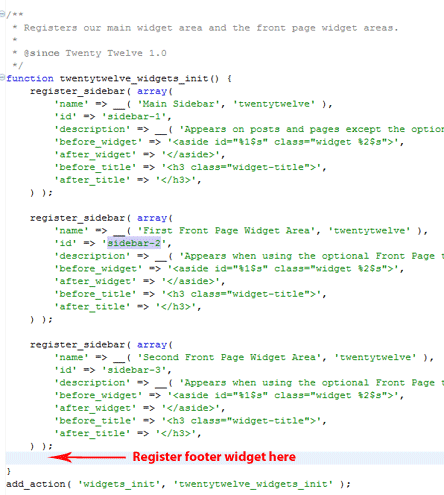
The following screenshot is taken from the Twenty Twelve theme’s functions.php file which should give you some perspective as to where you need to insert the above code block.
2. Show the footer widget area in your theme
Open your footer.php file and insert the following block of code where you want to show the footer widgets (this will show the 3 footer widget areas if they have any widgets in them):
<div id="footer-sidebar" class="secondary">

<div id="footer-sidebar1">

<?php

if(is_active_sidebar('footer-sidebar-1')){

dynamic_sidebar('footer-sidebar-1');

}

?>

</div>

<div id="footer-sidebar2">

<?php

if(is_active_sidebar('footer-sidebar-2')){

dynamic_sidebar('footer-sidebar-2');

}

?>

</div>

<div id="footer-sidebar3">

<?php

if(is_active_sidebar('footer-sidebar-3')){

dynamic_sidebar('footer-sidebar-3');

}

?>

</div>

</div>
3. Style the footer widget area to your liking
Add the following block of CSS code to your theme’s style.css file to add some basic styling to the footer widgets you just added. Customize it a little to match your needs. Our how to use firebug tutorial should come in handy for this.
#footer-sidebar {

display:block;

height: 250px;

}
#footer-sidebar1 {

float: left;

width: 340px;

margin-left:5px;

margin-right:5px;

}
#footer-sidebar2 {

float: left;

width: 340px;

margin-right:5px;

}
#footer-sidebar3 {

float: left;

width: 340px;

}
Adding Footer Widget to an Older Theme
Do the following if the theme you are using is a bit old:
1. Register the Sidebars in the WordPress Theme
Go to the WordPress theme editor and open the Theme Functions (functions.php) file. Now Search for the following line in your Theme Functions (functions.php)
if ( function_exists('register_sidebar') )
Once you find the above line then take a look at the the next line which should look similar to one of the followings depending on how many sidebars you have:
register_sidebar(array(
or
register_sidebars(2,array(
Say for example you have one sidebar in your theme and you want to add three rows of sidebars in the footer area so you can put widgets then overwrite the code with the following:
register_sidebars(4,array(
The above will register 4 sidebars (one that you already have and three more that you are about to introduce in the footer area of your wordpress theme).
2. Insert the Sidebars In the WordPress Theme
Now lets insert the siderbars where we want them in the WordPress theme. In our case we are going to insert in in the footer area of the theme so open the Footer (footer.php) file and insert the following code just above the ‘footer’ division:
<div id="footer-sidebar" class="secondary">

<div id="footer-sidebar1">

<?php if ( !function_exists('dynamic_sidebar') || !dynamic_sidebar(2) ) : ?>

<?php endif; ?>

</div>
<div id="footer-sidebar2">

<?php if ( !function_exists('dynamic_sidebar') || !dynamic_sidebar(3) ) : ?>

<?php endif; ?>

</div>
<div id="footer-sidebar3">

<?php if ( !function_exists('dynamic_sidebar') || !dynamic_sidebar(4) ) : ?>

<?php endif; ?>

</div>
</div>

<div style="clear-both"></div>
3. Put some style into the sidebars
Finally, lets put a little style to all the ‘footer-sidebar’ divisions that we just introduced. Open the Stylesheet (style.css) file and insert the following CSS (you will probably have to adjust the CSS to your need depending on what wordpress theme you are using).
#footer-sidebar {

display:block;

height: 250px;

}
#footer-sidebar1 {

float: left;

width: 340px;

margin-left:5px;

margin-right:5px;

}
#footer-sidebar2 {

float: left;

width: 340px;

margin-right:5px;

}
#footer-sidebar3 {

float: left;

width: 340px;

}
Hope this helps! Now you don’t have to change your beloved WordPress theme just to get footer sidebar/widget 🙂
Thank you for sharing this tutorial. I am trying to add custom widget in my theme but getting an unknown error. This is the code that I have been adding in functions.php. I have seen this code here https://www.wpblog.com/wordpress-custom-widget-area/ but not sure whetehr it’s working or not because when I am trying to add it in my site theme it not works.
function widget()
{
register_sidebar(array(
‘name’ => __(‘Primary Sidebar’, ‘wpb’),
‘id’ => ‘primary_sidebar’
‘description’ => ”,
‘class’ => ”,
‘before_widget’ => ”,
‘after_widget’ => ”,
‘before_title’ => ”,
‘after_title’ => ”,
));
}
add_action(‘widgets_init’, ‘widget’);
Thanks, It was exactly what I was looking for and also making it so simple and clear with examples 🙂
Thank you! It is what I am looking for.
Really nice…worked great – thanks for the details – you made this nice and easy!
@Florence, you should ask your theme developer where this file is. All themes should have a functions.php file (or equivalent).
Hi, this is the exact issue am having but unfortunately i dont have either the functions.php or the footer.php files in my theme. Should i just go ahead and create them and which folder should i dump them in. please save me like you saved the others tnx am waiting
Thanks for that 🙂
Thank you very much! You are a live saver!!!!
It was so useful that I could not leave without saying thank you.
Thank you, Your code worked like a charm for me! I just had to style the divs!
Thanks for the tutorial. The Codex is a heap load of info. Reading this makes it simple.
I know I sound like another broken record, but just wanted to say that this really helped me out. Thanks for taking the time to put this together!
Thank you. I have stuffed around with the footer for hours. GREAT TUTORIAL
OMG THANK YOU!!!!
I am still in the process of styling this as I type but I can already tell this is TOTALLY going to work!
You saved me a couple hundred dollars in designer/coding fees. I LOVE you! XOXQ! -chel
Awesome …..I had a serious headache getting to fix that 4 footer widgets and your tutorial was the best. Thanks so much for your help
@MEmilsson, Background of the footer widget or the whole theme?
Hi! Thanks very much for this.
I got one question thou: How du I change background color to black (for example)?
BR Mattias
Use the “float” CSS property on the footer widget class and they should go side by side.
one more query,
what would be code to keep those 3 footers side by side.Can any one help ..Thank you
This is really awesome.you are genius .I just added the code and it worked perfect.So we can add as many footer widget areas as we want .cheers
Great Tutorial!! You Rock my friend! Like always I had to change some CSS Styles but is working! Thanks Bro.
Clean & Perfect tutorial. I added 3 column footer widgets to my site. Thanks
AWESOME. Works perfectly!
Excellent tutorial! Worked right away and after adding a border, background color, box shadow and some text shadows, was exactly what I needed.
You da man!
@Raymond, you can create a “functions.php” file in your child theme if it doesn’t have one already. Then you should be good to go. WordPress will include the code from both your parent and child theme’s functions.php file and execute it.
How would you recommend doing this if you are using a child theme?
Really great post. Currently i am customizing one theme named kelta wordpress theme and i was facing some difficulties in adding widget. Now this post will help me in customizing the widget. Thanks for sharing.
easy tut to follow and worked a charm.. I’m thinking of placing some other widget slots in other areas using the same principle.
Cheers, DirtyDazz,
Great tutorial, simple and to the point. Best of all, IT WORKS! Lol.
This is an awesome tutorial. I was looking for a straightforward tutorial on how to add widgets to a website footer in WP and this was one of the best ones I found.
Its awesome.. this is what I’m looking for.. thanks.
Thank you. You made my day. People need to know some back ground have some background with coding before dealing with that ;).
Just used your tutorial to embed widgets in the footer for my theme. I was about to change my theme for additional widget areas. Thanks for the hack. Really easy and reliable. Works like magic
This tutorial is pretty close to perfect. I know it did what I needed it to.. Only thing different was the fact that I had to find the if statement in a different location, but once i di this worked flawlessly.
Thanks!
Great arcticle and very helpfull! Thx!!
Thank you for your good snippet.
Really works, thanks for the trick!
Very useful post. I really appreciate your blog.
Thanks
Thanks for this tutorial dude…
I its just a great job..keep it up
Does anyone know how to add a FOURTH footer area to TwentyEleven? I am using a Twenty Eleven child theme.
Thanks.
Thanks a lot. its really grt tutorial..
Wow, thank you very much, this is what I’ve been looking for, I am now editing my template. 😀 Keep it up!
Thanks for the help. Worked out perfect.,
I love to tackle problems like these and i was going to try and solve this myself but you beat me to it 🙂 and saved me a lot of time. Thanks! I have a nice theme and wanted to display weather forecast widget in the footer and it works perfectly.
Thanks, this worked very well for me. I just had to tweek the code a bit by putting the named dyanamic widget as opposed to number assignments.
Thank you
Good artilce specially for beginners. Now i have learnt the art of adding widgets in footer as well. Will implement it in my next theme.
Thanks
Really great tips. As i want to learn wordpress so this post might help me…
That was a simple code trick, and yet so many people find it difficult. We used tables for so long to get that effect. Thanks.