WordPress eStore Startup Guide for Dummies

Categories: Blog Setup, Wordpress Plugin

I have had a few requests from some of the users of the WordPress eStore plugin (to Sell digital content from your blog securely) to write up a step by step startup guide so they can be up and running and selling their products in less than five minutes… So here it is.

If you prefer a video tutorial then take a look at the WP eStore quick installation and usage video tutorial

Before you dive into playing around with all the various settings of the WP eStore plugin I recommend getting up and running first by following the simple startup steps outlined below.

wp_estore_dummies_icon1

1. Once you get the product download link in your email go ahead and download the zip file.
2. Extract the zip file and upload the ‘wp-cart-for-digital-products’ directory to your ‘/wp-content/plugins/’ directory.
3. Activate the plugin through the Plugins menu in WordPress.
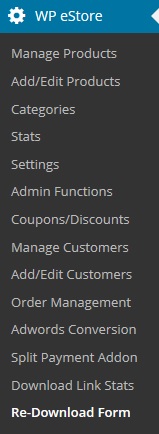
4. After you activate the WordPress eStore Plugin, the settings/options menu can be found on the left hand side menu similar to the following screenshot (on WordPress version 2.7 or above)

wp-estore-settings-menu-sc

5. First go to the ‘Settings’ menu and configure the general, email and digital product delivery options.

  • Most of the default settings should be enough to get you going but you may want to customize a few things.
  • Make sure to change the ‘Random Code’ to something hard to guess.

6. Now go to the ‘Add/Edit Products’ menu.

  • Fill in the Product name and product price fields.
  • Now fill in the URL of the actual product file in the ‘Digital Product Download URL’ field if this is a digital product.
    • eg. downloads/online-courses/seo-course/awesome_ebook.zip (relative to the WP eStore plugin directory). You can use the full URL too if your download file is located somewhere else on your blog, eg. http://www.your-domain.com/wp-content/uploads/products/ebooks/awesome_ebook.zip. Buyers will get an encrypted version of this link so they will never see/know this URL.

7. Upload the digital product (eg. the pdf, zip file) to the location you just specified above. (Make sure you have the correct URL and it is accessible… one easy way to check this is to copy the full URL and and paste it into the browser address bar and then press enter. If the URL is correct, the browser will pop a download window for that file.

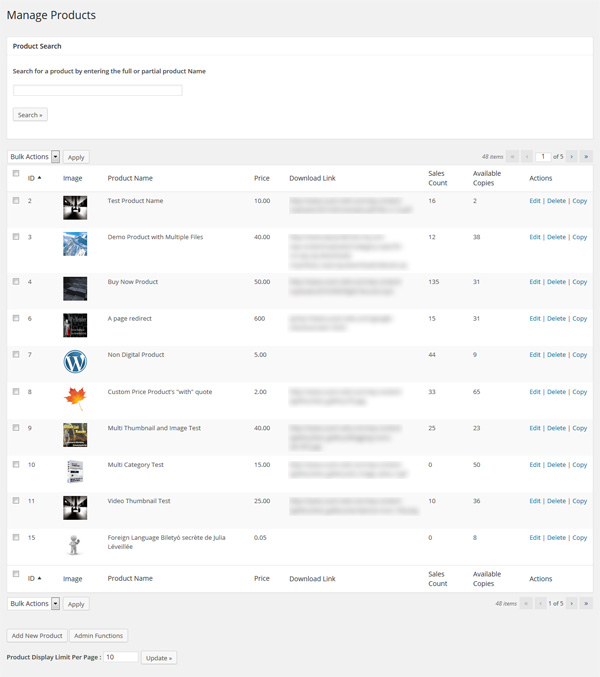
8. Go to the ‘Manage Products’ menu and this page will show you a table of all the existing products you have. To edit a product just click on the edit button for the corresponding product. Take note of the Product IDs in the ‘ID’ column of the table. You will need this product id to display an ‘add to cart’ button on your blog that corresponds to this product.

wordpress_estore_manage_product_sc1

9. Now just put the following trigger text where ever you want to add the ‘add to cart’ button to sell the product you just configured (assuming the product id of the product is 1)

dummies-add-to-cart

10. Add one of the following shortcodes for the shopping cart where you want it to appear (in the post and/or on a checkout page). You can use the widget too to show the shopping cart on the sidebar.

wp_eStore_cart_when_not_empty]

or

wp_eStore_cart]

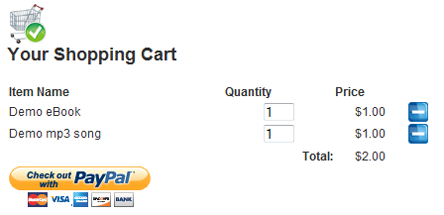
The first shortcode is useful when you want to show the shopping cart only when there are items in the cart (eg. in a post). The 2nd trigger text always shows the shopping cart (useful on a checkout page).

Now just sit back and see those sales come through and in your spare time browse the WP eStore documentation site to learn all the cool things you can do with this plugin :)

WP eStore Shopping Cart Screenshot

WP eStore Shopping Cart Screenshot

Useful Related Links

All WP eStore related documentation can be found on the WP eStore Documentation Site.

The WordPress eStore plugin can be found here.

Articles you may also like:

  1. WordPress eStore Plugin – Complete Solution to Sell Digital Products from Your WordPress Blog Securely
  2. WordPress Simple Paypal Shopping Cart Plugin
  3. List of the Best and Must Use WordPress Plugins
  4. WP-Table plugin for WordPress with the fatal error fix
  5. WordPress Easy Paypal Payment or Donation Accept Plugin
Tags: ,

Subscribe to Tips and Tricks HQ to stay informed

twitter_icon

164 Responses.

  • #1 by NBB on October 29, 2011 - 3:32 pm

    Really nice job, folks! It took about an hour to get a product up (not five minutes), but it was very easy. Everything works as advertised.

  • #2 by Glasgow Boy on January 27, 2011 - 9:54 am

    Hi there

    I’m wondering if you guys use mod_xsendfile to handle the files.

  • #3 by DrRob on December 29, 2010 - 10:47 am

    Bingo! That does the trick.

  • #4 by Ivy on December 28, 2010 - 6:44 pm

    Hi Rob, I believe this is what you are looking for:

    http://www.tipsandtricks-hq.com/ecommerce/how-to-allow-customers-to-specify-a-price-for-a-product-994

    Please let me know if this is not what you are looking for.

  • #5 by DrRob on December 28, 2010 - 5:51 pm

    Hi –

    Is there a way to leave the price field user specified? While I am mostly using the plugin for pre-priced digital content, I would also like to have an option where a price can be entered manually — to pay against services.

    Thanks!

  • #6 by Ivy on September 27, 2010 - 10:03 pm

    Hi, The files can be hosted anywhere you want as long as the eStore can access them. This means no password protection, hidden behind a firewall and so on.

  • #7 by Bentley on September 26, 2010 - 11:43 pm

    Hi,
    I use Amazon web services storage and just want to make sure my products can sit there (rather than on my website) and still be accessed via the shopping cart? I didn’t see mention of using a download URL other than one from on your actual website.
    Thanks

    B

  • #8 by Ivy on August 27, 2010 - 10:38 pm

    Hi Adam, The checkout process is handled by the Payment gateway (example: PayPal). Since PayPal is handling the transaction you do not need a SSL. The transactions is not processed though your site. You only need a SSL when you accept payments (mainly credit card payments) directly on your site.

  • #9 by Adam on August 27, 2010 - 1:12 pm

    Do we need an SSL cert for the store? Especially the checkout process? I don’t quite understand how this works…

  • #10 by Ivy on June 7, 2010 - 11:59 pm

    Hi, Please see the following site as it will explain what a 500 error is and how to fit this issue:
    http://www.checkupdown.com/status/E500.html

  • #11 by ajones on June 7, 2010 - 8:48 pm

    hello, i am installing the eStore plugin. I’ve uploaded it to the wp-content/plugins folder. In WP, when I click to “activate” I am getting this error: Error 500 – Internal server error.

    I am not getting this error with eMember when I followed the same steps. Any thoughts on what’s going on?

  • #12 by Ivy on January 16, 2010 - 7:08 pm

    Hi Malin, This setting is for the eStore plugin not the Simple Paypal Shopping cart. The following site has the documentation for the Simple Paypal Shopping Cart.

    http://www.tipsandtricks-hq.com/ecommerce/wp-shopping-cart

    Ivy

  • #13 by Malin Fabbri on January 16, 2010 - 8:49 am

    The instructions say “Make sure to change the ‘Random Code’ to something hard to guess.” I can’t find the random code. Using WP 2.9.1 and Simple Paypal Shopping Cart Settings v 2.6.

  • #14 by admin on January 3, 2010 - 7:20 pm

    You just need to make sure that the language files are saved in UTF-8 Format after you modify them otherwise the accents come up funny. If you need help with this please let me know.

  • #15 by Irsa on January 3, 2010 - 12:42 pm

    Hello,

    The plugin does not seem to manage words with accents? I use the French version and all words with accents are transformed…

    Thank you!

  • #16 by admin on January 2, 2010 - 9:00 am

    Hi Charles, yes the text is editable (edit the language file from the “languages” directory of the plugin)

    If you don’t want to show the “Terms and Conditions” checkbox then simply disable is from the settings menu of this plugin.

  • #17 by Charles on January 2, 2010 - 1:57 am

    The check box for ‘Terms and Conditions’ inside the shopping cart—and the text that appears
    when you click on the actual terms and conditions…. ..are those editable and/or optional to display at all??

    thanks,
    charles

  • #18 by admin on November 17, 2009 - 3:59 am

    Hi matt, not sure what you mean.. can you give an example? Are you talking about when the customer goes to paypal to checkout for the product? Maybe give me a link so I can go and have a look?

  • #19 by matt on November 16, 2009 - 11:33 pm

    Hi Amin.

    I’ve inputted the product name, description, and category fields, yet the Item Title field in my PayPal reports populate as “Shopping Cart”.

    Is there a way to populate the Item Title for inventory management purposes?

    Thanks!
    matt

  • #20 by admin on November 10, 2009 - 6:35 pm

    @Anirudh, The wp-e-commerce and the WP eStore are not the same plugin. Please post your wp-eCommerce plugin related issue on that plugin’s site.

  • #21 by Anirudh Goel on November 10, 2009 - 5:59 am

    Hi, i have migrated my wordpress installation to another location but the wp-e-commerce plugin is not updating the new links and it still refers to old site’s address for each product. How can i fix that?

  • #22 by Angelika on October 28, 2009 - 11:48 am

    Thank you for your prompt reply. Time to ‘play around’ with it and get acquainted with the plugin. :-)

  • #23 by admin on October 27, 2009 - 9:37 pm

    @Angelika, yeah you should be able to sell anything you want. First you need to figure out if you want to use “Add to Cart” buttons or “Buy Now” type buttons for one time payment. Once you figure that out then all you need to do is follow the instructions on the documentation site for that button type. If you want to use a recurring/subscription payment for a server then you can do so by configuring a subscription button.

  • #24 by Angelika on October 27, 2009 - 12:56 pm

    Hyea! I just proudly bought the e-store plugin and because of your excellent video have it all activated now.

    I will have downloadable e-products in the near future hence me getting this plugin. For now, though, I am just selling services – phone coaching sessions to be precise.

    Can I still use this plugin for that? and if so what would I need to do, please?

    Thank you for your help.

    Angelika.
    .-= Angelika´s last blog ..Lady in Red Dreams vs Man’s Comfort with TV – What Do You Do?? =-.

  • #25 by Nan on October 21, 2009 - 1:14 pm

    Thanks for your response and answer. Gonna get this plugin soon :)

  • #26 by admin on October 20, 2009 - 11:01 pm

    @Nan, 1) Yes, there is a mulitple parts dwonload feature so you can break a large file into smaller ones.

    2) Yes, the file can be anywhere on the web (your domain or on a shared hosting site). The customer always receives a link that never reveals where the file is actually located.

    3) You can use the personal paypal account. Please note that all PayPal accounts are free (personal, premium, business).

  • #27 by Nan on October 20, 2009 - 12:21 pm

    Hi,

    I’m interested to get this plugin, but I’d like to ask a few things first:

    1. Is there a multiple download feature? I’m gonna sell huge zip files to my customers (over 70mb) and to make it easier for them to download, I’m planning to break down the file to multiple zips.

    2. My hosting storage and bandwidth is a bit limited, so I’m planning to use hosting sites that has hotlinking feature for customers to download their files, like 4shared. Can I direct the customers to the download link on 4shared (for direct download) but the link is still encrypted? What I mean is, having my files stored off-site, and still having the links encrypted?

    3. Do we need to have Paypal merchant account for the transaction? Or just the normal, free account?

    Regards from Malaysia,
    Nan.

  • #28 by admin on October 20, 2009 - 3:55 am

    @Raintrader, Glad to hear that you like the plugin.

    #1 The translation is provided to me by other people so I have no way to verify but the language file can be manually modified to suit your needs. Simply open the corresponding language file from the “languages” directory of this pluign and modify the values to your needs. let me know if you need help with this.

    #2 I have emailed you regarding this on (I will need to have a look at your site to see what you mean)

  • #29 by Raintrader on October 19, 2009 - 9:56 am

    Hello, first of all: Thanx for that amazing plugin wich is exactly what i was looking for.

    There are just two problems wich i would like to get rid of.

    prob #1
    Although my language setting is set to German there are som words @ the Frontend wich are not translatetd corrctly.

    For example in the product display (fancy and normal as well) it says Price instead of German “Preis”.
    Where can i change that ??

    Also it seems to have troubles with German Umlauts (ÄÖÜäöü) especialy in product Desciption. When you enter a new product…everything look good.
    But after some reloads the Umlauts become ugly.

    Prob # 2
    on top of every page wich contains the Shopping Cart is the following line smal line of code displayed.
    how to get rid of it ?
    Would be great if you could get me back on track.

    Best wishes out of Germany.
    Sascha

  • #30 by maruse on September 29, 2009 - 9:17 am

    Thank you very much for your offer! What I need is for the shopping cart to choose between the language/eng.php or the language/jpn.php (which I made), depending on the language qTranslate is showing. I thought using if/else with “qtrans_getLanguage()” might do the trick, but it didn’t work, so nothing changes in the cart when you change languages with qTranslate. The creator of qTranslate offers this information on his website, but I can’t make any sense out of it:
    http://www.qianqin.de/qtranslate/forum/viewtopic.php?f=3&t=294
    I hope that if you look at this, you’ll be able to tell me what, if anything, I can do. Thank you again!

  • #31 by admin on September 28, 2009 - 11:27 pm

    Hi Maruse, I don’t know of anybody who made it to work with qTranslate. 95% of my users/customers are English based so I have never really looked into it but if there is something simple that I can do that doesn’t take a lot of my time then I will definitely help you out.

  • #32 by maruse on September 28, 2009 - 10:27 am

    Thank you for your quick response! I’m now thinking of doing something more complex… Do you know if eStore can be made to work with qTranslate? I tried to do this today, but since I know next to nothing about PHP, I didn’t get anywhere. I suppose as a last resort, I will just give my cart dual headings (eg Language A Heading/Language B Heading). Not very compact, but easy at least (lol) Anyway, I guess my question is if you know of anybody who has succeeded in making eStore work with qTranslate. I read an entry in this very website dated a few months ago from someone who said they were going to try to do this and that they would get back to you if they did. But since they haven’t posted anything after that, I guess they haven’t been successful yet…

  • #33 by admin on September 28, 2009 - 4:48 am

    Hi Maruse, Yes, the shopping cart is viewable in the language that you set in the settings menu.

  • #34 by maruse on September 28, 2009 - 12:35 am

    Hi there,

    I’m wondering if the cart is visible in different languages. I saw that there are a few language php files in eStore, but I couldn’t find an option to change the language of the cart. Any info you can give would be greatly appeciated! And great plug-in, by the way!

  • #35 by admin on August 28, 2009 - 7:44 pm

    Hi Dave, Yeah it sounds possible… are the members wordpress member?

  • #36 by Dave on August 28, 2009 - 3:06 pm

    hey there. I was wondering. Is it possible to offer different prices for people based on whether they are a paid member or have an active subscription? We’re looking for a feature like that.

    Thanks

    Dave

  • #37 by James Jackson on August 25, 2009 - 6:16 pm

    Thanks again for your time, Amin. :)

    I uploaded the new download.php file you sent me. But to finally get it working I had to use the relative URL and place the files for downloading in the download folder that is within the WP-cart folder rather than the download folder I had designated myself.

    Thanks again for such an amazing plugin. Even with this hiccup included this has still been the easiest setup for an ecommerce site I’ve ever done.

  • #38 by admin on August 24, 2009 - 6:51 pm

    Hi James, Glad to hear you like the plugin. you shouldn’t need to try any workaround. I think the ‘download.php’ file got corrupted somehow. I have sent you another copy of this file can you please upload it and give it another go?

  • #39 by James Jackson on August 24, 2009 - 11:57 am

    First off…. I can not beleive how simple this plugin is to setup. I’ve been a web designer since 1999 & cringe at the thought of setting up eCommerce site because they are ALWAYS a pain in the butt. Much love to you for making this so simple.

    I’ve installed WP eStore Plugin & it works like a charm until the very last step in the process. When I attempt to download the file by clicking the encrypted URL in the email sent to a customer I get this error message:

    Warning: session_start(): Cannot send session cache limiter - headers already sent...

    I’ve tried using both relative & static URLs for the download link & still have the same results. Any suggestions?

    You can see my test product here:
    http://learnstuffnow.com/wordpress/?p=81

    Thanks in advance!

  • #40 by Amanda Robins on August 13, 2009 - 8:39 pm

    Hi,

    I have noticed that you have worked in the affiliate program, wp estore plugin and the Wishlist software. I need the same thing please.
    I have a home page on my site that will be used as a squeeze page to capture email addresses and offer them a free membership to my website. This is the page that the affiliates will send people to.
    After they enter their name and email they will be taken to a One Time Offer page where they will have a chance to get a membership upgrade for $1 for the first month and $47 every month from then on. If they agree to the upgrade they will add the subscription which I need to have the right button from the WP eStore and then they will need to complete their payment and be taken to the gold member sign in page.
    If they just want their free membership they will be taken to the free member sign up page but this will need to be tracked in case they buy later.
    can you help me to get all the software to work together asap as I need it ready with in two weeks so I can launch the site on time.

    thanks
    Amanda

  • #41 by admin on August 12, 2009 - 8:28 am

    Hi Leon, I have integrated the Affiliate plugin, WP eStore plugin and Wishlist for one of my clients. Please contact me with a bit of details around what system you want in place (how you picture it to work) and I will see what I can do.

  • #42 by Leon McKee on August 11, 2009 - 4:55 pm

    If you can figure out a way to integrate your Affiliate plug-in so we can track non-purchase sign-ups made through WishList Member we’ll be golden. You would have one happy “new” customer and I would recommend your plug-ins to some of my contacts. We could also get you some “love”, as they say, from the Warrior Forum.

    Please add me to your update lists for the store and affiliate plug-ins.

    Leon McKee
    .-= Leon McKee´s last blog ..Who is Leon McKee? =-.

  • #43 by admin on August 10, 2009 - 5:04 am

    Hi Leon, Yes, you just have to follow the ‘wlmember-generic-integration.pdf’ instructions but I am going to add some documentation and provide the necessary code so you don’t have to do anything.

  • #44 by admin on August 10, 2009 - 5:02 am

    Yes, when someone cancels their membership the referrer for that member does not receive any more commission.

  • #45 by Leon McKee on August 9, 2009 - 11:04 am

    Would one use the wlmember-generic-integration.pdf for instructions to integrate WishList with this plug-in? I would think that once this is done your Affiliate plug-in would play nice i this configuration?

    Leon McKee

  • #46 by Amanda Robins on August 8, 2009 - 11:14 pm

    Hi,

    Just one quick question while you are fixing the software. When someone cancels their membership will this automatically stop the affiliate payments?

    thanks
    amanda

  • #47 by Amanda Robins on August 8, 2009 - 11:06 pm

    Thank you very much for your fast reply and all your help. You have saved me hundreds of dollars! thanks again and I look forward to the new version of your work.

    Amanda

  • #48 by admin on August 8, 2009 - 8:18 pm

    Hi Amanda, Yes, you can integrate the shopping cart, affiliate program and the wishlist plugin. I was doing this work for one of my customers and we found a small problem with wishlist. Wishlist have found the bug and fixed it on their development version so you will probably have to wait a bit for them to release their new version before this integration can be done.

    I am redoing the subscription setup option of a product/service which will allow you to setup any type of subscription button with the WP eStore (I intend to complete this work within the next two days).

  • #49 by Amanda Robins on August 8, 2009 - 7:19 pm

    Hi,

    I am looking at using this software with the affiliate program. I have a membership site and I use Wishlist membership software. my questions is can I link in the shopping cart and affiliate program with the wishlist software?

    Plus I want to have a subscription fee for on going membership. How do I set this up in the WordPress eStore? I want a one month $1 trial membership and then $47 per month from then on.

    thanks
    Amanda

Featured & Popular Articles

Tips and Tricks Hot Items

wordpress estore plugin
wordpress membership plugin
WordPress PDF Stamper Plugin
WordPress Lightbox Ultimate Plugin
WordPress Affiliate Link Manager Plugin
wordpress affiliate plugin