This WordPress plugin lets you customize the email details that appear on emails sent from WordPress. By default the “From Name” on emails sent from wordpress has a name “WordPress” and the “From Address” on emails has “[email protected]” which is not very meaningful. You can customize both these fields with this plugin so your customers are not confused.

Change WP Mail Plugin Installation
- Go to the “Add New” interface from the plugins menu.
- Click on the “Upload Plugin” button.
- Browse and upload the plugin file (change-wp-mail-from-details.zip).
- Activate the plugin.
Change WP Mail Plugin Usage
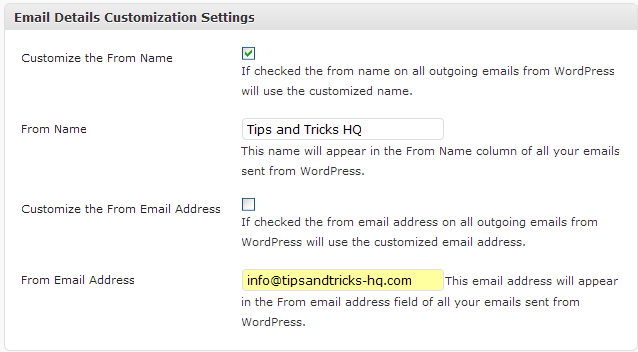
- Check the appropriate checkbox for the options that you want to customize.
- Enter the customized text in the appropriate field.
Special Note
If you are trying to customize the “From Name” and “From Email Address” for any of the following plugins then there is an even simpler solution:
- WordPress Shopping Cart (WP eStore)
- WordPress Membership Plugin (WP eMember)
- WordPress Affiliate Plugin (WP Affiliate Platform)
- WordPress Simple Cart plugin
You can use the following format in the “From Email Address” field in the settings menu of these plugins:
Your Name <[email protected]>
So for the above example “Your Name” will be displayed as the name and “[email protected]” will be used in the email address field.
Download Latest Version
Download the Plugin.
Check out our WordPress plugins page for more cool WordPress plugins.
@Ross, This plugin doesn’t stop any email. It simply overrides the header parameter value for the outgoing email.
Hi
Thanks for the plug in. My host does not provide smtp (for free) so I am using wp_mail. I found the php mail worked ok but that I needed to use the plug in to set the ‘from’ values to get wp_mail to work, so thanks for that. Your plug in is the best way to set the from values.
Everything works now except that I don’t get an email for a new comment. Any suggestions would be appreciated.
Ross
@Gwen, yeah it works fine on WordPress 4.0. I just tested it. Does it give any error on your installation?
I am trouble shooting the eMember plug in for WordPress and am running WP 4.0. I cannot run “Change WP eMail From Details” on this WP version. When will this plug in be compatible with WP 4.0? Is there another solution?
Thanks!
@Sebastian, Thank you for sharing the tweak.
If you want to get the default site email address and the site title just copy/paste in functions.php
/**

* change WordPress default FROM email address

**/

add_filter('wp_mail_from', 'new_mail_from');

add_filter('wp_mail_from_name', 'new_mail_from_name');

function new_mail_from($old) {

    $email = get_option( 'admin_email' );

    return $email;

}

function new_mail_from_name($old) {

    $site_name = get_option( 'blogname');

    return $site_name;

}
@BMan, yeah this plugin will help you achieve what you are after. It will let you customize the from email name and address of all outgoing emails from your WordPress site.
So I have a problem that I wonder if this plugin will solve. the issue is I am hosting two domains on the same hosting service provider. Both domains are significantly different from each other in their ambition and scope. In essence different brands.
I’m using wordpress on both domains. The problem is wordpress just grabs the default reply from address that I have set in my hosting provider. So when a new user registers at either domain some (the default one) get a reply from the correct domain. but the others get the reply from the other domain mail address. which is confusing at least and cheesy at best..
Am I looking at the right thing? or if not any better search terms I should be entering as I try to find a solution to this problem.
Thanks
Thanks, working great on a WP 3.4.1/BP 1.6 install. Definitely needed this.
No wonder my subscribers have feedback to me that they have not received my email. It is just that they did not know those emails were from me. I wonder why WordPress does not allow you to change email details manually. Anyways, thanks for sharing this plugin and steps on how to change the details. One would wonder why such an important function was not included in the first place.
This is a very handy plug-in. It also makes it easier to have all reply emails go into one email since I have quite a few blogs.
We keep all of our plugins current to the latest version of WordPress so it should not have any issues with the latest version. However if you do find an issue please let me know and we will have a look at it. =)
Great little plugin. Not much wrong with WP and strange that we have to use a plugin to solve such a problem. Nice work though, just hoping it will work with latest WP as seems you released this quite some time ago now. Mark.
Awesome plugin; thanks for making this change easy and now I can learn how it works when I’ve got the time – keep em coming!
I think it is very important to customize the email details that appear on emails sent from WordPress, it’s an useful solution to contact visitors easily.
Awesome! Thanks so much for this!
This has just entered my top 10 plugin list… BRILLIANT!!!
Thanks!!!
Excellent! You all are the bomb. This will be very helpful for us as we are using a shared hosting plan.
Hey great.. Single page plugin only.. Its working great.. we can change from name from email address..
Thanks for the plugin in, really usefull! Cheers!
Great thanks a lot! I’ve been so anoyed with this feature before!
I love it. The plugin works on a WP 3.2.1 installation.
I am using this plugin for my website and is really very reliable.Easy to install and quite user friendly
Thank you very much for the info and plugin!!!
Thanks for this great collection of plugins.It is very useful to me.Even nice blog too..Good work LOL….
that’s a great gathering of plugins, thanks
Thank you for this interesting guide. I love wordpress!
Love it! Us wordpress user really need more guides like this, cheers!
Your blog I found it very good, you have very interesting topics, thanks for the information.
Thank you Amin. Your programs and systems actually make life much easier. I haven’t updated my eStore for a while, maybe I missed the upgrade email from you?!
Good and simple plugin to install. Definitely worthwhile to change the from address to something more professional. The default shows a kind of carelessness to the receiver.
thanks for the details. my problem is now solved.
After a long time today I discovered a blog that provides real food for thought. Very impressing material
Hey, excellent job on writing this WordPress Plugin – Change WP eMail From Details | Tips and Tricks up, I am going to link this from my personal blog!
This is a handy plug-in. It also makes it easier to answer all emails into an email as I have quite a few blogs. Thanks for doing this.
Last blog @
Thanks for this plugin. Was looking around for something like this, and found it here. Like the was you can customize both fields.
Cheers
nice plugin, just downloaded,cheers
Thanks for the info. Will definitely try it on my WordPress blog.
Nice handy application –a useful solution to contact visitors easily. Takes a bit of effort to understand it fully, though.