Tips and Tricks WP eCommerce

eCommerce Solution for WordPress Blog

  • Home
  • eCommerce Plugins
  • WP eStore Documentation
  • WP Shopping Cart Doc

Configuring Taxes in Simple Shopping Cart

The Simple Shopping Cart plugin includes a Tax feature that allows you to apply taxes during checkout. You can configure either a basic tax rate that applies to all orders or a regional tax rate based on the customer’s location.

Table of Contents

  • Accessing the Tax Settings
  • Basic Tax
  • Tax by Region
    • How It Works:
  • Stripe Automatic Tax Compatibility
  • Display of Tax Amounts

Accessing the Tax Settings

  1. In your WordPress dashboard, go to:
    Simple Cart -> Settings -> Tax tab.
  2. Choose whether to configure:
    • Basic Tax – applies the same tax rate to all purchases.
    • Tax by Region – applies different tax rates based on customer location.

Basic Tax

The Basic Tax option lets you set a single tax percentage that is applied to the product price for all customers.

Example:
If a product costs $10.00 and the tax is set to 10%, the tax amount will be $1.00, making the total $11.00.

Notes:

  • The tax rate must be between 0 and 100.
  • Basic tax is automatically calculated and displayed in the checkout, thank you page, and order details.

Tax by Region

The Tax by Region feature lets you set different tax rates based on the customer’s:

  • Country
  • State
  • City

The following screenshot illustrates how to configure the Tax by Region feature.

How It Works:

  1. Enable Tax by Region in the Tax settings tab.
  2. Define one or more regions and set the tax percentage for each.
  3. When enabled:
    • A Region selection field will appear in the cart on the cart page.
    • Customers must select a region before checkout.
  4. The tax percentage for the selected region will be applied to the product price.

Important:
When Tax by Region is enabled, the Basic Tax setting is ignored. Only the regional tax rate is used — even if it’s set to 0%.

Stripe Automatic Tax Compatibility

  • Stripe offers an Automatic Tax feature.
  • If you have a custom tax set in the plugin (Basic or Regional), Stripe’s automatic tax will be disabled for that checkout to avoid double taxation.
  • If your custom tax rate is set to 0%, Stripe’s automatic tax can still be used.

Display of Tax Amounts

The calculated tax amount will be displayed in the shopping cart.
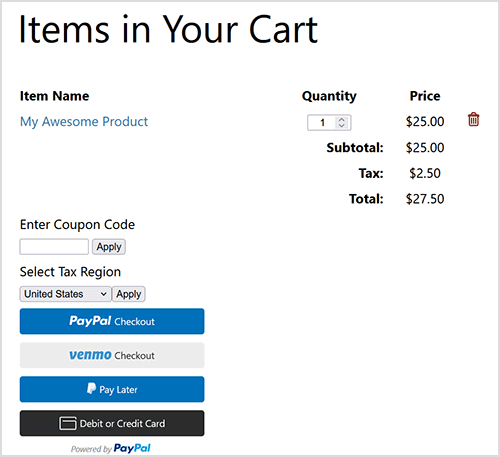
The tax amount will be displayed on the following pages also.

  • On the PayPal and Stripe checkout screens/pop-ups
  • On the Thank You page
  • In the Orders menu of admin dashboard

If Tax by Region is applied, the selected region will also be shown on the Order Details menu of admin dashboard.
Simple Shopping Cart – How Shipping Address is Collected

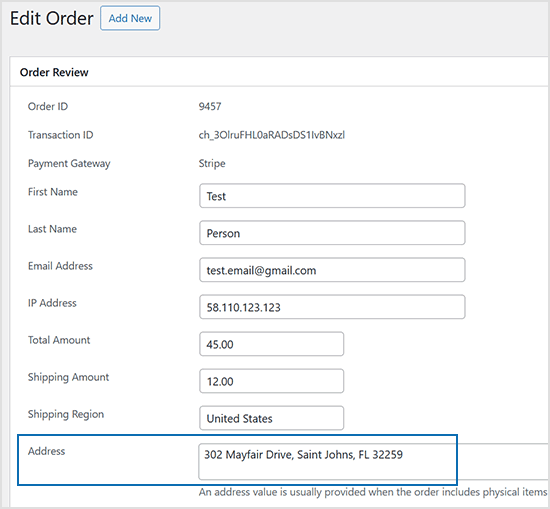
As the shop administrator, shipping physical products requires the customer’s shipping address. The plugin streamlines this by utilizing PayPal or Stripe’s shipping address collection during checkout, enhancing the customer’s experience. The address is then stored with the order for easy access from your site’s admin dashboard. Additionally, you can view the shipping address directly in your PayPal or Stripe merchant account.

Simple Shopping Cart – Enabling Terms and Conditions

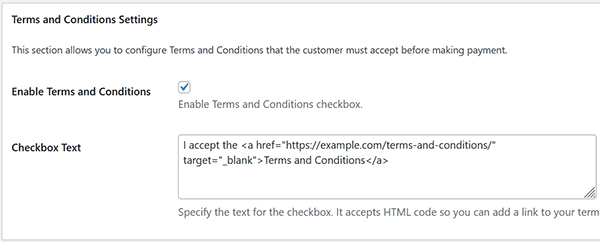
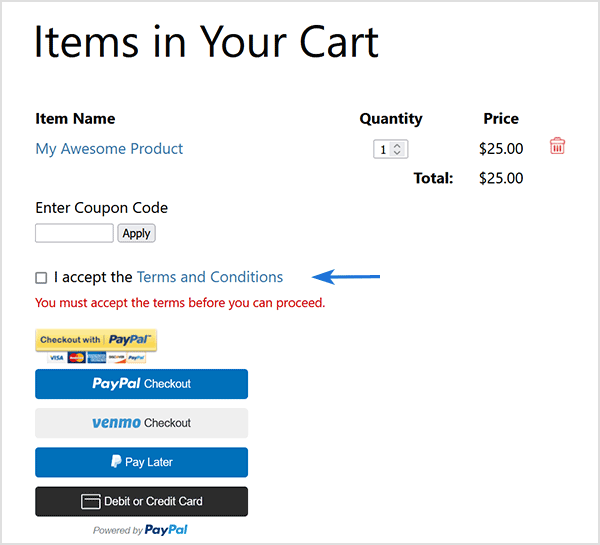
The Simple Shopping Cart plugin offers a dedicated feature for implementing Terms and Conditions. This functionality allows administrators to incorporate a Terms and Conditions or Privacy Policy page that customers are required to acknowledge and accept before completing a purchase. Utilizing this feature ensures transparent communication regarding the handling of personal information, fostering trust between your business and your customers.

Upon activation of the Terms and Conditions feature, a mandatory checkbox will appear on the shopping cart. This checkbox serves as an acknowledgment from customers that they have read, understood, and agreed to the stipulated Terms and Conditions or Privacy Policy. A potential customer must accept the Terms and Conditions prior to proceeding with the checkout process.

Enabling Terms and Conditions

To activate the Terms and Conditions feature in the Simple Shopping Cart plugin, please follow these steps:

  1. Navigate to the Settings menu of the Simple Shopping Cart plugin.
  2. Within the Settings menu, scroll to the “Terms and Conditions Settings” section.
  3. Check the “Enable Terms and Conditions” checkbox to activate the feature.
  4. Utilize the “Checkbox Text” field to customize the display text and the hyperlink associated with the Terms and Conditions.
  5. Click “Save” to apply the changes.

Manually Getting PayPal API Credentials for PayPal Commerce Platform

The Simple Shopping Cart plugin offers an automated method for acquiring your PayPal API credentials, detailed in the PayPal PPCP Setup and Configuration documentation. Use the manual approach outlined below only if the automatic option isn’t functioning on your site.

Note: The following guide serves as a backup option and is typically not required. It’s recommended to utilize the automated option found in the plugin’s PayPal API Connection settings tab.

Table of Contents

  • Live Client ID and Secret Key
    • Step 1) Log into PayPal Developer Account
    • Step 2) Toggle to Live Mode
    • Step 3) Create App and Get API Credentials
  • Sandbox (Testmode) Client ID and Secret Key
    • Step 1) Log into PayPal Developer Account
    • Step 2) Toggle to Sandbox Mode
    • Step 3) Create App and Get API Credentials
  • Save the API Credentials in the Plugin’s Settings

Live Client ID and Secret Key

Follow these steps to manually obtain your Live Client ID and Secret Key:

Step 1) Log into PayPal Developer Account

  1. Log into your PayPal Developer Account.
  2. Click on the ‘Apps and Credentials‘ menu.
    Note: If the sandbox/live toggle isn’t visible in the top right corner, click on ‘Developer Dashboard’. Once on the dashboard, you should see the ‘Apps and Credentials’ menu.

Step 2) Toggle to Live Mode

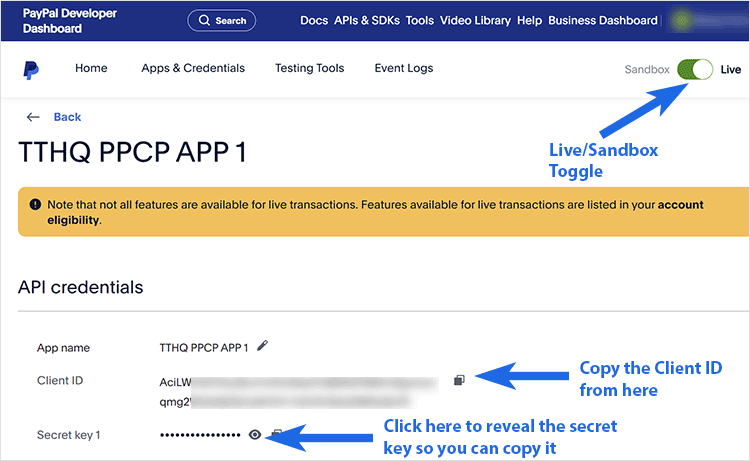
  1. Locate and click the toggle button in the top right-hand corner to switch to ‘Live‘ mode. This will allow you to access your Live Client ID and Live Secret Key.

Step 3) Create App and Get API Credentials

  1. Click ‘Create App‘. Enter a meaningful App Name and click ‘Create App‘ again.
  2. You’ll be directed to a page displaying your Live Client ID.
  3. Click ‘Show‘ to reveal your Live Secret Key.
  4. Copy each key separately and paste them into the corresponding fields in the Simple Shopping Cart plugin’s settings menu.

Sandbox (Testmode) Client ID and Secret Key

If you wish to conduct sandbox or test mode transactions with PayPal, you must create a separate app for this purpose. Follow these steps to acquire your sandbox API credentials:

Step 1) Log into PayPal Developer Account

  1. Log into your PayPal Developer Account.
  2. Click on the ‘Apps and Credentials‘ menu.
    Note: If the sandbox/live toggle isn’t visible in the top right corner, click on ‘Developer Dashboard’. Once on the dashboard, you should see the ‘Apps and Credentials’ menu.

Step 2) Toggle to Sandbox Mode

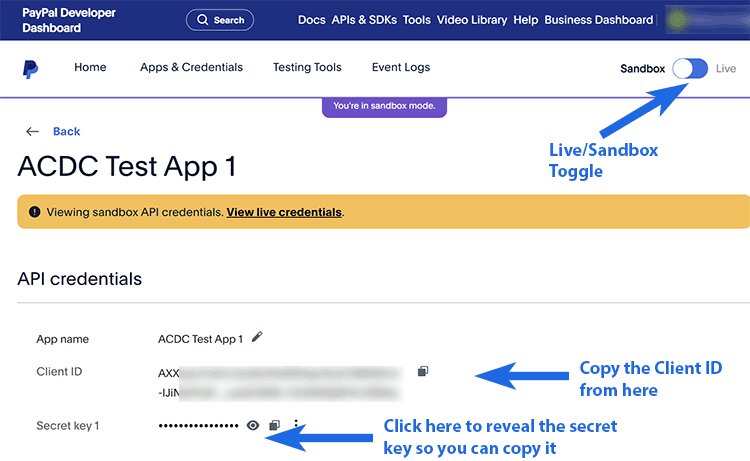
  1. Locate and click the toggle button in the top right-hand corner to switch to ‘Sandbox‘ mode. This will allow you to access your Sandbox Client ID and Sandbox Secret Key.

Step 3) Create App and Get API Credentials

  1. Click ‘Create App‘. Enter a meaningful App Name and click ‘Create App‘ again.
  2. You’ll be directed to a page displaying your Sandbox Client ID.
  3. Click ‘Show‘ to reveal your Sandbox Secret Key.
  4. Copy each key separately and paste them into the corresponding fields in the Simple Shopping Cart plugin’s settings menu.

Save the API Credentials in the Plugin’s Settings

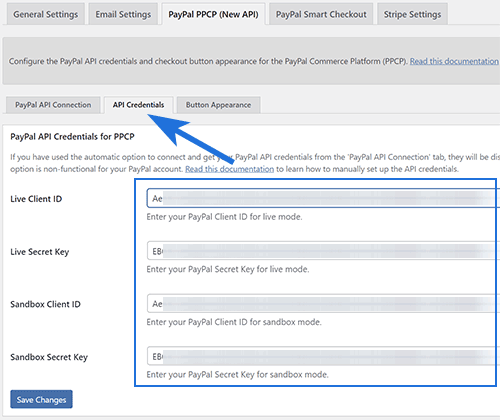
After copying your Client IDs and secret keys, paste them into the ‘API Credentials’ tab in the plugin’s settings menu.

PayPal Commerce Platform (PPCP) – Setup and Configuration

PayPal Commerce Platform (PPCP) is the new/latest product from PayPal, it offers the PayPal checkout and adds more payment options for global customers so that all your funds will be in one place, but your customers will see familiar payment methods.

This documentation outlines how to use it with the WP Simple Shopping Cart Plugin.

Table of Contents

  • Feature Overview
  • Configure PayPal Commerce Platform Checkout
    • Step 1) Enabling PPCP Checkout option
    • Step 2) Acquiring the API Credentials
    • Step 3) Verify Acquisition of API Credentials
  • Optional/Additional Configuration Steps
    • Sandbox Account
    • Button Appearance
    • PayPal Language (Locale)
  • Customer Experience with the Commerce Platform
  • Disable the Standard PayPal Checkout Option
  • Troubleshooting Related

Feature Overview

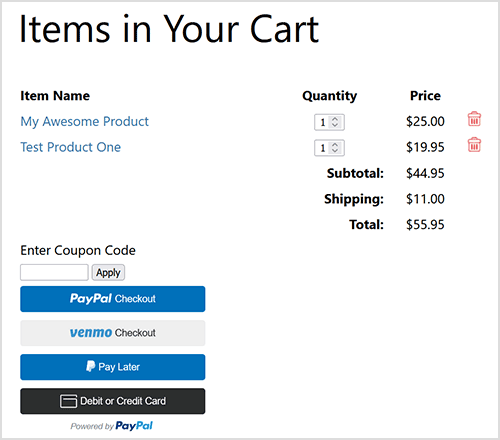
The PayPal Commerce Platform Checkout is an option you can enable in the WP Simple Cart Plugin. It adds checkout buttons like the ones shown below to your shopping cart when enabled. It provides optimal payment solutions tailored to your customers’ country/region.

Configure PayPal Commerce Platform Checkout

To use the PayPal Commerce Platform (PPCP) Checkout with the WP Simple Cart plugin, enable the feature and set up the API credentials.

Step 1) Enabling PPCP Checkout option

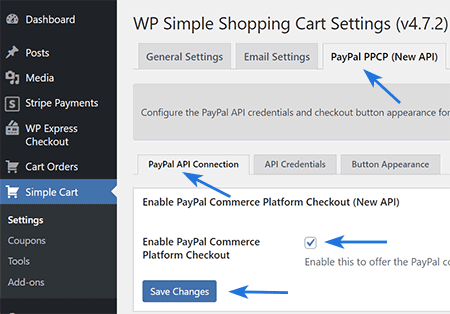
  • Navigate to ‘Settings‘ under Simple Cart and select the “PayPal PPCP” tab.
  • Find the section titled ‘Enable Commerce Platform Checkout’.
  • Check the box to activate it and save your settings.

Step 2) Acquiring the API Credentials

Note: You will need a PayPal Business account. It’s free to create one, and it provides access to all the PayPal features required for accepting payments on your website.

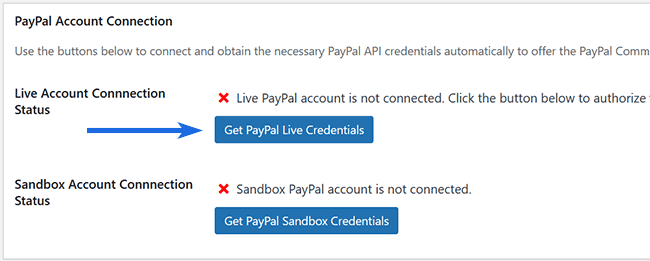
  1. Scroll to the ‘PayPal Account Connection’ section.
  2. Click on ‘Get PayPal Live Credentials’ to begin the authorization process and obtain API credentials from your PayPal account.
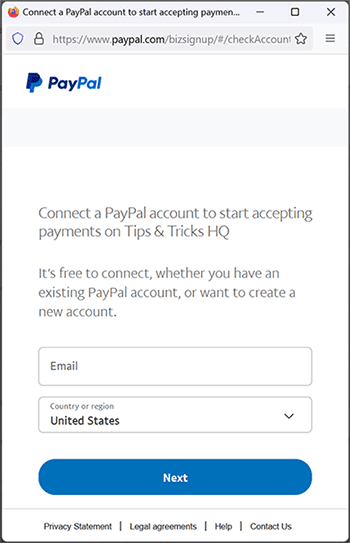
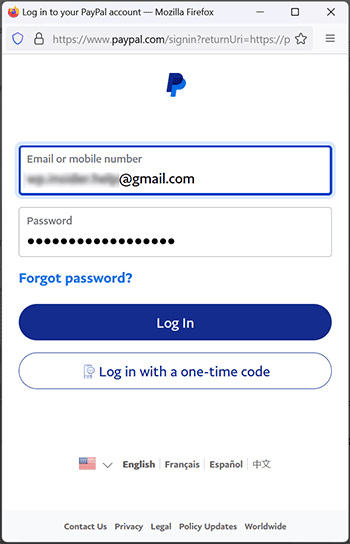
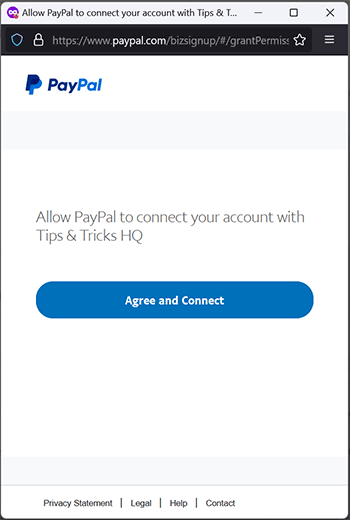
  3. A popup will appear, prompting you to log into your PayPal account. Log in and authorize our app to access your account and retrieve the API credentials.

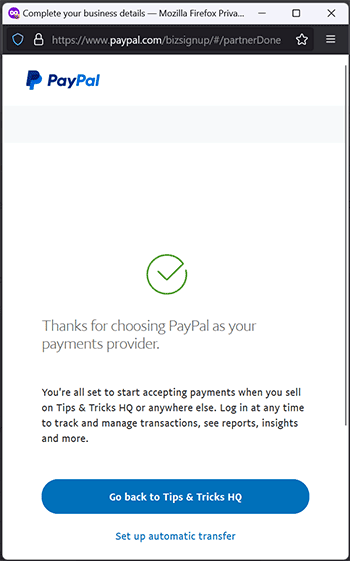
These screenshots provide examples of what you may encounter during the authorization process and the acquisition of API credentials. Depending on the status of your business account and your location, PayPal may pose additional questions. Upon completing these steps, the plugin will automatically receive and store the API credentials in the database, finalizing the API acquisition process.

Step 3) Verify Acquisition of API Credentials

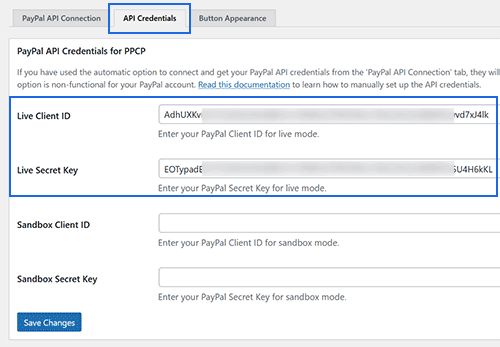
  • Navigate to the “API Credentials” subtab to confirm that the plugin has successfully acquired and stored the API credentials.
  • If the API credentials section displays the API keys, the setup for the PPCP checkout option is complete and ready for use.

Optional/Additional Configuration Steps

Sandbox Account

If you wish to conduct sandbox/test mode transactions with this API, follow the above steps using the ‘Get PayPal Sandbox Credentials’ button.

Button Appearance

For customization of the PayPal Commerce Platform checkout button appearance in your shopping cart, navigate to the ‘Button Appearance’ subtab. The default settings are optimized for immediate use, but you can modify them as needed.

PayPal Language (Locale)

PayPal normally detects the buyer’s locale automatically and adjusts the checkout language and experience accordingly. However, if you want to force a specific language for the checkout page, you can use the “Default Locale” field.

Navigate to the Settings menu of the Simple Cart plugin. Then go to PayPal PPCP Settings ? Button Appearance. Scroll to the bottom of the page where you will find the “Default Locale” field.

Enter a locale code from PayPal’s list of supported locales (use the value from the Locale Code column in PayPal’s documentation).

Examples of locale codes include: en_US, de_DE, es_ES, ja_JP, etc.

Customer Experience with the Commerce Platform

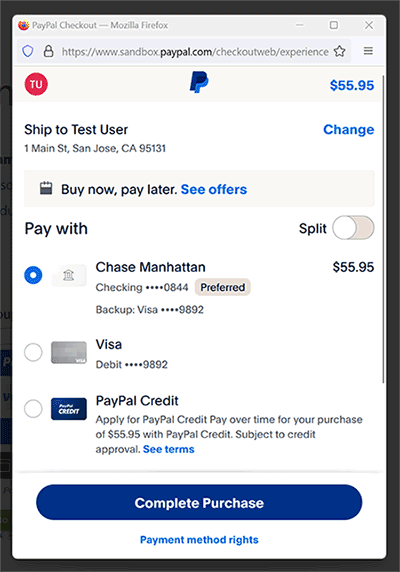
When customers add an item to the Simple Shopping Cart, they can proceed to checkout using the PayPal Commerce Platform buttons. Upon clicking a PayPal Checkout button, a popup will appear for them to finalize the checkout process.

The following is an example of how the payment popup window appears.

Disable the Standard PayPal Checkout Option

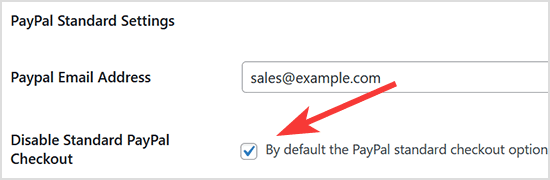
The standard PayPal checkout option is enabled in the cart by default. If you prefer to use only the PayPal Commerce Platform (PPCP) after enabling it, you can disable the standard PayPal option. To do this, go to the plugin’s settings menu, locate the ‘Disable Standard PayPal Checkout’ field, check it, and save your changes.

Troubleshooting Related

If you encounter issues logging into your PayPal account during the API credential retrieval step, try this: Open a separate window, go to PayPal.com, log out of your account, clear your browser’s cookies, and then attempt the process again.

Simple Shopping Cart – Using the Debug Logging Feature to Troubleshoot

If you have ran into an issue while using the Simple Shopping Cart plugin on your WordPress website, perhaps your customers are not receiving their sales notification after a successful purchase, the debug log is a great troubleshooting resource.

What is Debug Logging?

The debug logging feature logs steps of the payment process and those steps that were not able to be completed are marked as a ‘Failure’. This gives admin an insight into which step of the payment process needs attention in order to work correctly.

Generally, a failure in the payment process is caused by an incomplete or incorrect set up of the plugin. Please browse through the documentation page to ensure you have completed all setup required for the Simple Shopping Cart Plugin.

How Can I Enable the Debug Logging Feature?

By default, the debug log is not enabled. If you are testing the Simple Shopping Cart plugin’s transaction process, it is a good idea to enable the debug log first. This way, if you find that there is a problem with a step in the payment process or the email is not being sent to either the merchant or the customer, you can diagnose the issue quickly and easily.

To enable the debug log for the Simple Shopping Cart plugin complete the following:

  1. Click on the Settings menu of the Simple Shopping Cart plugin.
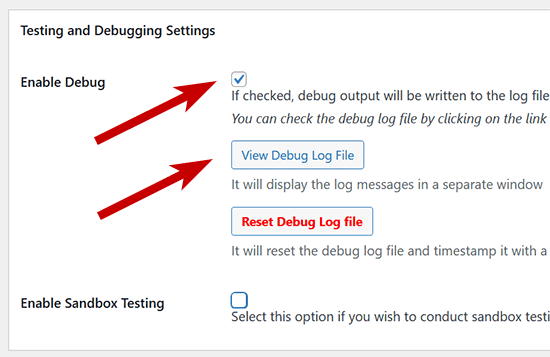
  2. Towards the bottom of the General Settings tab, you will see a section titled ‘Testing and Debug Settings’.
  3. Check the Enable Debug option to enable the debug logging feature.
  4. Click the Save Changes button.

Viewing the Debug Log File to Solve an Issue

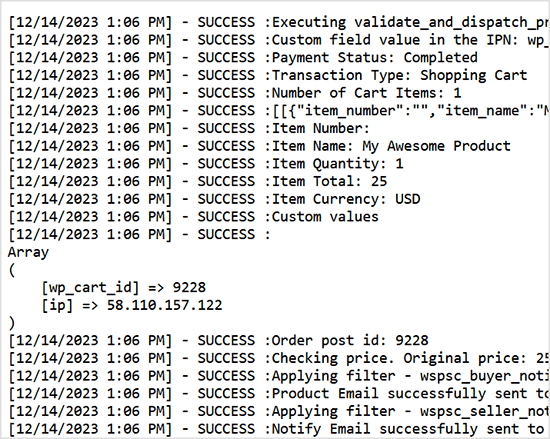
Once you have enabled the debug logging feature and completed a test or live transaction on your website using the Simple Cart plugin, you can click on the View Debug Log File to see the details and potentially find a step of the process that is failing.

The following screenshot shows an example of the debug logging output:

After you have completed troubleshooting you may like to disable the debug logging feature and clear the log file.

Other Useful Resources

  • Payment Testing Checklist
  • Enabling PayPal IPN Feature for Standard PayPal Checkout

Setting Up Product Variations

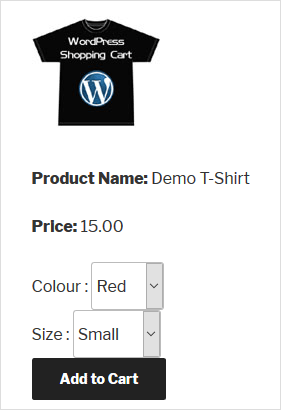
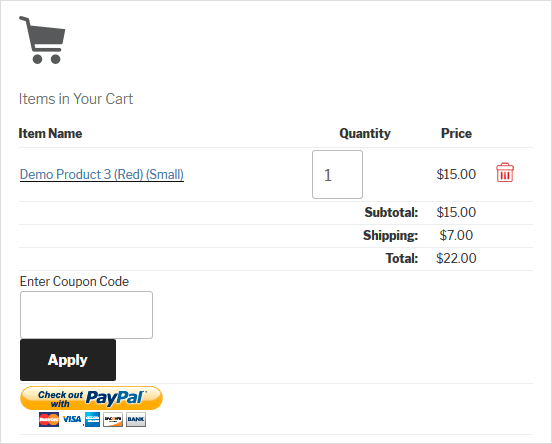
The Simple Shopping Cart plugin has a very simple variation setup feature. You can use Variation Control to design products as shown in the following screenshot.

simple-cart-product-with-variation-control-screenshot
simple-cart-screenshot-with-variation

Table of Contents

  • Video Tutorial: Configuring Product Variations
  • Shortcode Parameter for Product Variation
  • Product Variation with Price Modifier
    • Variation Notes

Video Tutorial: Configuring Product Variations

Shortcode Parameter for Product Variation

To apply variation control to your product, utilize the ‘var1’, ‘var2’, ‘var3’ parameters in the shortcode, as demonstrated below:

[wp_cart_button name="Test Product" price="25.95" var1="VARIATION-NAME|VARIATION1|VARIATION2|VARIATION3"]

Here is an example product shortcode using one variation option:

[wp_cart_button name="Test Product" price="29.95" var1="Size|Small|Medium|Large"]

Below is an example product shortcode using 3 variations:

[wp_cart_button name="Test Product" price="29.95" var1="Size|small|medium|large" var2="Color|red|green|blue" var3="Sleeve|short|full"]

Product Variation with Price Modifier

You can now create product variations that dynamically adjust the base price based on the selected option. This is useful when certain variations cost more (or less) than the default price.

Use the following format to define variations with price modifiers:

[wp_cart_button name="Test Product" price="15.00" var1="Size|small|medium::5|large::10" var2="Color|red|green::2|blue::3" var3="Sleeve|short|full::5"]

In the above example:

  • Selecting medium adds $5 to the base price.
  • Selecting large adds $10.
  • Choosing green adds $2, and blue adds $3.
  • Choosing full sleeves adds $5.

You can also apply negative price modifiers to reduce the base price. For example:

[wp_cart_button name="Test Product Two" price="20.00" var1="Size|small|medium::10|large::-5" var2="Color|red|green::2|blue::3" var3="Sleeve|short|full"]

In this case:

  • Selecting large subtracts $5 from the base price.

Variation Notes

  • Ensure each variation group (var1, var2, etc.) is properly formatted with the | separator for options and :: for price modifiers.
  • If no price modifier is needed for an option, simply omit the ::modifier part (e.g., short or full in the example above).

Exporting Cart Orders Data

The Export Cart Orders Data functionality of the WP Simple Shopping Cart Plugin allows website operators to easily generate a well-structured CSV file that contains detailed order information from their customers. This feature proves beneficial for business owners as it enables them to export cart orders, facilitating effective sales monitoring and enhancing targeted marketing efforts.


How to Export Cart Orders Data

If you are using the WP Simple Shopping Cart Plugin on your WordPress website and you wish to export your cart orders, complete the following steps:

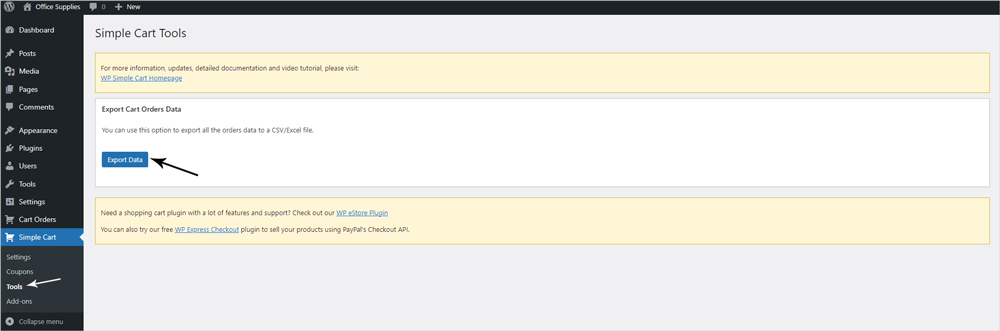
  1. Within the WordPress dashboard, click on the ‘Simple Cart‘ menu and then on ‘Tools‘.
  2. From the ‘Simple Cart Tools‘ page, you will see a section titled ‘Export Cart Orders Data‘.
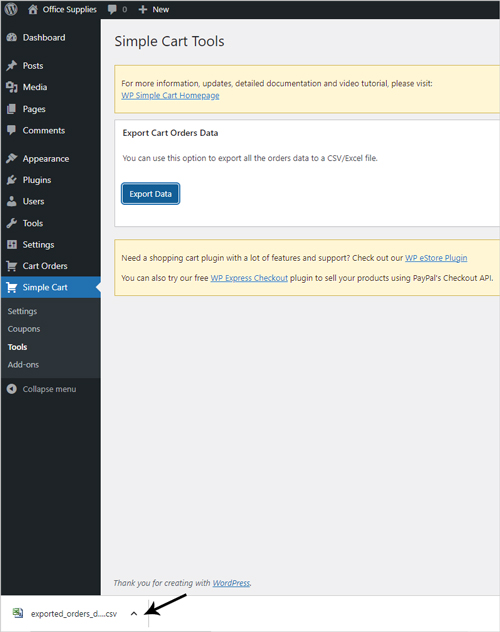
  3. Click the ‘Export Data‘ button to have your cart orders compiled in one CSV/Excel file. You will see this file pop straight up which you can then click on and save to your computer.

What Will be Included in the Cart Orders CSV File?

By downloading the CSV file, you will be able to view all cart orders from your particular website, comprising the following headers:

  • Order ID
  • Transaction ID
  • Date
  • First Name
  • Last Name
  • Email
  • IP Address
  • Total
  • Shipping
  • Coupon Code
  • Address
  • Items Order

The content under these headers will mirror the provided information. In cases where certain details are absent, such as digital items not requiring customer address collection, the corresponding header will remain empty. The following screenshot displays a single cart order exported to a CSV file:


Customize the Item Name in the Shopping Cart

You can customize the item name display in the shopping cart by overriding the default output.

By default, the item name will link to the page where the item was added from. In the following section I will show you how it can be overridden and the link is removed.

The “wspsc_cart_item_name” filter can be used to override the item name that gets displayed in the shopping cart.

Add the following block of code to your functions.php file of the theme which will replace the linked item name with just plain text name:

add_filter('wspsc_cart_item_name', 'wspsc_customize_cart_item_name', 10, 2);
function wspsc_customize_cart_item_name( $item_name, $item ){
    $item_name = esc_attr( $item['name'] );
    return $item_name;
}

[Deprecated] – Integrate WP eStore with AWeber via Email Parser

This documentation is old and has been deprecated. It should not be used anymore. Use the new documentation for eStore and AWeber integration.

Before AWeber introduced their API, they only supported 3rd party integration using email parsers. This documentation explains how to integrate eStore using AWeber’s email parser method.

Step 1: Create an Email Parser

AWeber use email parsers in situations where you want subscribers to add to your list via an email from a third party, typically a payment processor, rather than the subscriber sending an email directly from their email program.

Quick Video
Creating AWeber Parser

To add a new custom email parser select “Email Parser” from the “My Lists” menu and choose “Add New” from the “Custom Parsers” section.

  • My List -> Email Parser
  • Custom Parsers -> Add New

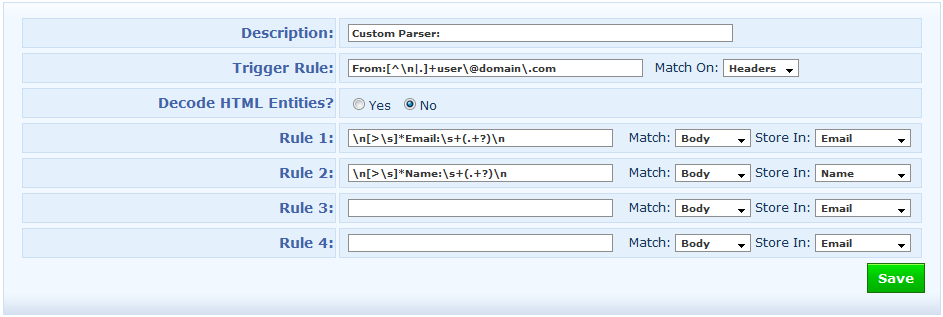
The new email parser configuration will look similar to the following (Click to enlarge)

New Parser

New Email Parser

There are only two fields (Description and Trigger Rule) that need changing here.

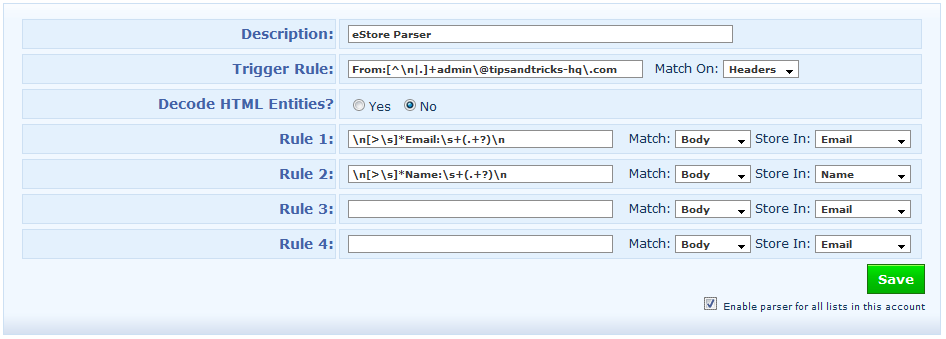
  1. Give a description for this parser, eg. eStore Parser
  2. In the Trigger Rule field, replace the “user\@domain\.com” with the email address that you have specified in the “From Email Address” field of WP eStore’s settings menu (This step is very important).
  3. If you have multiple lists in your account then edit the parser you just created then check the “Enable parser for all lists in this account” checkbox and save it (This step is also very important). Enabling this option will not harm any of your other lists… all it does is that it activates this parser so it can filter signup request from eStore and assigns the contact to the correct list.

For example, the email address I have specified in my “From Email Address” field is [email protected] so I need to replace:

user\@domain\.com

with

admin\@tipsandtricks-hq\.com

Below is a screenshot of my email parser (click to enlarge):

My Email Parser

My Email Parser

Adding an Email Parser is really simple but even a small error can throw everything off.

Step 2: Configure the WP eStore’s Autoresponder Settings

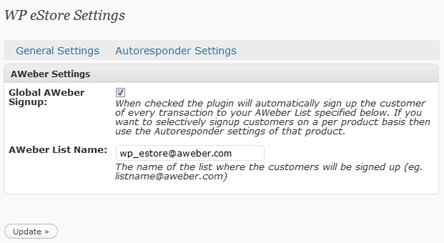
Now all you need to do is specify the AWeber list name that you want your customers to be signed up to and enable AWeber Signup Globally or Specify it in the “Autoresponder Settings” of the product if you want to selectively signup customers to a specific list on a per product basis.

AWeber Settings Menu

AWeber Settings Menu

Your Shopping Cart

Shopping Cart Empty
Shopping Cart is Empty
Visit The Shop

Search

Featured Documents

Stylish Product Display Options for WP eStore WP eStore Quick Setup and Usage Video Tutorial WP eStore Shortcodes and Functions Reference WordPress eStore Plugin Features WordPress eStore Plugin Demo What Our Customers Have to Say About Our Products WordPress eStore WishList (Feature Suggestions) WordPress eStore Frequently Asked Questions (FAQ) How to Show Add to Cart buttons

Featured Plugins

WP Express Checkout Plugin
wordpress_estore_icon
wordpress membership plugin icon
wordpress_affiliate_plugin_icon

Copyright © 2026 | eCommerce Plugins