If you frequently make PayPal payments to multiple recipients (e.g. to payout for affiliate commission) and if you don’t use the PayPal’s mass payment option then this article is for you. Now, my first question to you is “Why aren’t you using mass payment again?” 🙂
PayPal’s mass payment allows anyone with a Premier or Business account to send multiple payments instantly and has the following two big advantages:
- You save big on the fees. A low fee of 2.0% of the payment amount with a cap of $1.00 USD (or its equivalent in the payment currency) is assessed on each payment made with Mass Payment.
- Payments with PayPal’s Mass Payment are instant so you don’t have to mail out the checks.

Enabling Mass Payment in Your PayPal Account
If you don’t have the PayPal mass payment feature enabled in your account, then you have to call PayPal support and request them to enable the mass payment.
How to Make a PayPal Mass Payment
Step 1: Create a Mass Pay File
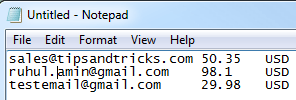
Create a tab-delimited text file. List the recipients’ email addresses in the first column and the payment amounts in the second column. In the third column, enter the three-letter code for the currency in which the payments will be sent. The following is a screenshot of a sample mass payment file:
Step 2: Make the Payment
In this step you have to log into your PayPal account and use the mass pay file created in step 1 to make the actual payment. Watch the following video tutorial to learn how the whole process works:
Thanks for the useful information.
@ Joe, in which country u are residing ?I think there are specific rules for some countries.
A very simple and thrifty way to take advantage of a lesser known PayPal feature!
Thank you
+1 from me! Really useful and time saver!
Thanks!!
Excellent tip. I saved lot of time using mass payment. Thank you!
Great info. got exactly what I was looking for. Easy to follow for sure highly recommend this
just what I needed to find out, thanks very much. Saved me a few hours to say the least.
Exactly what I needed to know. The amount of time I have wasted on individual payments is unbelievable, thanks for saving me future time.
this is the 2nd time i’ve stumbled over this post. I’ve gone through the tips and rewatched the video – very valuable info. previously we have implemented Moneybookers which charges very low rates and could be schedule for team monthly payment. however, they seem to have frequent account disabling, and requires authentication and documentation for verification. With this, will be implementing PP mass pay right away!
Great post!
One thing to note with the difference with Mass Payment, there’s no protection for sender vs the normal mode, e.g chargeback for faulty product, so it’s useful for certain payments, e.g employees, aff comms, etc.
But definitely a great win-win way to pay for a team-type environment.
Not that I know of. The masspay API has been added recently so I don’t think there is much out there for it yet.
I would like to say to make a correction here, you can use Paypal’s Mass Payment API to automatically interact with the Mass Payment system.
https://cms.paypal.com/au/cgi-bin/?cmd=_render-content&content_ID=developer/howto_api_masspay
My question is, is there already a module for WordPress or any other CMS which actually already does this? If not, it seems I will be making one.
Nope, PayPal only allows you to upload a “mass pay” file from your local computer.
What a great post. When I looked at Mass Pay before for a website I have built it seemed a fairly complex system, however this post has simplified it right down. Do you know if there’s a way to automatically upload the file as it will get generated from a database?
really useful, this saves a lot of time.
Hi,
Thanks for this article!
I didn’t knew that sending mass payment was that easy 🙂
Hi Joe, when money is transferred from one PayPal account to another someone will get charged a fee (around 5%). You can choose to make the recipient pay for this fee which is fine for some case but not all the time.
For example, you are my affiliate and you made $1000 in commission this month. When I transfer this money to your account you expect to get $1000 not ($1000-$50)=$950
So the person who is paying the affiliates should pay for the transaction so the affiliate don’t incur the charge otherwise the affiliates will get upset and drop out from the affiliate program pretty quick 🙂
Now, instead of doing a normal transfer if you use mass payment you only incur 2% fee which saves a lot of money when making multiple payments of large amount.
Save big on the fees? When I send money/payments via PayaPal, I don’t get charged anything. Only the recipient is charged a fee if applicable.
Am I missing something?