This WordPress plugin lets you customize the email details that appear on emails sent from WordPress. By default the “From Name” on emails sent from wordpress has a name “WordPress” and the “From Address” on emails has “[email protected]” which is not very meaningful. You can customize both these fields with this plugin so your customers are not confused.

Change WP Mail Plugin Installation
- Go to the “Add New” interface from the plugins menu.
- Click on the “Upload Plugin” button.
- Browse and upload the plugin file (change-wp-mail-from-details.zip).
- Activate the plugin.
Change WP Mail Plugin Usage
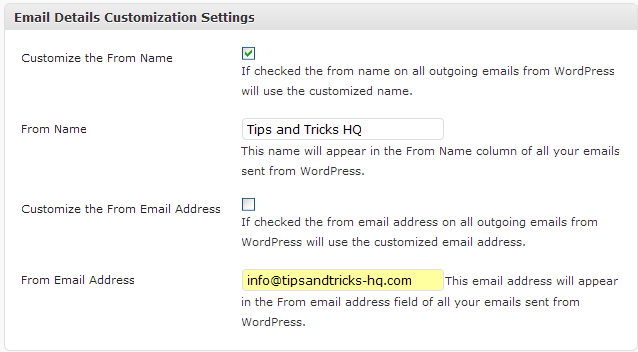
- Check the appropriate checkbox for the options that you want to customize.
- Enter the customized text in the appropriate field.
Special Note
If you are trying to customize the “From Name” and “From Email Address” for any of the following plugins then there is an even simpler solution:
- WordPress Shopping Cart (WP eStore)
- WordPress Membership Plugin (WP eMember)
- WordPress Affiliate Plugin (WP Affiliate Platform)
- WordPress Simple Cart plugin
You can use the following format in the “From Email Address” field in the settings menu of these plugins:
Your Name <[email protected]>
So for the above example “Your Name” will be displayed as the name and “[email protected]” will be used in the email address field.
Download Latest Version
Download the Plugin.
Check out our WordPress plugins page for more cool WordPress plugins.
Thank you for this very useful plugin, all good wishes 🙂
I love it when people come together and share opinions, great blog, keep it up.
Definitely worthwhile to change the from address to something more professional.
Thanks, I was searching for a good Plugin in order to customize our new customize blog and the email details for it. Seems that I found what I was looking for.
Woww!!! your a genius. Thanks this solution works perfect for my wordpress blog thanks again!
This is like the coolest and most useful plugin to have if you contact your folks on a regular basis.
Thanks a bunch
A solution that definitely works and time saving compared to the tedious alternative method. Many thanks for sharing.
Good and simple plugin to install. Definitely worthwhile to change the from address to something more professional.
This plugin is very handy for filtering your incoming mail!
Fantastic plug-in – saves a lot of headache stopping the client responding to WP!
Well done
This is exactly what I’m looking for. Now my visitors won’t be so confused. Kim at Hydroxatone
WOW!! I have been trying to figure this out.. Thanks for the info
Finally…I’ve been looking for a plugin like this for quite a while.
Excellent article I am going to pass this onto all my WordPress clients, I think it will make their sites a lot more professional looking.
Thanks for the great tip I have bookmarked this for future reference.
This is a very handy plug-in. It also makes it easier to have all reply emails go into one email since I have quite a few blogs. Thanks for making this.
Great idea! Man, this will really save me a lot of trouble. Thanks for this article
Thanks I’ve been trying to figure out how to do this for a few weeks! I bookmarked you because I know this isn’t the only wordpress problem I’m going to encounter.
Well done, simple and elegant!
I finally found the fix I was looking for. Found your site off Google and now I’m happy because I found this plug-in
I am definitely adding this plug-in to my blog. Thanks for sharing and thanks for showing how to install.
I found this simple wordpress plugin very useful . I recommend it to all wordpress users.
The content of this post is very valuable. It is not a waste of time reading it. I’m happy to read this post. Thank you for sharing.
Yeah it works on WP Multisite.
Hello dear site owner, I enjoy reading through your blog, by posting a little comment I want to support you and wish you a good continuation. Wishing you the best of luck in all of your blogging efforts.
Does this work on MultiSite mode? So each blog could set it’s own from email? Have not had time to test it yet and wondering if anyone else has.
Thanks for the cool plugin….
Thanks for the plugin – it is incredibly useful although it took me a while to fully understand it.
Great plugin. You are very talented to have developed this application. This plugin will be great to customize my email and message to increase open rates. Thanks a bunch for sharing your creation with the general public. Loved it.
I think it is very important to customize the email details that appear on emails sent from WordPress It makes your website appear a lot more professional.
very detailed, it really help me a lot
Good and simple plugin to install. Definitely worthwhile to change the from address to something more professional. The default shows a kind of carelessness to the receiver.
You can send email by using a fake domain using any simple PHP script (no need to use a plugin for that). When you do use fake domains the chance of getting it marked as a spam by the email client is high.
Thanks, nice plugin.
I had a doubt though, does it need any confirmation from the e-mail address we select?
I mean, if not for that then can we cloak any fake id on any domain?
If yes, then it could be used for the wrong reasons.
Thank you so much! This is sooo simple and definitely takes care of that annoying email problem.
I’m back again! Found your plugin from a Google search “email from WordPress” (you’re at #8). Just what I needed. Thanks. We gotta stop meeting like this . . . . !
I really consider this as a great tool because recently I have had some issues customizing my emails in the sent items of the email list. I tried whatever possible to do it but could not just get it right. I became so frustrated that I threw my shoes at the computer. Now I am so glad that there is a word press plug-in for that matter which enables me to customize the emails sent in the list!
Hey,
I’m three years online doing business with wordpress, and all this time I had this nagging notion that I need to solve the email details problem on all my sites. Never got time to do it…
But, what do you know. Luckily for me I saw a link to this plugin on some forum, merely by accident, and viola!! I’m the happiest man right now!!
Thanks a lot!
– Alex.
Thank you for this awesome plugin. It is just what I needed to customize and personalize my wordpress installations!
Hey Amin!
I just wanted to say thanks for this plugin! I am a customer already and love your plugins, but this one is just too useful! Solves a simple but crappy problem with WordPress uber fast!
Thanks very much!
Frank
You edit the details in the “Settings menu” of the plugin not in the editor.
Hi , ithis is going to be a rally useful neat plugin. ‘m not seeing the wysiwyg view when trying to edit the from address, i get the code view . I’m not a programmer. How do I get the view like the image under the plugin usage image with check boxes etc?
thanks
Love the simplicity and ease of this plugin – perfect solution to the email from WordPress issue
Awesome solution, you guys. This saved me from a potentially painful & tedious alternative!
great part of information.thanks,help a lot
Thank you Amin. Your programs and systems actually make life much easier. I haven’t updated my eStore for a while, maybe I missed the upgrade email from you?!
Hi Rado, yes you should be able to specify your gamil address as the “From address”.
Hi Amin, does it mean with this plugin we could put in for example a gmail address, and then the email sent-from for Re: would have that gmail email address?
It always enoys me when I see the wordpress default. Even when working with your shopping cart or bulk action email. I simply got used to not to check that address (once a month only) and enter into the email body “do not reply to this address”, or to miss those few people who don’t read it and reply anyway.
Thank you.
Nice plugin. Just a feedback: It would be great if you could also add a subject modification feature in the next update 🙂
Thanks!
When someone leaves a comment wordpress sends an email. Many plugins send emails using WordPress too. In all those cases you get “WordPress” in the name field and “[email protected]” in the from field. Many people like to customize those for whatever purposes. This is where this plugin comes in handy.
Hi Amin:
why would WP be sending emails in the first place?
I don’t understand the need for this, but must be overlooking something obvious.