If you are using any of my WordPress shopping cart plugins (WP eStore or WP Simple Shopping Cart) then chances are that you have a PayPal account and making a bit of money selling your stuff online too. Next step is to keep your money safe so you don’t loose it from hacking related issues or get fooled by some scam email.

In this post I have shared two simple PayPal security related tips that you can start using and add that extra layer of security and sleep better at night. The first one is to add more protection around your PayPal account login.
Use The PayPal Security Key
The security key gives you an extra layer of security when you log in to your PayPal account. It creates random security codes to use along with your regular username and password.
It’s like a combination lock for your account – designed to let you in and keep others out – except that the combination always changes. It comes in 2 types, each with different advantages:
- Mobile phone security key: You can get temporary security codes on your mobile phone by text messages (also called SMS).
- Security key: This is a small device, the size of a credit card that you carry with you. It creates a unique security code that you use to log in to your account.
Basically you log into your PayPal account as you normally would. After you enter your username and password, you’ll be asked to enter a security code. Once you enter the security code from the hard token you are granted access to your account. So for anyone to be able to hack into your paypal account will have to hack your account password and also have the security token at the same time!
Using your Mobile Phone
You can use your mobile phone to use it for the PayPal Security Key. This works like a 2 Factor authentication process.
You have to first register your phone from the following interface of your PayPal account profile.
PayPal Account Profile -> Account settings -> Security key
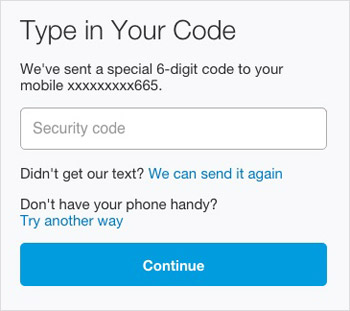
After this is activated, every time you attempt to log into your PayPal account, you’ll be directed to this screen (to enter the security key sent to your phone) after entering in your username and password:
Using a Hard Token
It cost $5 to order a security key (at the time of writing this post) and it is very simple to order and activate.
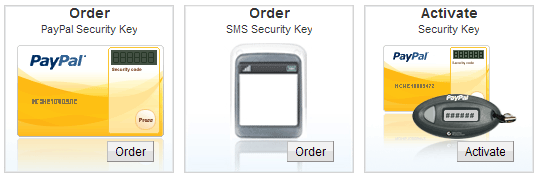
Order your PayPal security key from your PayPal account.
The second tip is on adding more security around the email communication between you and PayPal.
Use Email Identification
Ever wonder if that PayPal email is real? You can use PayPal’s Iconix email identification tool, which can reduce phishing by confirming whether or not an email is really from PayPal.
If you are using Gmail like myself then you can get visual verification of the authenticity of emails from PayPal and eBay by turning on the authentication icon from the Labs tab under settings. Doing so attaches an icon that looks like a key to emails from these verified senders. see screenshot below:

Now, whenever you receive an email from PayPal you will immediately know if it was genuinely sent from PayPal or not… No more wasting time!
@Anna, No because they still need the password. You can also order a new security key (which makes the old one invalid).
Hi,
What happens if you loose your security key, or it is stolen. Can someone then log into your acct?
Hello !
Really a better paypal security related information. I am also user of paypal.
I really like second option of sms.
Thank you very much for sharing such type of good information
Very good is Article!
I really glad to read your blog because I always found the current issues information for your blog.
This post is very much helpful for all the internet users, I think at present around 90% peoples are using PayPal for online transition and there many PayPal fraud cases also come out in last six months.
According to me every PayPal user need to read this post,
Fantastic tips, really useful information for paypal users, I don’t understand why they don’t make it more visible for their costumers, I didn’t even knew this existed. Thanks.
This is great! very useful, thanks a lot for sharing this wonderful post and keep it up!
All information that are stored online can be accessed by someone who is more expert on computers.So it is very important to know how to make sure of your financial account. Thanks for your tips. I will take note of the emails sent to me by paypal.
Thank you for sharing. I never heard about security key, it’s very useful. I will try it.
I’ve always found paypal ppretty safe, as long as you know the person you are sending the money to, but it never hurts to be to careful and I think these added measures will help
hey
Incredibly great thanks to ya!
i have just enabled the authentication key in my Gmail account. Now as it is nearly a year from you so helpful article, It is under:
Labels>Settings>Labs>Authentication icon for verified Senders
Thanks!
The other thing is the PayPal security key. Is it something that will secure the process of transaction?
When I was setting up my PayPal account for my e-commerce platform, it asked me to issue a key on my site. It is kind of complicated.
Can you write more about the security of PayPal and its simplifications for the e-commerce platforms/
All the best
Nicole
Hi,
Very good post.
Thanks for your tips for these extra layers of security.
Regards
The PayPal Security Key is defintely a MUSTHAVE. I know a guy who had his PayPal account hooked up to his bank account and someone hacked in and stole thousands. All could have been avoided if he had just gotten a security key. I get a text message whenever I try to log in with my code so nobody will ever be able to steal from my PayPal account unless they have my cell phone
Yes, you definitely can’t allow yourself to be fooled by the phishing emails. They are not hard to spot, though I find. Even the professional-looking ones that I’ve seen can be pegged once you take a closer inspection.
I feel secure using paypal. I have on more than one occasion had someone hack into my account, and made purchases that I did not authorize. This didn’t bother me because Paypal gave me the money back.
This WP plugin is the best, thanks for this post. I tried others but this is the best i ever used
Hi Dizi, No it will not charge you $5.00 when you generate a security key. I believe this is a one time fee.
Thanks for sharing these extra layers of security.Just a question for the paypal security device.It will cost me 5$ for the device or every time i will generate the security pass i will have to be charged the 5$?
Regards
All information that are stored online can be accessed by someone who is more expert on computers.So it is very important to know how to make sure of your financial account. Thanks for your tips. I will take note of the emails sent to me by paypal.
I hardly ever write comments on blogs, but your article urged me to praise your blog. Thanks for the read, I will surely
favorite your site and check in occasionally. Cheers.
Thanks for sharing these extra layers of securit
This WP plugin is the best, thanks for this post. I tried others but this is the best i ever used
Well now i can shop on-line at ease
Hi Rahul,
Thanks for the article. I will feel better with the security card!
Pam
This WP plugin is the best, thanks for this post. I tried others but this is the best i ever used
I don’t know of any other email client that does the PayPal’s Iconix identification right off the bat.
Hi, thanks for this information, glad to read your posting here. I have question here, can PayPal’s Iconix email identification tool be used for other email service beside gmail?
Thanks
Panagiotis, This is a one time fee of $5.00 you do not have to pay $5.00 each time you generate a security key.
Ivy
Thanks for sharing these extra layers of security.Just a question for the paypal security device.It will cost me 5$ for the device or every time i will generate the security pass i will have to be charged the 5$?
Regards
Panagiotis
Thanks for sharing this useful tips, those who use PayPal (me too) must use this extra security in order to avoid any problem. btw i like 2nd option,.